CSS Battle - #19 Cube
TL;DR
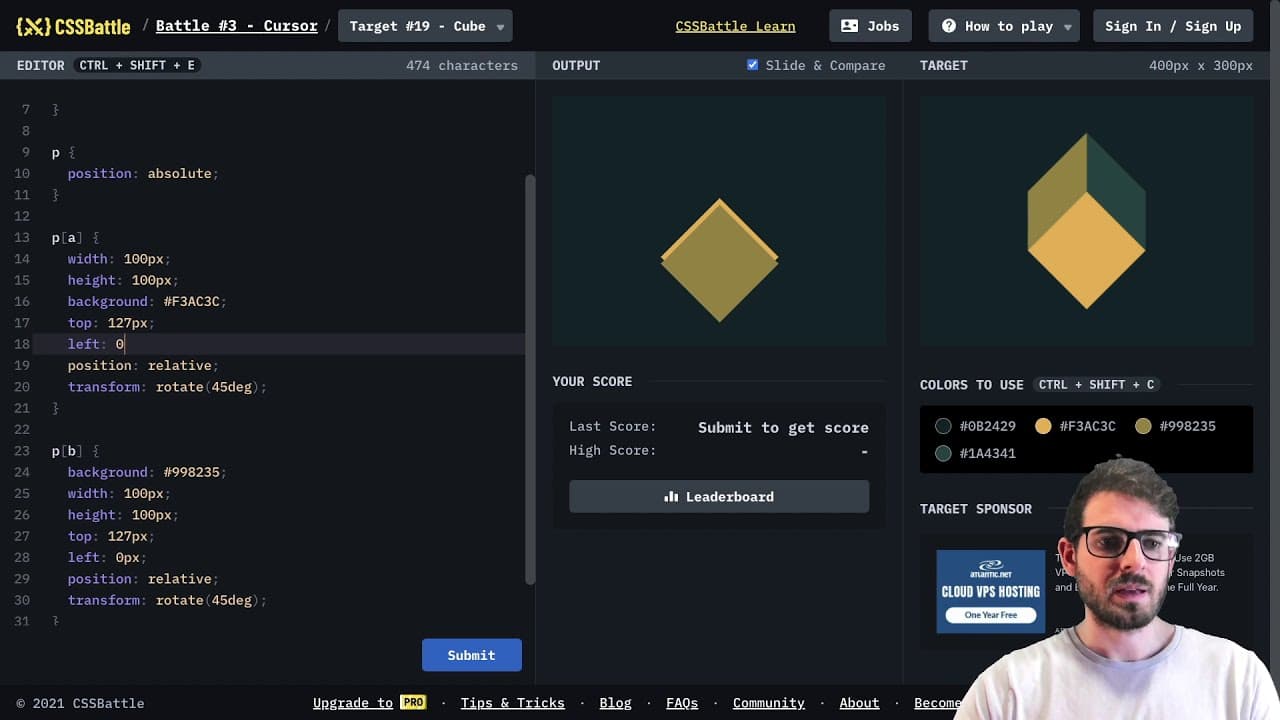
A tutorial on building a cube using CSS techniques.
Transcript
how's it going everyone i hope you guys are having a great day welcome back to another video we are going to be doing another css battle challenge in this one and more specifically i want to try to build out this little cube the number 19 looks pretty cool so listen up if you're new to this channel you're new to css battles be sure to stick around ... Read More
Key Insights
- 🫵 CSS battles challenge viewers to apply creative problem-solving when creating designs using CSS techniques.
- 🎮 The video highlights the importance of experimenting with values and properties in CSS to achieve desired visual results.
- 😒 The use of flexbox simplifies the layout process, making it easier to center elements dynamically.
- 🎨 Transformations like rotate and skew can dramatically change the appearance of elements, adding depth to designs.
- 🎨 Proper understanding of absolute and relative positioning is crucial for accurate design placement.
- 💯 The tutorial indicates that coding doesn't need to be perfect; the focus should be on learning and trying new techniques.
- 🫵 The creator encourages viewers to explore other tutorials and build their CSS skills through practice and challenges.
Install to Summarize YouTube Videos and Get Transcripts
Explore YouTube Video Summarizer or Get YouTube Transcript Extractor
Questions & Answers
Q: What is the main focus of the CSS battle in the video?
The focus of the CSS battle in the video is to create a visually appealing cube design using various CSS techniques. The creator demonstrates the step-by-step process, including adjusting background colors, utilizing display flex for positioning, and applying the transform property to rotate and skew the shapes. This encourages viewers to learn and apply CSS creatively.
Q: Which CSS properties does the creator use to position the squares?
The creator utilizes flexbox for centering the main square, combining properties such as 'display: flex' and 'justify-content: center' to manage the layout. Additionally, they apply absolute positioning to individual squares along with manual adjustments to the 'top' and 'left' properties to achieve precise placement.
Q: How does the creator adjust the squares' appearance?
The creator adjusts the squares' appearance through a series of CSS transformations. They use the 'transform' property to rotate the squares, experimenting with values like 45 degrees and skewing them to create visually interesting shapes. Adjustments to dimensions and colors help in refining the appearance until it meets their vision.
Q: Why is practice emphasized in CSS battles?
Practice is emphasized in CSS battles as it provides an opportunity for viewers to apply their knowledge and improve their skills in CSS. By engaging in these challenges, viewers can experiment with different techniques, discover new properties, and develop a stronger understanding of CSS capabilities, which enhances their coding proficiency.
Summary & Key Takeaways
-
In this video, the creator demonstrates how to design a cube structure, specifically focusing on styling elements with CSS while explaining each step.
-
The challenge involves using properties like display flex and transform to manipulate the position and rotation of elements effectively.
-
The creator encourages viewers to engage in their own CSS battles, showcasing the learning potential of experimenting with CSS art and design.
Read in Other Languages (beta)
Share This Summary 📚
Summarize YouTube Videos and Get Video Transcripts with 1-Click
Try YouTube Summary with ChatGPT & Claude or YouTube Transcript Generator
Explore More Summaries from Web Dev Cody 📚





Summarize YouTube Videos and Get Video Transcripts with 1-Click
Try YouTube Summary with ChatGPT & Claude or YouTube Transcript Generator