Products
Features
YouTube Video Summarizer
Summarize YouTube videos
Web & PDF Highlighter
Highlight web pages & PDFs
Chat with PDF
Ask any PDF questions with AI
Ask AI Clone
Chat with your highlights & memories
Audio Transcriber
Transcribe audio files to text
Glasp Reader
Read and highlight articles
Kindle Highlight Export
Export your Kindle highlights
Idea Hatch
Hatch ideas from your highlights
Integrations
Obsidian Plugin
Notion Integration
Pocket Integration
Instapaper Integration
Medium Integration
Readwise Integration
Snipd Integration
Hypothesis Integration
Apps & Extensions
Chrome Extension
Safari Extension
Edge Add-ons
Firefox Add-ons
iOS App
Android App
Discover
Discover
Ideas
Discover new ideas and insights
Articles
Curated articles and insights
Books
Book recommendations by great minds
Posts
Essays and notes from readers
Quotes
Inspiring quotes collection
Videos
Curated videos and summaries
Explore Glasp
Glasp Newsletter
Weekly insights and updates
Glasp Talk
Interview series with great minds
Glasp Blog
Latest news and articles
Glasp Use Cases
Learn how others use Glasp
Build & Support
Glasp API
Access Glasp's API for developers
MCP Connector
Connect Glasp to Claude & ChatGPT
Community
Glasp Reddit Community
Students
Student discount and benefits
FAQs
Frequently Asked Questions
AboutPricing
DashboardLog inSign up

Doing web searches

91 views
•
November 6, 2022
by
Anthony Pym
YouTube video player
Doing web searches

TL;DR

Learn advanced Google search techniques, including Boolean operators and wildcards, to refine your searches effectively.

Transcript

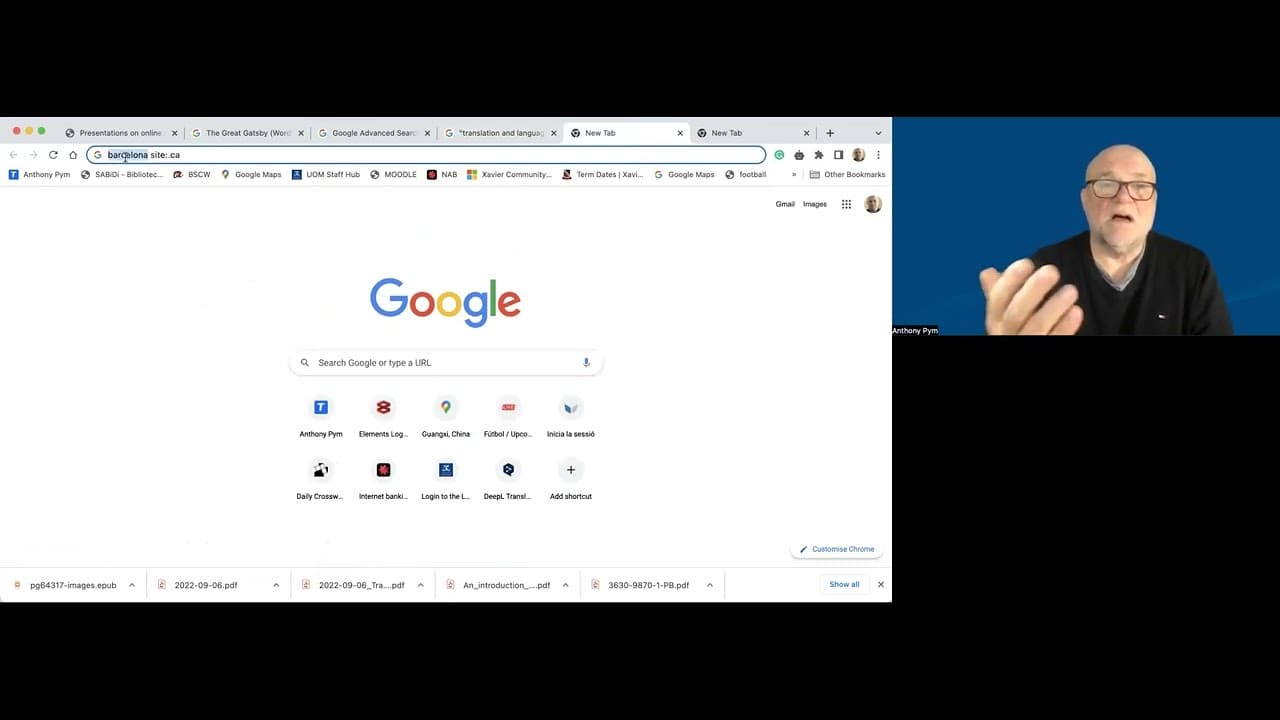
oh a few notes about search engines and how to search on them and you know about this because you've been doing it forever perhaps in Google or perhaps in some other search engine but I'm going to stay with Google now the first point you can do the searches you've always done it but there is Google advanced search which has the Boolean operators an... Read More

Key Insights

  • 👨‍🔬 Google advanced search offers refined search capabilities using Boolean operators and location specifications.
  • 👨‍🔬 Inverted commas help in searching for exact phrases or titles on Google.
  • 👻 Site colon allows users to search within specific websites or locations for targeted information.
  • 🧑‍🏭 Wildcards, such as the asterisk, act as placeholders for unknown words in search queries.
  • 👨‍🔬 Utilizing advanced search techniques can significantly enhance research efficiency.
  • 💁 Location-specific searches in Google can provide region-specific information.
  • 👨‍🔬 Wildcards in searches can lead to unexpected discoveries and creative research paths.

Install to Summarize YouTube Videos and Get Transcripts

Explore YouTube Video Summarizer or Get YouTube Transcript Extractor

Questions & Answers

Q: What are some advanced search techniques on Google?

Advanced search techniques include Boolean operators, inverted commas for specific phrases, site colon for location-specific searches, and wildcards for flexible search options.

Q: How can inverted commas enhance search results on Google?

Placing inverted commas around a phrase or title in a Google search narrows down results to include only that exact phrase instead of related terms or synonyms, delivering more accurate results.

Q: How does site colon help in Google searches?

By using site colon followed by a specific website or location, Google limits search results to only show information from that particular site or location, aiding in targeted research.

Q: What is the significance of using wildcards in Google searches?

Wildcards, represented by an asterisk, serve as placeholders for unknown words or variations in a search query, allowing users to explore a range of results related to a particular topic.

Summary & Key Takeaways

  • Utilize Google advanced search with Boolean operators for precise search results.

  • Use inverted commas to search for specific phrases or titles.

  • Specify search locations with site colon for targeted information.


Read in Other Languages (beta)

English

Share This Summary 📚

Summarize YouTube Videos and Get Video Transcripts with 1-Click

Download browser extensions on:

Try YouTube Summary with ChatGPT & Claude or YouTube Transcript Generator

Explore More Summaries from Anthony Pym 📚
Abdullah Hassan (translator, linguist and scholar) thumbnail
Abdullah Hassan (translator, linguist and scholar)
Anthony Pym
The parts of a research paper thumbnail
The parts of a research paper
Anthony Pym
Translating constructive ambiguity thumbnail
Translating constructive ambiguity
Anthony Pym
Language technologies and the translation professions thumbnail
Language technologies and the translation professions
Anthony Pym
Adolfo Gentile (translator, interpreter, educator) thumbnail
Adolfo Gentile (translator, interpreter, educator)
Anthony Pym
Andrew Chesterman on Skopos theory (part 1 of 3) thumbnail
Andrew Chesterman on Skopos theory (part 1 of 3)
Anthony Pym

Summarize YouTube Videos and Get Video Transcripts with 1-Click

Download browser extensions on:

Try YouTube Summary with ChatGPT & Claude or YouTube Transcript Generator

Apps & Extensions

  • Chrome Extension
  • Safari Extension
  • Edge Add-ons
  • Firefox Add-ons
  • iOS App
  • Android App

Key Features

  • YouTube Video Summarizer
  • Web & PDF Summarizer
  • Web & PDF Highlighter
  • Chat with PDF
  • Ask AI Clone
  • Audio Transcriber
  • Glasp Reader
  • Kindle Highlight Export
  • Idea Hatch

Integrations

  • Obsidian Plugin
  • Notion Integration
  • Pocket Integration
  • Instapaper Integration
  • Medium Integration
  • Readwise Integration
  • Snipd Integration
  • Hypothesis Integration

More Features

  • APIs
  • MCP Connector
  • Blog & Post
  • Embed Links
  • Image Highlight
  • Personality Test
  • Quote Shots

Company

  • About us
  • Blog
  • Community
  • FAQs
  • Job Board
  • Newsletter
  • Pricing
Terms

•

Privacy

•

Guidelines

© 2026 Glasp Inc. All rights reserved.