Create a Google Chrome Extension (For Beginners)
TL;DR
Learn how to create a Google Chrome extension that changes the background of Google.com.
Transcript
hey i hope you're doing great my name is jay and today is gonna be a quick but fun video because we gonna learn how to create a google chrome extension and it's gonna be a simple one very easy and quick but it's gonna get you started and you can go from there and create your own masterpiece so here you go um i have my vs code open in my browser my ... Read More
Key Insights
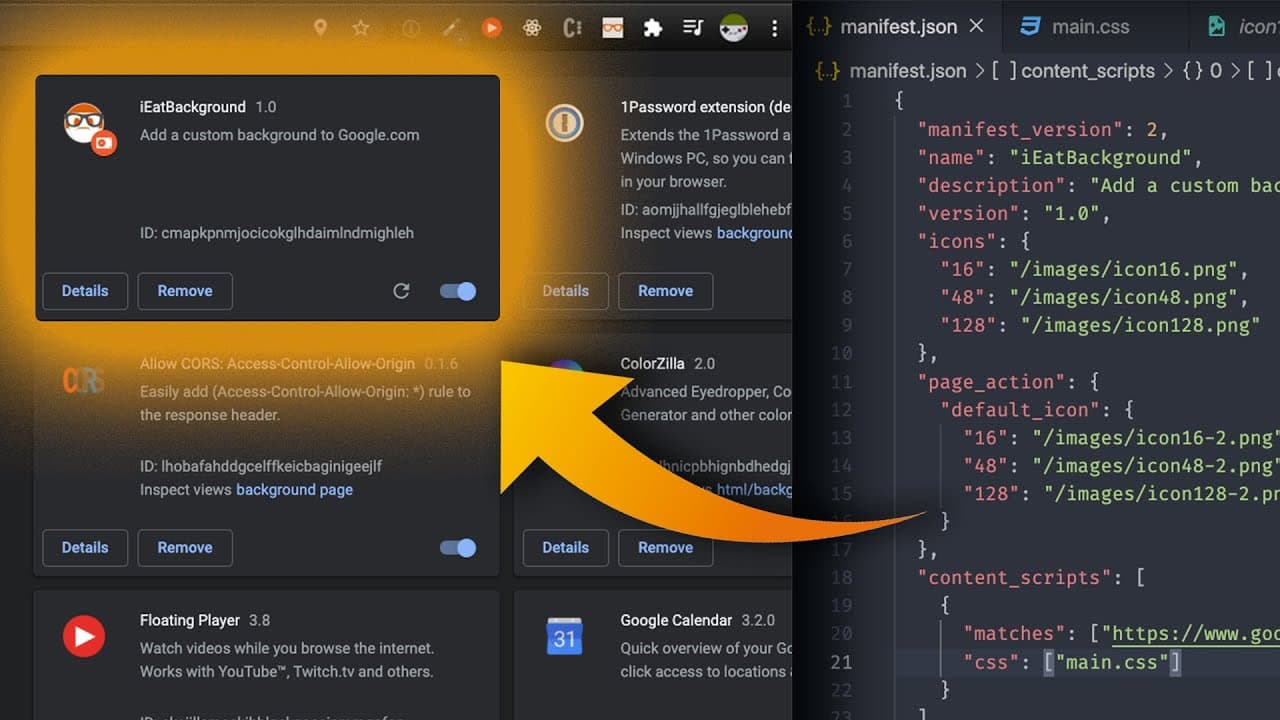
- 💁 Creating a Chrome extension involves creating a manifest.json file with crucial information.
- 📁 Custom icons can be added to the extension by placing them in an "images" folder and referencing the file names and sizes in the manifest.json file.
- 👨💻 The extension can modify the appearance of websites by using content scripts and injecting CSS code.
- 👻 The "matches" field in the manifest.json file allows the extension to target specific websites or pages for modification.
- 👨💻 Refreshing the extension is necessary to apply any changes made to the code.
- 👨💼 Chrome extensions have the potential to be more complex and can be the foundation for building a business.
- 😥 The tutorial provides a basic understanding and can serve as a starting point for creating Chrome extensions.
Install to Summarize YouTube Videos and Get Transcripts
Explore YouTube Video Summarizer or Get YouTube Transcript Extractor
Questions & Answers
Q: What is the purpose of the manifest.json file?
The manifest.json file is the most important file in a Chrome extension as it contains all the necessary details and configurations for the extension, such as the version, name, description, and icons.
Q: How can I add custom icons to my Chrome extension?
To add custom icons, create an "images" folder in the extension directory and place the icon files (in various sizes) inside it. Then, specify the file names and sizes in the manifest.json file.
Q: How does the extension change the background of Google.com?
The extension uses a content script that injects CSS code into the Google.com page. By specifying the domain in the "matches" section of the manifest.json file, the extension can detect when the user is on Google.com and apply the custom background CSS code.
Q: Can I customize the CSS code to create a different effect?
Yes, you can modify the CSS in the content script to create a different background effect. The tutorial demonstrates injecting a sample CSS code that changes the background to a grayscale version of the creator's logo, but you can experiment with different styles and designs.
Summary & Key Takeaways
-
The video tutorial demonstrates how to create a Google Chrome extension that modifies the background of Google.com.
-
It starts with creating a manifest.json file that contains essential details and settings for the extension.
-
The tutorial also covers adding custom icons to the extension and injecting CSS code to change the background.
Read in Other Languages (beta)
Share This Summary 📚
Summarize YouTube Videos and Get Video Transcripts with 1-Click
Try YouTube Summary with ChatGPT & Claude or YouTube Transcript Generator
Explore More Summaries from iEatWebsites 📚
Summarize YouTube Videos and Get Video Transcripts with 1-Click
Try YouTube Summary with ChatGPT & Claude or YouTube Transcript Generator