Student navigation | Using course mastery on Khan Academy | Khan for Educators | Khan Academy
TL;DR
Khan Academy introduces a new mastery view that simplifies navigation and helps students focus on their learning experience.
Transcript
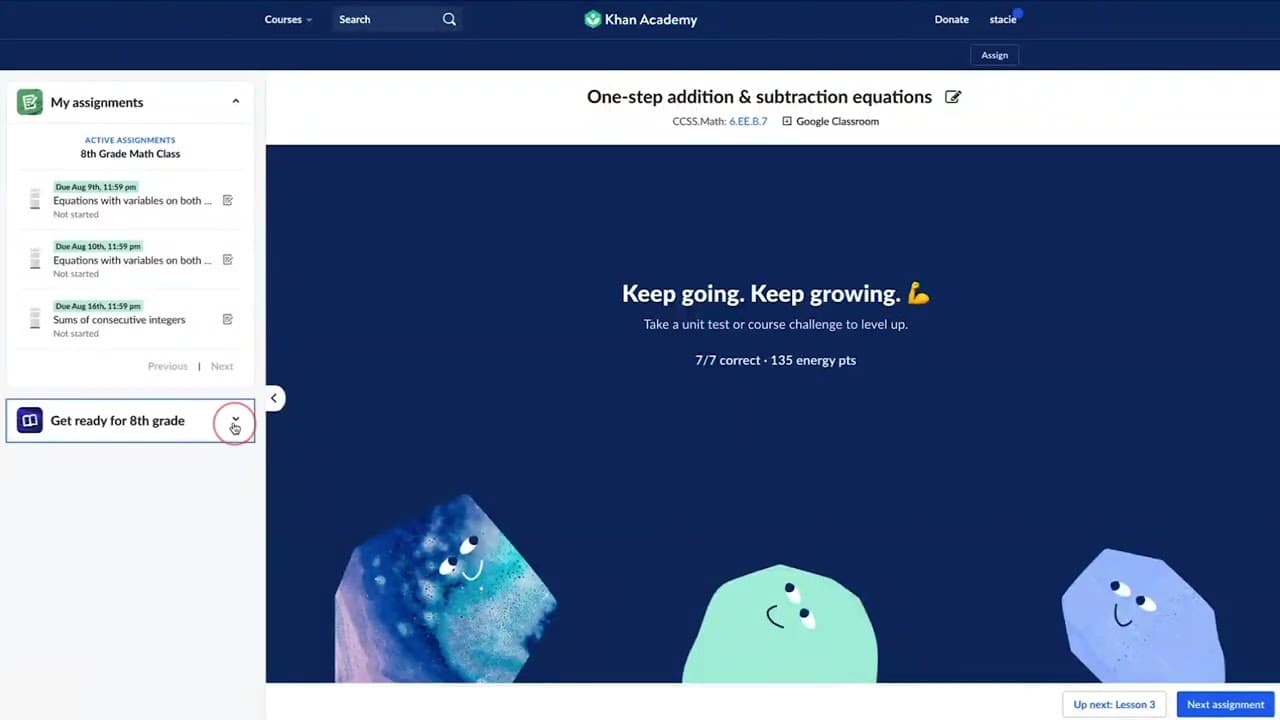
- Hi, I'm Stacy with Khan Academy. And today I'm going to show you how students will navigate our new mastery view within the learning platform. Students will no longer need to navigate to a course homepage, or to their learner homepage, in order to find the work that they would like to focus on. Navigation is now very easy to do from this learning... Read More
Key Insights
- 👻 Khan Academy's mastery view simplifies navigation for students, allowing them to focus on learning rather than finding their work.
- 🥶 The left side menu can be hidden for a distraction-free content experience.
- 🧑🎓 Assignments are organized by due date, ensuring students always see the next task that needs completion.
- 🦻 Supporting content such as articles and instructional videos are provided to aid students in understanding and practicing the concepts.
- 🧑🎓 Mastery levels are indicated by a Mastery Tower next to each exercise, helping students track their progress.
- 🙈 Different course mastery goals may result in seeing different titles and content.
- 🔄 The "up next" button takes students to the next exercise or article in the mastery view, while the "next assignment" button leads to the next assignment given by the teacher.
Install to Summarize YouTube Videos and Get Transcripts
Explore YouTube Video Summarizer or Get YouTube Transcript Extractor
Questions & Answers
Q: How does Khan Academy's new mastery view simplify navigation for students?
Khan Academy's new mastery view eliminates the need for students to navigate to different pages, making it easier for them to access their work from the learning screen.
Q: How can students hide the left side menu in the mastery view?
Students can hide the left side menu by clicking on the arrow pointing to the left, creating a focused content experience. They can open the menu again by clicking the arrow.
Q: How is the order of assignments determined in the mastery view?
Assignments in the mastery view are listed in order of due date, regardless of whether the student has completed them. This ensures that students always see the next assignment that needs to be completed.
Q: How can students identify the content that supports the exercises they are working on?
Students can identify the supporting content for exercises by looking for articles and instructional videos listed before the exercise. This helps them understand the context and concepts related to the practice.
Summary & Key Takeaways
-
Khan Academy's new mastery view allows students to easily access their work without navigating to various pages.
-
The left side menu can be hidden for a focused content experience and opened again when needed.
-
Assignments are listed in chronological order based on the due date, allowing students to always see their next assignment.
Read in Other Languages (beta)
Share This Summary 📚
Summarize YouTube Videos and Get Video Transcripts with 1-Click
Try YouTube Summary with ChatGPT & Claude or YouTube Transcript Generator
Explore More Summaries from Khan Academy 📚


Summarize YouTube Videos and Get Video Transcripts with 1-Click
Try YouTube Summary with ChatGPT & Claude or YouTube Transcript Generator