CLF-C01 — Architectural diagram example
TL;DR
Andrew Brown explains AWS architectural diagrams using Adobe XD.
Transcript
hey this is andrew brown from exam pro and what i want to show you here is a real world architectural diagram i created this a while ago this is a previous version of the um example or technically teacher c platform that powers the learning experience for my cloud certifications and so i'm hoping that by giving you some exposure you'll absorb some ... Read More
Key Insights
- Andrew Brown uses Adobe XD to create detailed AWS architectural diagrams, emphasizing the importance of using AWS architectural icons for clarity and consistency.
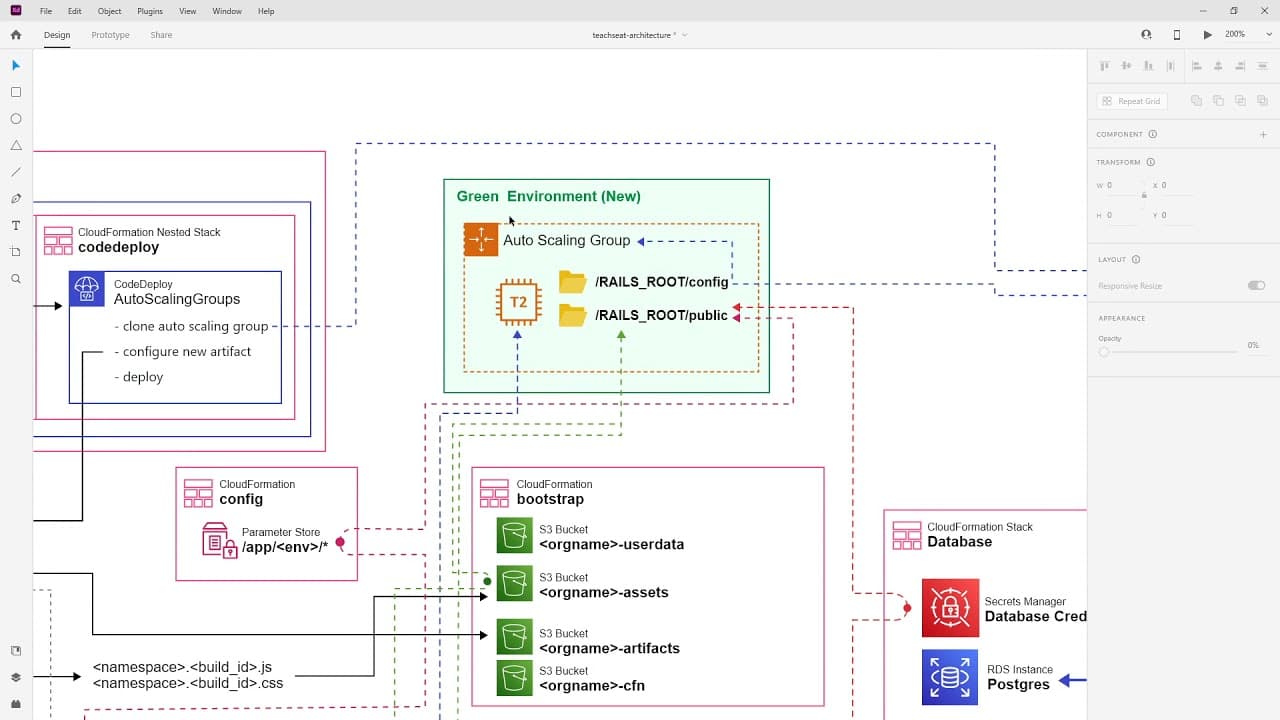
- The architectural diagram showcases a traditional setup powered by virtual machines, specifically highlighting the role of EC2 instances in the architecture.
- Auto Scaling Groups manage EC2 instances, automatically scaling based on demand to ensure the application can handle varying loads efficiently.
- Parameter Store and Secrets Manager are crucial for storing environment variables and database credentials, ensuring secure and efficient application configuration.
- S3 buckets are used for storing various assets, including user data, artifacts, and cloud formation templates, demonstrating the versatility of AWS storage solutions.
- The CI/CD pipeline is explained using CodePipeline, CodeBuild, and CodeDeploy, illustrating the automated deployment process triggered by changes in GitHub.
- Elastic Load Balancer (ALB) is used to distribute traffic across instances, enhancing the application's availability and reliability.
- SSM Automation and custom Amazon Machine Images (AMIs) automate the server setup process, ensuring the latest updates and configurations are applied regularly.
Install to Summarize YouTube Videos and Get Transcripts
Explore YouTube Video Summarizer or Get YouTube Transcript Extractor
Questions & Answers
Q: What software does Andrew Brown use to create AWS architectural diagrams?
Andrew Brown uses Adobe XD to create AWS architectural diagrams. He emphasizes the importance of using AWS architectural icons for clarity and consistency in the diagrams. Adobe XD is a free tool from Adobe, and he mentions that there are other options available, such as Lucidcharts, but he prefers Adobe XD for this purpose.
Q: What is the role of EC2 instances in the architectural diagram?
In the architectural diagram, EC2 instances serve as the virtual machines that power the application. They are managed by Auto Scaling Groups, which automatically scale the number of instances up or down based on demand. This ensures that the application can handle varying loads efficiently, maintaining performance and availability.
Q: How are environment variables and database credentials managed in the architecture?
Environment variables and database credentials are managed using AWS services like Parameter Store and Secrets Manager. Parameter Store is used to store environment variables or application configuration variables, while Secrets Manager securely stores database credentials. These services ensure that sensitive information is managed securely and efficiently, allowing the application to access necessary configurations and credentials.
Q: What is the purpose of S3 buckets in the architecture?
S3 buckets in the architecture are used for storing a variety of assets, including user data, artifacts, and cloud formation templates. They provide a versatile storage solution that supports the application's infrastructure and data storage needs. S3's scalability and durability make it an ideal choice for managing both application data and infrastructure-related assets.
Q: How does the CI/CD pipeline work in the architectural setup?
The CI/CD pipeline in the architectural setup is implemented using AWS services like CodePipeline, CodeBuild, and CodeDeploy. The process begins with code changes in GitHub, which trigger the pipeline. CodePipeline orchestrates the workflow, CodeBuild compiles and builds the application, and CodeDeploy handles the deployment to the environment. This automated process ensures efficient and reliable application updates.
Q: What role does the Elastic Load Balancer play in the architecture?
The Elastic Load Balancer (ALB) plays a crucial role in distributing incoming traffic across multiple EC2 instances. This ensures that the application remains highly available and can handle traffic efficiently. By balancing the load, ALB enhances the application's reliability and performance, making it resilient to fluctuations in traffic and potential failures.
Q: How are server setups automated in the architecture?
Server setups are automated using custom Amazon Machine Images (AMIs) and SSM Automation. Custom AMIs are pre-configured with necessary software and configurations, streamlining the deployment of new instances. SSM Automation documents automate the process of launching instances, installing software, and applying updates, ensuring that servers are consistently configured and up to date with the latest patches and settings.
Q: Why is it important to regularly update the servers in the architecture?
Regularly updating the servers in the architecture is important to ensure security, performance, and stability. By applying the latest updates and patches, the architecture remains protected against vulnerabilities and exploits. Additionally, updates can include performance improvements and new features, enhancing the overall efficiency and capabilities of the application. Regular updates also ensure compatibility with other services and components in the architecture.
Summary & Key Takeaways
-
Andrew Brown provides an in-depth look at creating AWS architectural diagrams using Adobe XD, emphasizing the use of AWS architectural icons for clarity. He explains a traditional architecture powered by virtual machines, highlighting the role of EC2 instances and Auto Scaling Groups in managing application load.
-
The architectural setup includes Parameter Store and Secrets Manager for secure configuration management, and S3 buckets for asset storage. A CI/CD pipeline is demonstrated using CodePipeline, CodeBuild, and CodeDeploy, showcasing an automated deployment process triggered by GitHub changes.
-
The use of Elastic Load Balancer (ALB) ensures traffic distribution across instances for high availability. Custom AMIs and SSM Automation streamline server setup, ensuring regular updates and configurations to maintain an efficient and secure environment.
Read in Other Languages (beta)
Share This Summary 📚
Summarize YouTube Videos and Get Video Transcripts with 1-Click
Try YouTube Summary with ChatGPT & Claude or YouTube Transcript Generator
Explore More Summaries from ExamPro 📚

Summarize YouTube Videos and Get Video Transcripts with 1-Click
Try YouTube Summary with ChatGPT & Claude or YouTube Transcript Generator