CLF-C01 — CloudFormation Follow Along
TL;DR
Learn CloudFormation basics with a practical example of creating an S3 bucket.
Transcript
Read and summarize the transcript of this video on Glasp Reader (beta).
Key Insights
- The process of creating a CloudFormation stack involves writing a YAML template, which specifies the resources to be created, such as an S3 bucket.
- CloudFormation can be intimidating initially, but understanding its basic structure and components can simplify the process.
- AWS Cloud9 is used as a development environment to write and manage CloudFormation templates, offering an integrated space for code execution.
- The tutorial emphasizes the importance of specifying the correct format version and resource dependencies in the CloudFormation template to avoid errors.
- CloudFormation Designer offers a visual interface for template creation, although it is less commonly used compared to direct YAML coding.
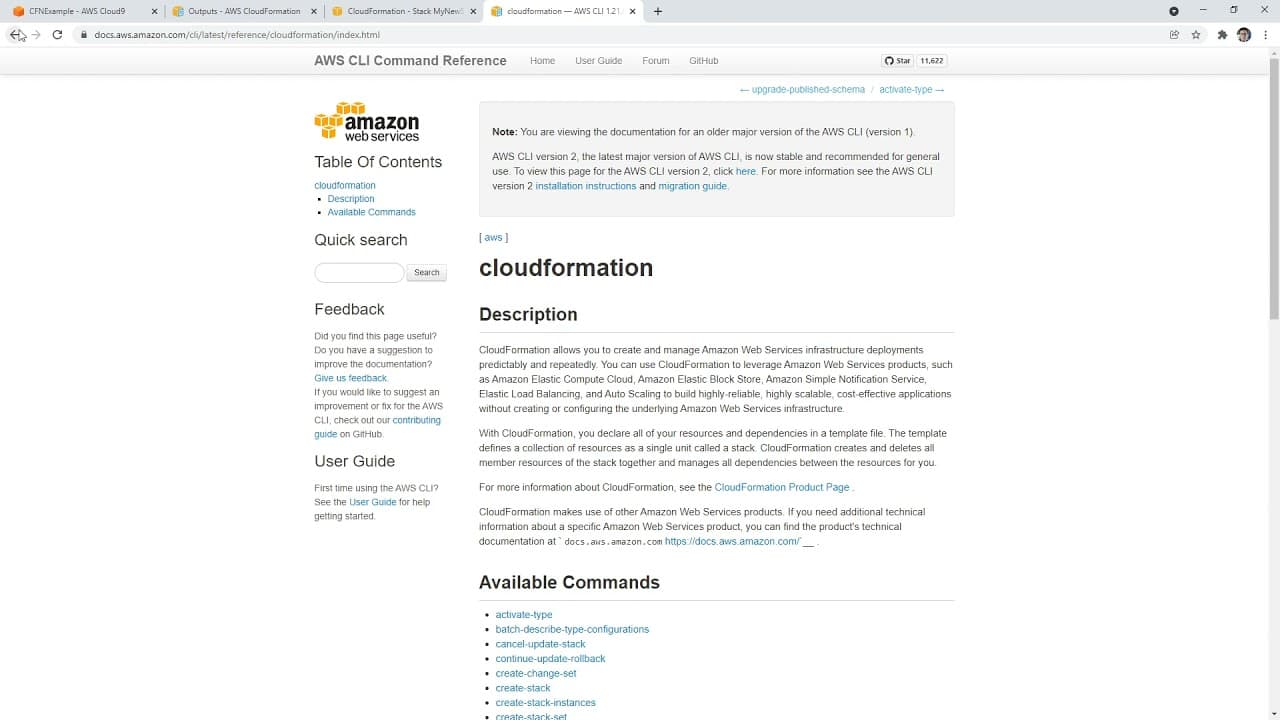
- The AWS CLI can be used to create and manage CloudFormation stacks, providing an alternative to the AWS Management Console.
- Debugging CloudFormation templates involves validating the template structure and ensuring all parameters and resources are correctly defined.
- The tutorial concludes with a demonstration of creating and deleting CloudFormation stacks, highlighting the practical application of the concepts discussed.
Install to Summarize YouTube Videos and Get Transcripts
Explore YouTube Video Summarizer or Get YouTube Transcript Extractor
Questions & Answers
Q: What is the primary focus of the video tutorial?
The primary focus of the video tutorial is to introduce CloudFormation, an AWS service for infrastructure as code. It provides a step-by-step guide on creating a CloudFormation stack using a YAML template, specifically demonstrating the process of setting up an S3 bucket. The tutorial aims to simplify the initial intimidation of CloudFormation by walking through the basic components and structure of a CloudFormation template.
Q: How does the instructor use AWS Cloud9 in the tutorial?
In the tutorial, the instructor uses AWS Cloud9 as a development environment to write and manage CloudFormation templates. Cloud9 provides an integrated space where users can write code, execute commands, and manage resources without needing to switch between different tools. The instructor demonstrates setting up a new Cloud9 environment, writing a basic CloudFormation template, and using it to create an S3 bucket, highlighting Cloud9's utility in managing AWS infrastructure as code.
Q: What are some common errors mentioned in the tutorial when working with CloudFormation?
The tutorial highlights several common errors encountered when working with CloudFormation, such as incorrect YAML syntax, unresolved resource dependencies, and unsupported template structures. The instructor emphasizes the importance of specifying the correct format version and ensuring all parameters and resources are correctly defined. Debugging involves validating the template structure and fixing any issues that arise, such as missing attributes or incorrect logical IDs, to ensure successful stack creation.
Q: What role does CloudFormation Designer play in the tutorial?
CloudFormation Designer is briefly explored in the tutorial as a tool for visualizing CloudFormation templates. It provides a graphical interface that allows users to design and visualize the resources and their relationships within a template. Although the instructor notes that the Designer is less commonly used compared to direct YAML coding, it serves as a useful tool for those who prefer a visual approach to template creation. The tutorial demonstrates how to use the Designer to paste and validate a CloudFormation template.
Q: How does the tutorial address the use of AWS CLI for CloudFormation?
The tutorial addresses the use of AWS CLI as an alternative method for managing CloudFormation stacks. It demonstrates how to use CLI commands to create and manage stacks, providing a command-line approach to interacting with CloudFormation. The instructor shows how to specify template URLs or local paths in CLI commands and discusses troubleshooting common issues, such as parameter file errors. This section highlights the flexibility of using CLI for CloudFormation management outside the AWS Management Console.
Q: What is the significance of the YAML template in CloudFormation?
In CloudFormation, the YAML template is a crucial component as it defines the infrastructure resources to be created and managed. The tutorial emphasizes understanding the YAML syntax and structure, including specifying format versions, parameters, and resource dependencies. The template acts as a blueprint for the stack, detailing the configuration and properties of each resource, such as an S3 bucket. Properly structuring the YAML template is essential for successful stack creation and management.
Q: What practical application does the tutorial conclude with?
The tutorial concludes with a practical application of creating and deleting CloudFormation stacks. After demonstrating the process of writing a YAML template and creating an S3 bucket, the instructor shows how to delete the stacks using both the AWS Management Console and the AWS CLI. This cleanup process emphasizes the importance of managing resources efficiently and provides a complete overview of the lifecycle of a CloudFormation stack, from creation to deletion.
Q: How does the tutorial help in preparing for AWS certification exams?
The tutorial aids in preparing for AWS certification exams by providing a practical understanding of CloudFormation, a key topic in many AWS exams. By walking through the process of creating and managing CloudFormation stacks, the tutorial helps learners grasp the fundamental concepts and skills needed for the exams. While hands-on experience with CloudFormation is not required to pass, the tutorial enhances comprehension of infrastructure as code, which is valuable for exam preparation and real-world AWS applications.
Summary & Key Takeaways
-
The video introduces CloudFormation, an AWS service for infrastructure as code, demonstrating how to create a CloudFormation stack using a YAML template. It covers setting up a Cloud9 environment, writing a basic template, and using the AWS Management Console and CLI to manage stacks.
-
The tutorial walks through creating an S3 bucket using CloudFormation, emphasizing the importance of understanding YAML syntax and template structure. The instructor shares insights into common errors and debugging techniques, providing a practical approach to using CloudFormation effectively.
-
CloudFormation Designer is briefly explored as a tool for visualizing templates. The video also discusses using the AWS CLI for stack management, showcasing different methods to interact with CloudFormation. The session ends with cleaning up resources and deleting the Cloud9 environment.
Read in Other Languages (beta)
Share This Summary 📚
Summarize YouTube Videos and Get Video Transcripts with 1-Click
Try YouTube Summary with ChatGPT & Claude or YouTube Transcript Generator
Explore More Summaries from ExamPro 📚

Summarize YouTube Videos and Get Video Transcripts with 1-Click
Try YouTube Summary with ChatGPT & Claude or YouTube Transcript Generator