How to Install i3-gaps Tiling Window Manager on Raspberry Pi
TL;DR
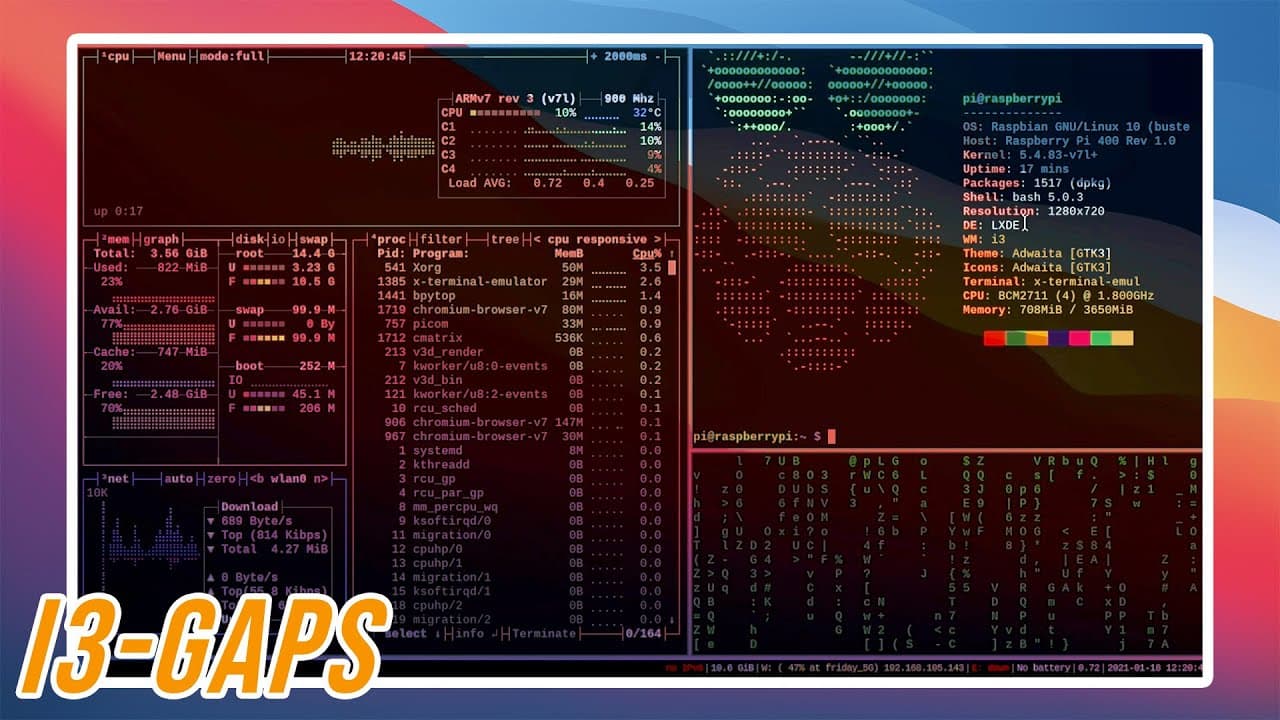
To install the i3-gaps tiling window manager on Raspberry Pi OS, clone the i3-gaps repository, install required dependencies, build from source, and adjust configuration files to enable i3. This setup maximizes productivity by automatically arranging windows without overlap while preserving the existing LXDE environment.
Transcript
hey guys it's don here from novusberrytech and welcome back to the channel and today i'm going to show you guys how to easily install i3 tiling window manager for the raspberry pi os so let's get started so if you guys don't know what i3 window manager is it's basically a tiling window manager where any time when you open a brand new window it'll t... Read More
Key Insights
- 🪟 Tiling window managers like i3 promote productivity by automatically arranging windows, preventing overlap.
- 👻 Customizing i3 requires modifying configuration files, allowing users to personalize shortcuts and window management strategies.
- ♓ The process of installing i3 on Raspberry Pi includes compiling from source and adjusting settings for a stable experience.
- 👤 Tools like rofi enhance i3's functionality by improving application launch processes, integrating a more user-friendly menu.
- 👶 Users can acquire new themes and configurations from repositories, encouraging community engagement and personal touches.
- ♓ Keeping the existing LXDE environment while implementing i3 provides a balanced approach to utilizing the Raspberry Pi's capabilities.
- 🥺 i3’s reliance on keyboard shortcuts can lead to a more efficient workflow for users who prefer minimal mouse interaction.
Install to Summarize YouTube Videos and Get Transcripts
Explore YouTube Video Summarizer or Get YouTube Transcript Extractor
Questions & Answers
Q: What is the main advantage of using a tiling window manager like i3?
The primary advantage of using a tiling window manager like i3 is its ability to manage multiple open windows in a non-overlapping fashion. This setup significantly enhances productivity by allowing users to view several applications simultaneously without the chaos typical of traditional window managers where windows stack on top of each other.
Q: How does i3 differ from other window managers?
Unlike conventional window managers that tend to stack windows, i3 tiles them side by side. This unique feature is more efficient for power users, especially in coding or server management environments, as it maximizes screen space and improves workflow by facilitating better visibility of multiple applications.
Q: What are some recommended customizations after installing i3?
After installing i3, users are encouraged to configure their environment to suit personal preferences. This includes adjusting gap settings between windows, changing the modifier keys for shortcuts, and installing additional tools like rofi for a better menu experience, ensuring the setup is both functional and visually appealing.
Q: Can i3 operate without a desktop environment like LXDE?
Technically, i3 can function independently as a window manager; however, it is more practical to use it alongside a desktop environment like LXDE. This integration allows for easier management of desktop icons and themes, providing users with a familiar interface while benefiting from i3's tiling capabilities.
Q: What steps should be taken to integrate i3 with Raspberry Pi OS?
To integrate i3 with Raspberry Pi OS, follow a structured approach: first download i3 from the relevant repository, install necessary dependencies, compile the source, and modify auto-start configurations to replace the default window manager with i3, ensuring a seamless startup experience.
Q: What is the importance of the configuration files in i3?
Configuration files in i3 are crucial for personalizing the window manager's behavior and appearance. Through these files, users can set keybindings, adjust window gaps, and control startup applications, allowing each user to tailor their experience according to their habits and preferences.
Summary & Key Takeaways
-
The i3 window manager offers a productive tiling setup where new windows automatically arrange themselves, beneficial for multitasking on a Raspberry Pi.
-
The tutorial includes steps to install i3 on Raspberry Pi OS, with a focus on keeping the existing LXDE environment and modifying configuration files for optimal functionality.
-
Viewers are encouraged to explore themes and configurations from various online repositories to customize their i3 experience further.
Read in Other Languages (beta)
Share This Summary 📚
Summarize YouTube Videos and Get Video Transcripts with 1-Click
Try YouTube Summary with ChatGPT & Claude or YouTube Transcript Generator
Explore More Summaries from Novaspirit Tech 📚






Summarize YouTube Videos and Get Video Transcripts with 1-Click
Try YouTube Summary with ChatGPT & Claude or YouTube Transcript Generator