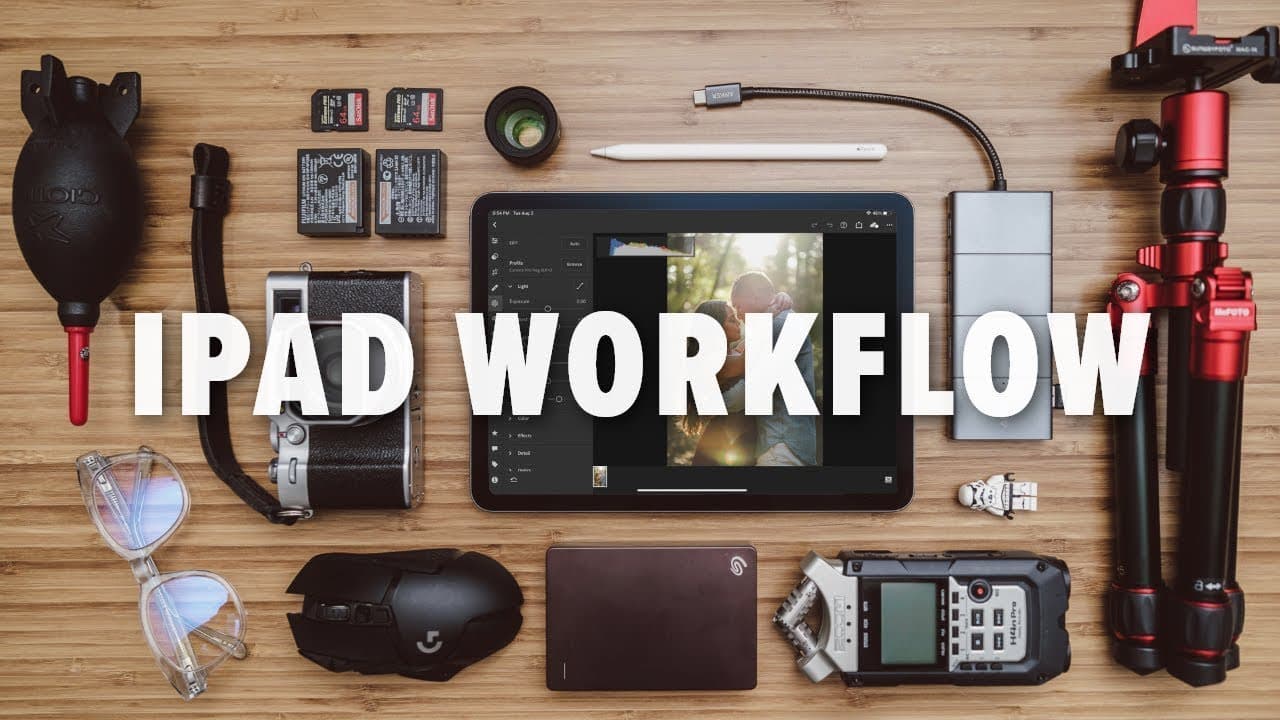
iPad Photography Workflow 2023 | iPad Air 4 + Lightroom CC + Anker 11-in-1 USB-C Hub
TL;DR
Richie Balisteros outlines an efficient photography workflow using the iPad Air 4.
Transcript
an entire photography workflow just on the ipad is it possible well let's find out what's up everyone reggie b photo here and welcome back to the channel so for those of you who are new my name is richie balisteros and i am a wedding photographer based in the san francisco bay area so for me my photography workflow has been 100 on a desktop workflo... Read More
Key Insights
- 🤵 Transitioning to an iPad for photography can enhance flexibility and productivity, particularly for busy professionals like wedding photographers.
- 💻 The iPad Air 4's display is surprisingly color-accurate and reliable for photo editing, often outperforming larger laptop screens.
- 😶🌫️ Using cloud-based applications like Lightroom CC ensures seamless workflow integration and easy access to edits across devices.
- 📁 A USB hub is essential for connecting multiple peripherals and managing file transfers efficiently on the iPad.
- 😫 Lightroom CC on the iPad offers a robust set of editing tools that cater to professional photography needs.
- 💻 Proper screen settings are crucial for maintaining color accuracy during the editing process, affecting the quality of final images.
- 😒 The use of the Apple Pencil can greatly improve editing precision and creativity when making adjustments to photographs.
Install to Summarize YouTube Videos and Get Transcripts
Explore YouTube Video Summarizer or Get YouTube Transcript Extractor
Questions & Answers
Q: What motivated Richie to switch to an iPad workflow for photography?
Richie wanted a more flexible editing setup that allowed him to manage his photography tasks while being present with his kids at home. The portability of the iPad Air 4 enabled him to handle various tasks without being tied to his desktop, improving both his workflow and work-life balance.
Q: Why did Richie choose the iPad Air 4 over the iPad Pro?
Richie selected the iPad Air 4 due to its smaller screen size, which he found more manageable, and its cost efficiency compared to the iPad Pro. He also emphasized the display quality and compatibility with the Apple Pencil and Magic Keyboard, which aligned with his editing needs.
Q: How does Richie manage file transfers and storage using the iPad?
Richie uses an Anker USB hub connected to the iPad Air 4, which allows him to connect an external hard drive and an SD card. This setup facilitates importing, managing, and backing up his photos efficiently, ensuring he has enough storage and easy access to his files.
Q: What are the steps Richie follows to cull and edit his photos in Lightroom CC?
Richie demonstrates a structured approach where he first imports photos into Lightroom CC, selects images for editing using the speed culling mode, and then manages his selections to focus on the ten best images. He showcases various editing features in the app to enhance his photos.
Q: How does Richie ensure color accuracy while editing on the iPad?
Before editing, Richie disables features like dark mode, night shift, and true tone, which can alter the display's color settings. He adjusts the brightness of the screen to maintain consistency, crucial for achieving accurate color corrections in his photos.
Q: Can the iPad Air 4 effectively support all the editing functionalities Richie needs?
Yes, Richie notes that while the iPad Air 4 offers a slightly different layout in Lightroom CC compared to the desktop version, it provides all the essential editing tools. This includes tone curves, color grading, and sharpness adjustments sufficient for his professional photography needs.
Q: What does Richie think about using the Apple Pencil for editing?
Richie finds the Apple Pencil refreshing for editing, especially during more deliberate and considered editing sessions. It allows him precise control and enhances his editing experience, particularly for tasks that require more attention to detail.
Q: How does Richie export the edited photos and integrate them back into his desktop workflow?
After editing, Richie exports photos directly to files in a specific JPEG format for social media and other uses. The synced edits then automatically appear in his Lightroom catalog on the desktop, allowing for further adjustments and final touches if needed.
Summary & Key Takeaways
-
Richie Balisteros shares his experience of transitioning from a desktop to an iPad Air 4 for his photography workflow, highlighting the advantages such as portability and display quality.
-
He explains how to effectively use the Lightroom CC app on the iPad for importing, culling, and editing photos, emphasizing the seamless integration with his existing desktop workflow.
-
The video also discusses the importance of using a USB hub for additional connectivity options, enabling smoother file transfers and multitasking during the editing process.
Read in Other Languages (beta)
Share This Summary 📚
Summarize YouTube Videos and Get Video Transcripts with 1-Click
Try YouTube Summary with ChatGPT & Claude or YouTube Transcript Generator
Explore More Summaries from Reggie Ballesteros 📚


Summarize YouTube Videos and Get Video Transcripts with 1-Click
Try YouTube Summary with ChatGPT & Claude or YouTube Transcript Generator