Tutorial: Simulating the Universe in After Effects
TL;DR
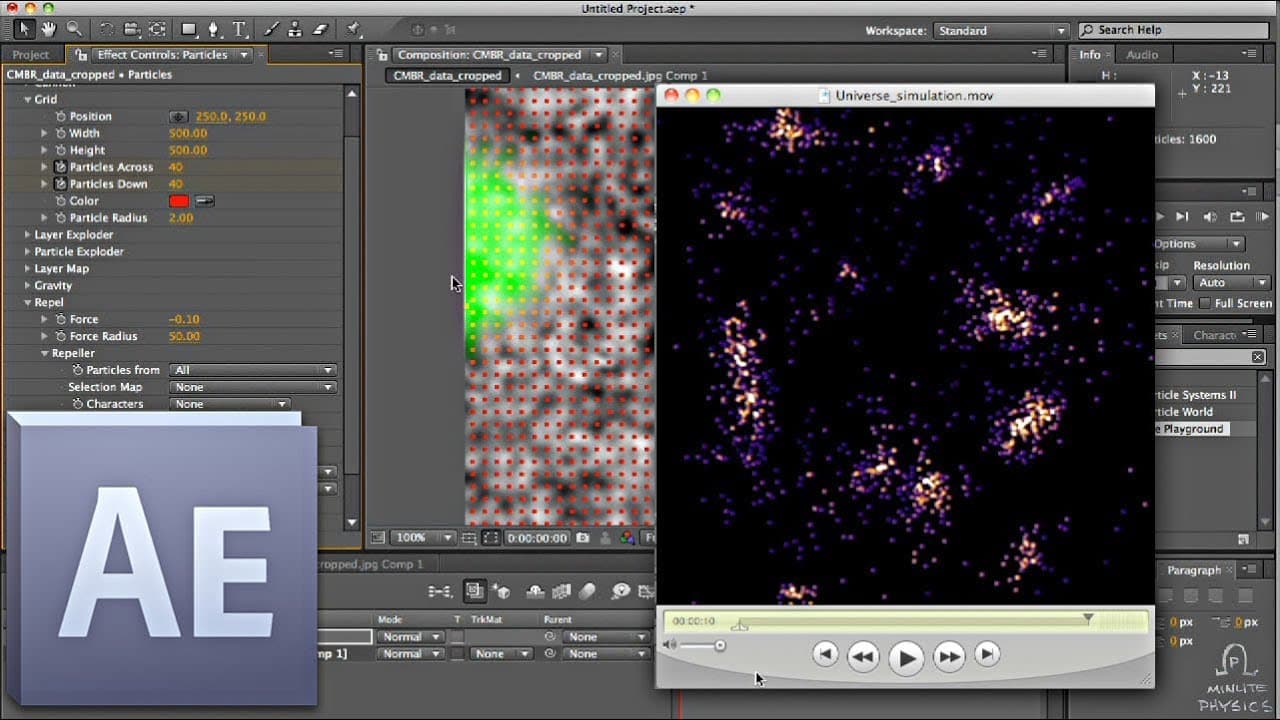
Simulate the universe using After Effects with CMB data for particles attracting based on density.
Transcript
this is going to be a boring video no not that kind of boring there we go all i'm going to do is show you how to simulate the universe on your own computer we're going to be using after effects and it doesn't really matter what version you have as long as it's fairly recent to start with we need some initial conditions we want to know what the univ... Read More
Key Insights
- 🛰️ CMB data from the WMAP satellite is crucial for simulating the early universe.
- ⚾ Particles in the simulation are attracted based on density, mimicking gravitational interactions.
- ❓ Mapping particle density from CMB data enhances the accuracy of the universe simulation.
- 💁 Color grading in the simulation adds visual representation of galaxy formation.
- 🔨 After Effects provides powerful tools for creating intricate simulations.
- ❓ Understanding particle behavior and forces is essential for a realistic simulation.
- 💅 The simulation showcases the beauty of galaxy formation and large-scale structures.
Install to Summarize YouTube Videos and Get Transcripts
Explore YouTube Video Summarizer or Get YouTube Transcript Extractor
Questions & Answers
Q: What data is used to simulate the universe in After Effects?
The simulation utilizes CMB data from the WMAP satellite, which shows the early universe's conditions just after the big bang. This data is essential for creating a realistic simulation of the universe.
Q: How are particles generated in After Effects for the simulation?
Particles are created using the Particle Playground plugin in After Effects, with grid seeding and repelling forces to make them attract based on density. This process ensures a visually accurate representation.
Q: What is the significance of mapping particle density based on CMB data?
Mapping particle density using CMB data allows for a more accurate simulation, with dark spots representing low density and bright spots representing high density. This mapping creates a realistic gravitational interaction among particles.
Q: How is color added to the simulation to represent galaxy formation?
Color is added using adjustment layers in After Effects, with levels adjustment and colorama effects to create an orange-to-blue gradient. This coloration represents galaxy formation as particles collide and interact.
Summary & Key Takeaways
-
Use CMB data from the WMAP satellite to simulate the early universe.
-
Generate particles in After Effects using repelling forces for attraction.
-
Map particle density based on CMB data to create a realistic universe simulation.
Read in Other Languages (beta)
Share This Summary 📚
Summarize YouTube Videos and Get Video Transcripts with 1-Click
Try YouTube Summary with ChatGPT & Claude or YouTube Transcript Generator
Explore More Summaries from minutephysics 📚


Summarize YouTube Videos and Get Video Transcripts with 1-Click
Try YouTube Summary with ChatGPT & Claude or YouTube Transcript Generator