Products
Features
YouTube Video Summarizer
Summarize YouTube videos
Web & PDF Highlighter
Highlight web pages & PDFs
Chat with PDF
Ask any PDF questions with AI
Ask AI Clone
Chat with your highlights & memories
Audio Transcriber
Transcribe audio files to text
Glasp Reader
Read and highlight articles
Kindle Highlight Export
Export your Kindle highlights
Idea Hatch
Hatch ideas from your highlights
Integrations
Obsidian Plugin
Notion Integration
Pocket Integration
Raindrop Integration
Instapaper Integration
Medium Integration
Readwise Integration
Snipd Integration
Hypothesis Integration
Apps & Extensions
Chrome Extension
Safari Extension
Edge Add-ons
Firefox Add-ons
iOS App
Android App
Discover
Discover
Ideas
Discover new ideas and insights
Articles
Curated articles and insights
Books
Book recommendations by great minds
Posts
Essays and notes from readers
Quotes
Inspiring quotes collection
Videos
Curated videos and summaries
Explore Glasp
Glasp Story
How we grew from 0 to 3 million users
Glasp Newsletter
Weekly insights and updates
Glasp Talk
Interview series with great minds
Glasp Blog
Latest news and articles
Glasp Use Cases
Learn how others use Glasp
Build & Support
Glasp API
Access Glasp's API for developers
MCP Connector
Connect Glasp to Claude & ChatGPT
Community
Glasp Reddit Community
Students
Student discount and benefits
FAQs
Frequently Asked Questions
AboutPricing
DashboardLog inSign up

Mastering Nested Layouts In Android: A Complete Guide!
11 views
•
August 5, 2023
by
Ekeeda
YouTube video player
Mastering Nested Layouts In Android: A Complete Guide!

TL;DR

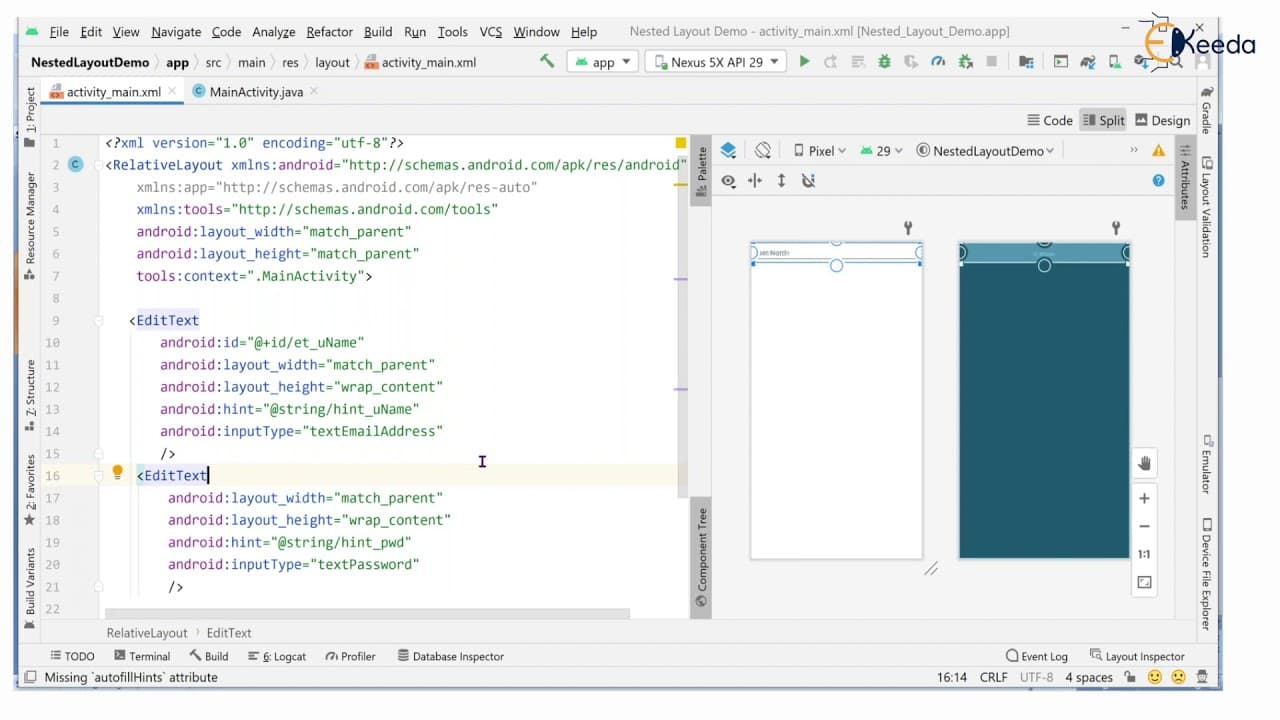
This video tutorial guides you on implementing nested layouts in Android using both relative and linear layouts.

Transcript

hello viewers welcome back in this session we are going to discuss about listed layouts or inner layouts here we will see the example whatever we have seen part of relative layout but here we are going to use the relative layout as well as the linear layout parent we are going to take it as relative layout inside that will take two edit text with r... Read More

Key Insights

  • 👻 Nested layouts in Android allow for the creation of more complex and organized user interfaces.
  • 🧘 Combining different layout types, such as relative and linear layouts, gives developers more flexibility in positioning UI elements.
  • 🏑 EditText fields and buttons can be customized with various attributes to achieve the desired appearance.
  • 😒 Proper use of layout parameters and hierarchy is crucial in achieving desired alignment and positioning of UI elements.
  • 😀 Nested layouts can improve the visual appeal of an app and enhance the user experience.
  • 👻 Utilizing string resources for button labels allows for easier localization and modification of text in the future.
  • 😒 The use of linear layouts with horizontal orientation can create visually appealing and compact UI designs.

Install to Summarize YouTube Videos and Get Transcripts

Explore YouTube Video Summarizer or Get YouTube Transcript Extractor

Summary & Key Takeaways

  • The tutorial demonstrates how to create a nested layout using a combination of relative and linear layouts.

  • The example includes two EditText fields for username and password, and two buttons for sign up and sign in.

  • By utilizing proper view group hierarchy and layout attributes, the tutorial showcases an organized and visually appealing user interface.


Read in Other Languages (beta)

English

Share This Summary 📚

Summarize YouTube Videos and Get Video Transcripts with 1-Click

Download browser extensions on:

Try YouTube Summary with ChatGPT & Claude or YouTube Transcript Generator

Explore More Summaries from Ekeeda 📚
Darcy's Law and Duipits Theory -  Ground Water and Well Hydraulics - Water Resource Engineering 1 thumbnail
Darcy's Law and Duipits Theory - Ground Water and Well Hydraulics - Water Resource Engineering 1
Ekeeda
Non   Homogeneous Linear Equations with Constant Coefficients thumbnail
Non Homogeneous Linear Equations with Constant Coefficients
Ekeeda
Transient Response and Steady State Error Problem 1 - Time Response Analysis - Control Systems thumbnail
Transient Response and Steady State Error Problem 1 - Time Response Analysis - Control Systems
Ekeeda
Introduction to Simple Machines - Simple Machines - Engineering Mechanics thumbnail
Introduction to Simple Machines - Simple Machines - Engineering Mechanics
Ekeeda
Characteristics of Good Stone thumbnail
Characteristics of Good Stone
Ekeeda
What Is Agile Testing and How Does It Work? thumbnail
What Is Agile Testing and How Does It Work?
Ekeeda

Summarize YouTube Videos and Get Video Transcripts with 1-Click

Download browser extensions on:

Try YouTube Summary with ChatGPT & Claude or YouTube Transcript Generator

Apps & Extensions

  • Chrome Extension
  • Safari Extension
  • Edge Add-ons
  • Firefox Add-ons
  • iOS App
  • Android App

Key Features

  • YouTube Video Summarizer
  • Web & PDF Summarizer
  • Web & PDF Highlighter
  • Chat with PDF
  • Ask AI Clone
  • Audio Transcriber
  • Glasp Reader
  • Kindle Highlight Export
  • Idea Hatch

Integrations

  • Obsidian Plugin
  • Notion Integration
  • Pocket Integration
  • Raindrop Integration
  • Instapaper Integration
  • Medium Integration
  • Readwise Integration
  • Snipd Integration
  • Hypothesis Integration

More Features

  • APIs
  • MCP Connector
  • Blog & Post
  • Embed Links
  • Image Highlight
  • Personality Test
  • Quote Shots
  • Open Graph Checker

Company

  • About us
  • Our Story
  • Brand Assets
  • Blog
  • Community
  • FAQs
  • Job Board
  • Newsletter
  • Pricing
Terms

•

Privacy

•

Guidelines

© 2026 Glasp Inc. All rights reserved.