How to Show and Hide Formulas in Excel Easily
TL;DR
To show formulas in Excel, use Ctrl + ` (tilde) for a quick toggle, or go to the Formulas tab and click 'Show Formulas'. For a more detailed method, navigate to File > Options > Advanced and select 'Show formulas in cells instead of their calculated results'. Adjust column widths if needed to view all formulas clearly.
Transcript
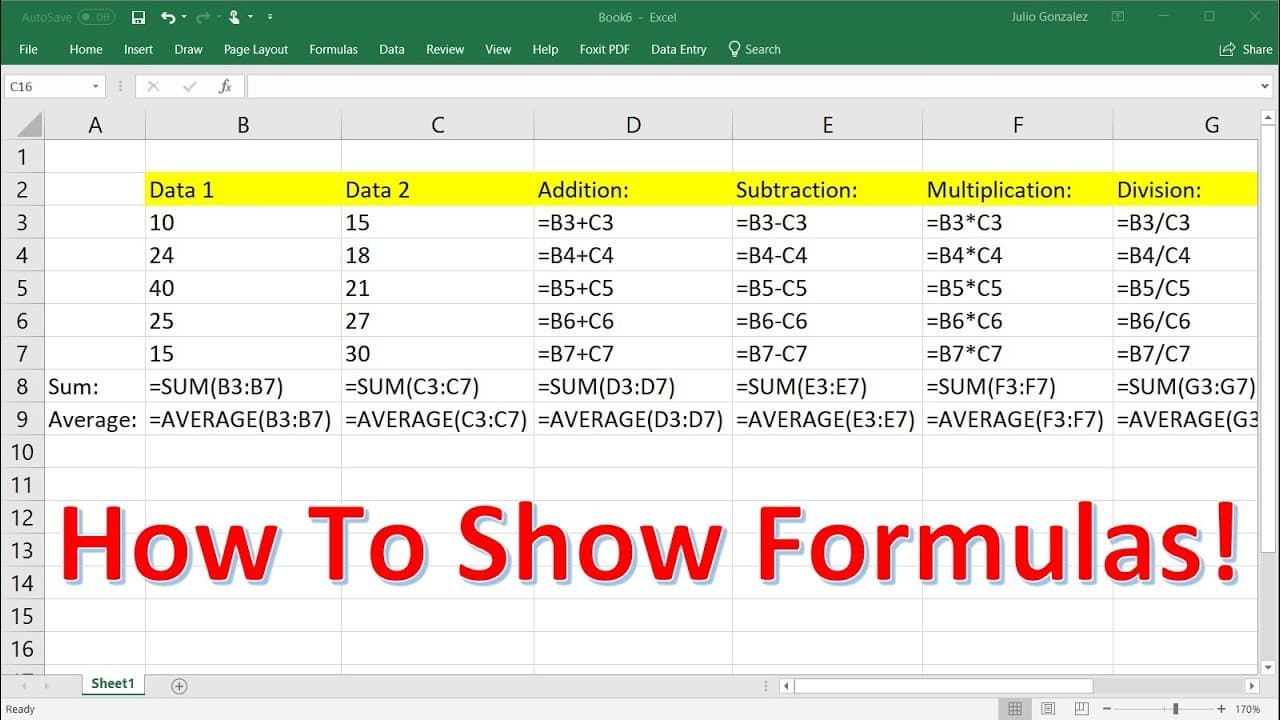
in this lesson we're going to talk about how to show the formulas on an excel spreadsheet so right now you can't really see the formulas listed however if you highlight a certain cell like this one cell d3 you could see the formula at the top and it says equal b3 plus c3 so it's addition here you could see a subtraction based formula and for this o... Read More
Key Insights
- 👻 Highlighting specific cells allows you to view the formula at the top of the spreadsheet.
- ♿ The option to show formulas can be accessed through File > Options > Advanced.
- 🍰 The Formulas tab provides a shorter method to display all formulas on the spreadsheet.
- 🛀 Adjusting column widths may be necessary after showing formulas.
Install to Summarize YouTube Videos and Get Transcripts
Explore YouTube Video Summarizer or Get YouTube Transcript Extractor
Summary & Key Takeaways
-
By highlighting specific cells, you can see the formulas at the top of the spreadsheet.
-
The first method to show all formulas is to go to File > Options > Advanced and select "Show formulas in cells instead of their calculated results."
-
Another shorter method is to go to the Formulas tab and click on "Show formulas," adjusting column widths if necessary.
Read in Other Languages (beta)
Share This Summary 📚
Summarize YouTube Videos and Get Video Transcripts with 1-Click
Try YouTube Summary with ChatGPT & Claude or YouTube Transcript Generator
Explore More Summaries from The Organic Chemistry Tutor 📚



Summarize YouTube Videos and Get Video Transcripts with 1-Click
Try YouTube Summary with ChatGPT & Claude or YouTube Transcript Generator