This Next.js function simplifies dynamic rendering
TL;DR
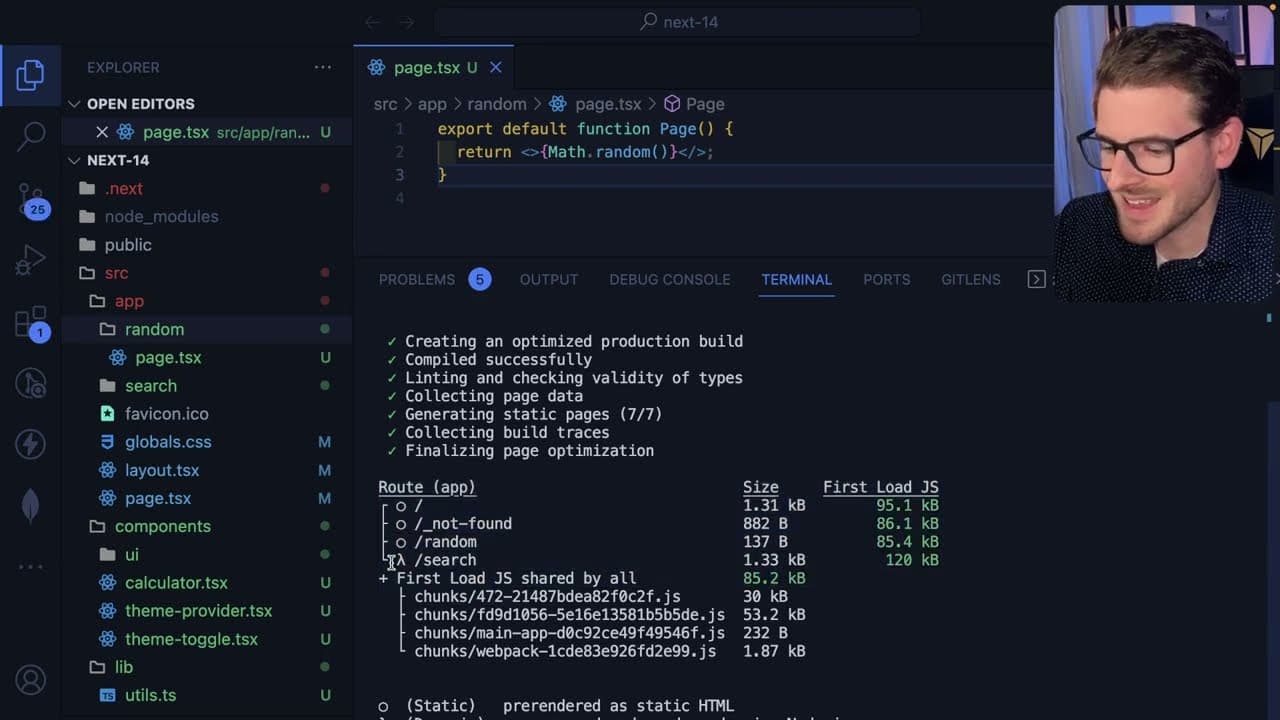
Next.js may render pages dynamically in development mode, leading to confusion for new users.
Transcript
I want to share something with you all that you might run into when you're using nextjs for the first time you might be a little bit confused from it so I have a nextjs application running with Dev mode on this port and I have a page here called SL random which basically just generates a random number and Returns the page okay so if you're familiar... Read More
Key Insights
- 😕 Next.js can confuse beginners because it defaults to dynamic rendering in development mode, even for pages that seem static based on code structure.
- 🏛️ Static rendering means that the page content is generated during build time and should not change until the next build unless configured otherwise.
- 🥺 When a Next.js page contains dynamic functions or dependencies, it risks being treated as dynamic, leading to different behaviors between environments.
- 💨 The export
dynamicmethod and utilizing caching functions likeno storeare effective ways to manage a page's behavior and ensure consistency across different build types. - 🏛️ Understanding the static and dynamic rendering models in Next.js is crucial for building reliable applications and avoiding unexpected issues during deployment.
- 🫠 Reading documentation, especially focusing on chapters related to data fetching, can help clarify concepts and improve a developer's experience with Next.js.
- 💍 Engaging with the community through Discord channels can provide support and answers from experienced developers navigating similar challenges.
Install to Summarize YouTube Videos and Get Transcripts
Explore YouTube Video Summarizer or Get YouTube Transcript Extractor
Questions & Answers
Q: What confuses new developers about Next.js rendering?
New developers often assume that if a page is structured for static rendering, it will behave statically. However, when running in development mode, Next.js treats all endpoints as dynamic, causing pages to load new data on refresh, which can be misleading and error-prone.
Q: How does the Dev mode impact page rendering in Next.js?
In Dev mode, Next.js treats every route dynamically, which means that even pages that seem statically configured will refresh data upon every reload. This can lead to inconsistent behavior between the development environment and the production build, which can be confusing for newcomers.
Q: What are the two methods to specify dynamic rendering in Next.js?
The first method is using export const dynamic = 'force dynamic', which ensures that the endpoint gets treated as dynamic. The second method is importing a cache function like no store, which, when used on data-fetching functions, marks the whole page as dynamic, offering more granular control over rendering.
Q: What should developers do to avoid issues with static rendering in Next.js?
Developers should utilize the no store caching method on their data-fetching functions and ensure that any props, cookies, or asynchronous operations that might affect data retrieval are managed properly to maintain the expected dynamic behavior when needed.
Summary & Key Takeaways
-
The speaker explains the behavior of Next.js regarding static and dynamic rendering, highlighting that understanding when pages are rendered statically or dynamically is crucial for developers using Next.js for the first time.
-
In development mode, even if a page appears static due to code structure, it can behave dynamically, resulting in unexpected random outputs upon refreshing the page.
-
The speaker provides solutions to control dynamic rendering with techniques like using export dynamic or incorporating cache functions within data access layers, emphasizing that this approach prevents build-time discrepancies.
Read in Other Languages (beta)
Share This Summary 📚
Summarize YouTube Videos and Get Video Transcripts with 1-Click
Try YouTube Summary with ChatGPT & Claude or YouTube Transcript Generator
Explore More Summaries from Web Dev Cody 📚





Summarize YouTube Videos and Get Video Transcripts with 1-Click
Try YouTube Summary with ChatGPT & Claude or YouTube Transcript Generator