BEST New Feature macOS CATALINA
TL;DR
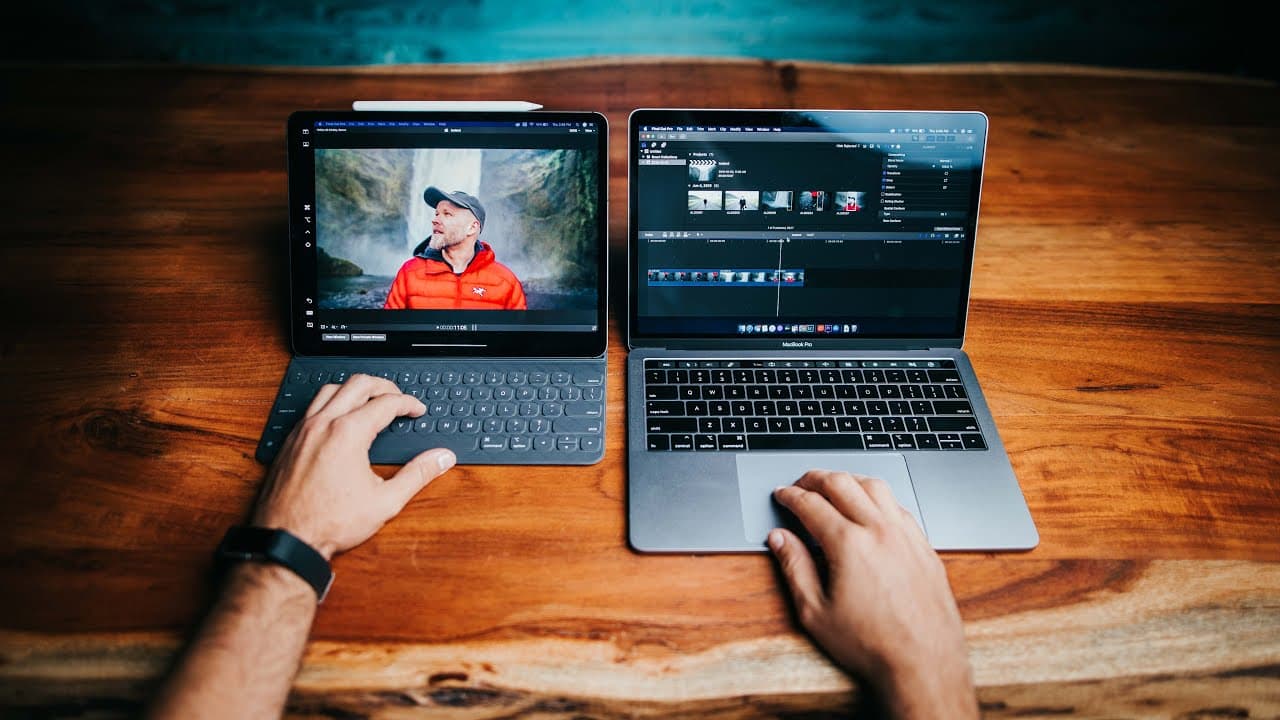
Mac OS Catalina offers innovative updates, like dual monitor setup with iPad, enhancing editing workflow for creatives.
Transcript
so the new Mac OS Catalina is finally out and I'm usually not the type of person to right away jump into a new update because of bugs and things that might be there that caused my other programs like Adobe to crash but in this case there's one feature that as a creative made me update immediately so there's some great new updates in Catalina for ex... Read More
Key Insights
- 😀 Mac OS Catalina introduces various updates such as automatic wallpaper changes, split iTunes apps, iPhone backup in Finder, and improved Notes and Safari.
- 👻 Sidecar in Catalina allows for an iPad to function as a dual monitor, enhancing editing capabilities for creatives.
- 🤟 Possibilities for future development include additional gestures, control features, and program adaptations for improved workflow.
- ❓ Creatives can benefit greatly from the seamless dual monitor experience offered by Sidecar.
- 🧘 Sidecar enhances productivity, workflow efficiency, and editing capabilities for tasks like video editing, photo editing, and color grading.
- 🤗 Integrating iPad with Sidecar opens opportunities for creatives to have a versatile editing tool.
- ❓ The potential for future software developments may further enhance the editing experience with Sidecar.
Install to Summarize YouTube Videos and Get Transcripts
Explore YouTube Video Summarizer or Get YouTube Transcript Extractor
Questions & Answers
Q: What are some key updates in Mac OS Catalina?
Mac OS Catalina introduces automatic wallpaper changes, split iTunes apps, iPhone backup in Finder, improved Notes and Safari, screen time monitoring, and Apple Arcade gaming.
Q: What is the standout feature in Mac OS Catalina for creatives?
The standout feature is Sidecar, enabling an iPad to function as a dual monitor, offering a seamless editing workflow for tasks like video editing, photo editing, and color grading.
Q: How does Sidecar benefit creatives in their editing process?
Sidecar enhances productivity and workflow efficiency by providing a dual monitor setup, allowing for tasks like video editing, photo editing, and color grading to be more seamless and intuitive.
Q: What are the possibilities for future development with Sidecar and iPad integration?
Future developments may include additional gestures, control features, and program adaptations to further enhance the dual monitor experience for creatives, potentially making the iPad a versatile editing tool.
Summary & Key Takeaways
-
Mac OS Catalina introduces various updates such as automatic wallpaper changes, iTunes split into Apple Music, Podcasts, and Apple TV, iPhone backup in Finder, improved Notes and Safari, screen time monitoring, and Apple Arcade gaming.
-
The standout feature is Sidecar, enabling an iPad to function as a dual monitor, enhancing editing capabilities for creatives.
-
Sidecar allows for a seamless dual monitor experience, boosting productivity and workflow efficiency for tasks like video editing, photo editing, and color grading.
Read in Other Languages (beta)
Share This Summary 📚
Summarize YouTube Videos and Get Video Transcripts with 1-Click
Try YouTube Summary with ChatGPT & Claude or YouTube Transcript Generator
Explore More Summaries from Matti Haapoja 📚




Summarize YouTube Videos and Get Video Transcripts with 1-Click
Try YouTube Summary with ChatGPT & Claude or YouTube Transcript Generator