Mastering Sqlite Part 6: Revamp Your Database With Data Updates!
TL;DR
Learn how to update data in an Android database efficiently.
Transcript
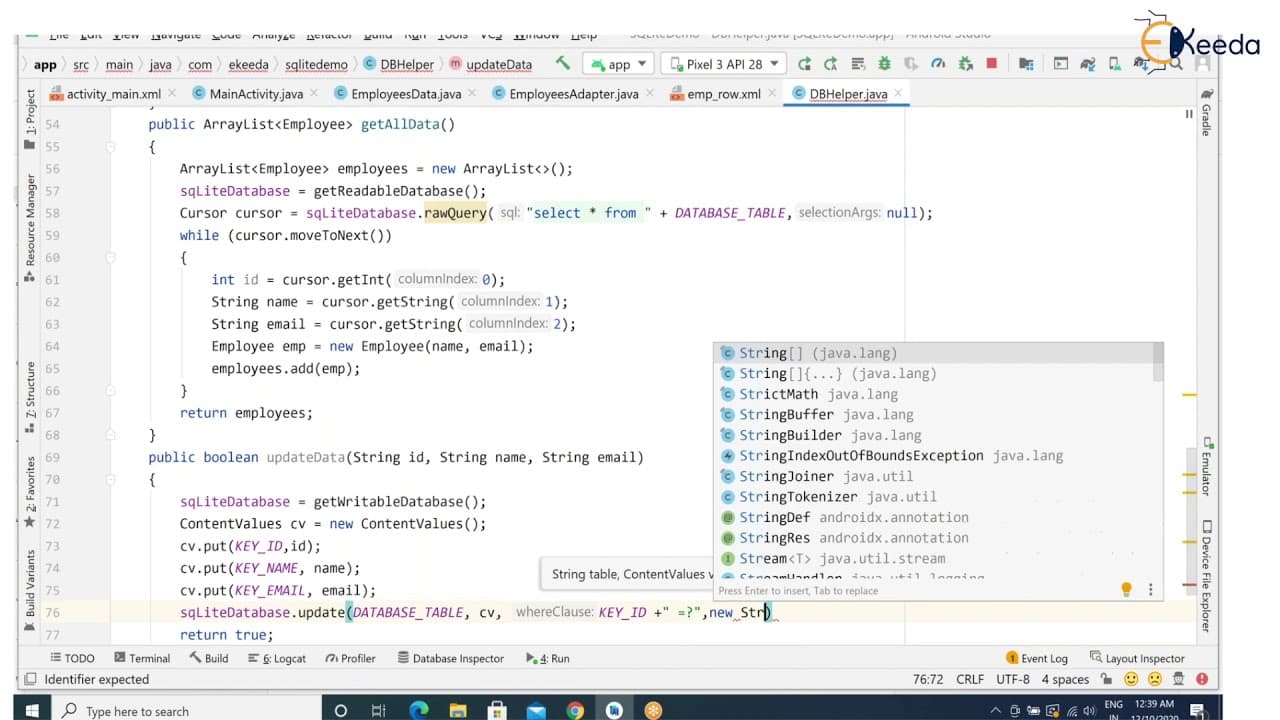
hello viewers welcome back in our previous session we have discussed how to retrieve the data from the database into a list view with the help of hurry list concept we have seen that in our previous session in this session we are going to discuss about how to update a particular content inside your database so from this list item i have four list f... Read More
Key Insights
- 🧘 Retrieve data from the database to edit using an ID for specific content.
- 🪜 Make UI modifications by adding an ID columns for data editing efficiency.
- 🍵 Implement an update method in the helper class to handle data updates in the database.
- 🏛️ Utilize SQLite database object and ContentValues class to update data entries effectively.
- 👤 Use Toast to display update success messages to users.
- ❓ Include error handling for situations like no data found for update operations.
- 🏑 Clear fields after data has been updated for a cleaner UI experience.
Install to Summarize YouTube Videos and Get Transcripts
Explore YouTube Video Summarizer or Get YouTube Transcript Extractor
Questions & Answers
Q: How can you update a specific content in an Android database?
To update a specific content in an Android database, you need to implement a method to update the data entry by specifying the ID, name, and email to be updated.
Q: What is required to update data in an Android database?
To update data in an Android database, you need to have access to the ID of the list item you want to update, along with the new name and email data.
Q: What method should be used to update data in an Android database efficiently?
For efficient data updating in an Android database, create a method that utilizes the SQLite database object and the ContentValues class to perform the update using key-value pairs.
Q: How can you handle the update process from the UI point of view in Android?
In Android, handle the update process by creating a UI display message using Toast to inform users about the successful or unsuccessful data updates.
Summary & Key Takeaways
-
Retrieve data from the database and display it in a list view using the Hurry List concept.
-
Demonstration on how to update specific content in the database.
-
Detailed explanation on creating a method to update data entries in Android databases.
Read in Other Languages (beta)
Share This Summary 📚
Summarize YouTube Videos and Get Video Transcripts with 1-Click
Try YouTube Summary with ChatGPT & Claude or YouTube Transcript Generator
Explore More Summaries from Ekeeda 📚


Summarize YouTube Videos and Get Video Transcripts with 1-Click
Try YouTube Summary with ChatGPT & Claude or YouTube Transcript Generator