How to Code an Increment Decrement Counter - Beginner Javascript Practice
TL;DR
Learn to build a basic counter application using JavaScript.
Transcript
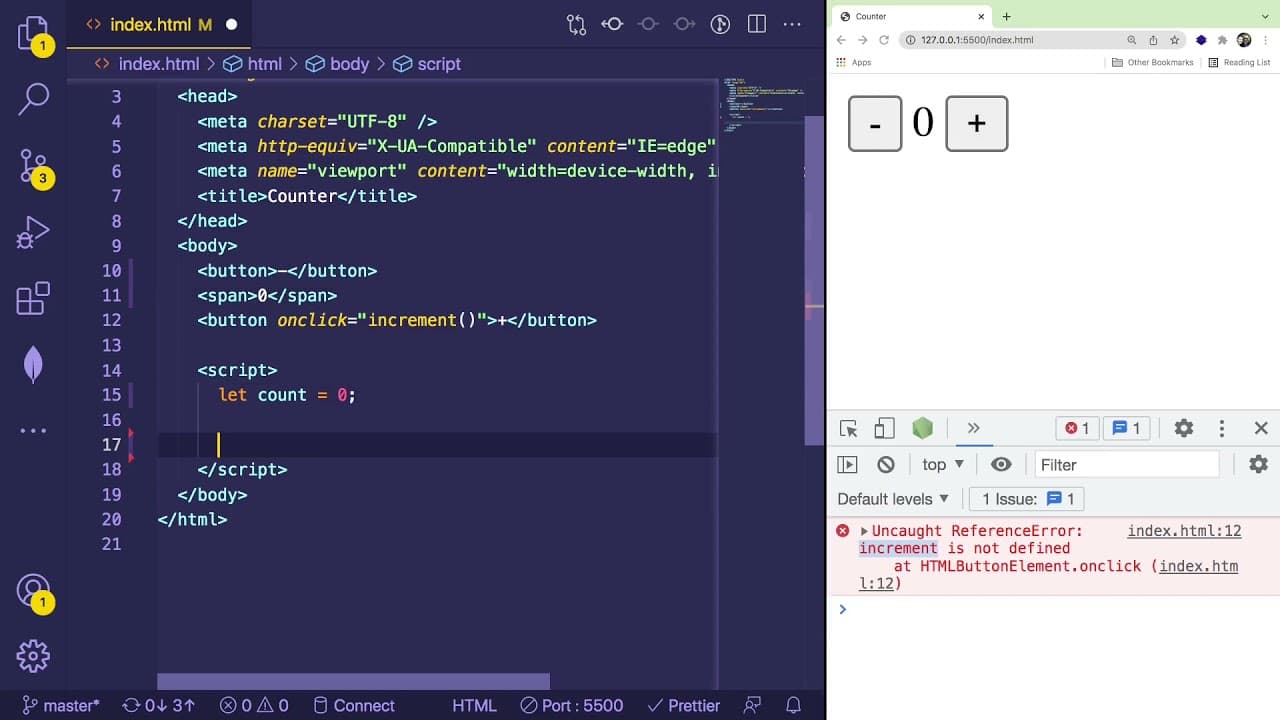
so in this video i'm going to show you a beginner friendly javascript practice widget or application you can try to build yourself and this is what we're going to be building it's basically a counter where you have a number and you can decrement it by pressing the minus sign or you can increment it by pressing the plus sign so super straightforward... Read More
Key Insights
- 🏛️ The tutorial aims at beginners who want to practice building JavaScript applications by creating a simple counter.
- ❓ It emphasizes the importance of understanding HTML structure before delving into JavaScript functionality.
- 🫵 By encouraging viewers to attempt the project themselves first, the video promotes active learning and confidence-building in programming.
- 😒 The use of console logging is highlighted as a vital tool for debugging and ensuring code functionality.
- 😒 Variable scoping is explained through the use of 'let' and 'const,' illustrating how each serves a different purpose in coding.
- 👤 The tutorial illustrates how to manipulate the DOM effectively, enabling dynamic updates to the webpage based on user interactions.
- 🕸️ Simplified concepts of state management in web applications are introduced through the counter's logic, pertinent to beginner programming.
Install to Summarize YouTube Videos and Get Transcripts
Explore YouTube Video Summarizer or Get YouTube Transcript Extractor
Questions & Answers
Q: What is the main objective of the video?
The main objective of the video is to guide beginners through the process of creating a straightforward counter application using HTML and JavaScript, emphasizing the importance of hands-on practice and building basic programming skills.
Q: How does the increment function work in the counter application?
The increment function increases the counter's value by one each time the related button is clicked. The function first verifies that it is invoked successfully through console logging. It then updates a variable representing the count and modifies the inner text of a DOM element to display the new count.
Q: What is the significance of using event listeners in this tutorial?
Event listeners are crucial in this tutorial as they enable the application to respond to user interactions, such as button clicks. By attaching event listeners to the increment and decrement buttons, the code executes the corresponding functions, allowing for dynamic counting based on user input.
Q: What role does the 'innerText' property play in the application?
The 'innerText' property is used to change the text displayed inside the span element on the webpage. After incrementing or decrementing the count, the application updates the span's inner text to reflect the current value, allowing users to see the changes in real-time.
Q: Why should beginners try to build the application before watching the provided solution?
Attempting to build the application independently helps beginners reinforce their understanding of JavaScript concepts and problem-solving skills. It encourages active engagement with the material, making the learning experience more effective and memorable.
Q: What tools are suggested for hosting the application while developing?
The video recommends using the Live Server extension available in Visual Studio Code to host the application while developing. This allows developers to view real-time updates and changes made in the HTML and JavaScript files directly in the browser.
Q: How does the tutorial explain the difference between 'let' and 'const'?
The tutorial explains that 'let' allows variable reassignment, making it more suitable for variables whose values change, such as the counter. In contrast, 'const' is used for variables that will remain constant throughout the execution, like the reference to the DOM element that does not change.
Q: What additional resources or future content can viewers expect from the channel?
Viewers can expect more videos focused on building simple widgets and practicing JavaScript skills in the future. The tutorial encourages interaction, inviting comments for suggestions on future tutorials that could help build foundational programming knowledge.
Summary & Key Takeaways
-
The video provides a step-by-step guide for beginners to create a simple counter application using HTML and JavaScript, demonstrating essential programming concepts.
-
Viewers are encouraged to try building the application on their own before watching the solution, fostering hands-on learning and problem-solving skills.
-
The tutorial covers implementing increment and decrement functions, handling DOM elements, and updating the user interface dynamically.
Read in Other Languages (beta)
Share This Summary 📚
Summarize YouTube Videos and Get Video Transcripts with 1-Click
Try YouTube Summary with ChatGPT & Claude or YouTube Transcript Generator
Explore More Summaries from Web Dev Cody 📚





Summarize YouTube Videos and Get Video Transcripts with 1-Click
Try YouTube Summary with ChatGPT & Claude or YouTube Transcript Generator