LLM Module 2 - Embeddings, Vector Databases, and Search | 2.9 Notebook Demo Pinecone (Optional)
TL;DR
Pinecone is a cloud-based vector database that simplifies and scales similarity search.
Transcript
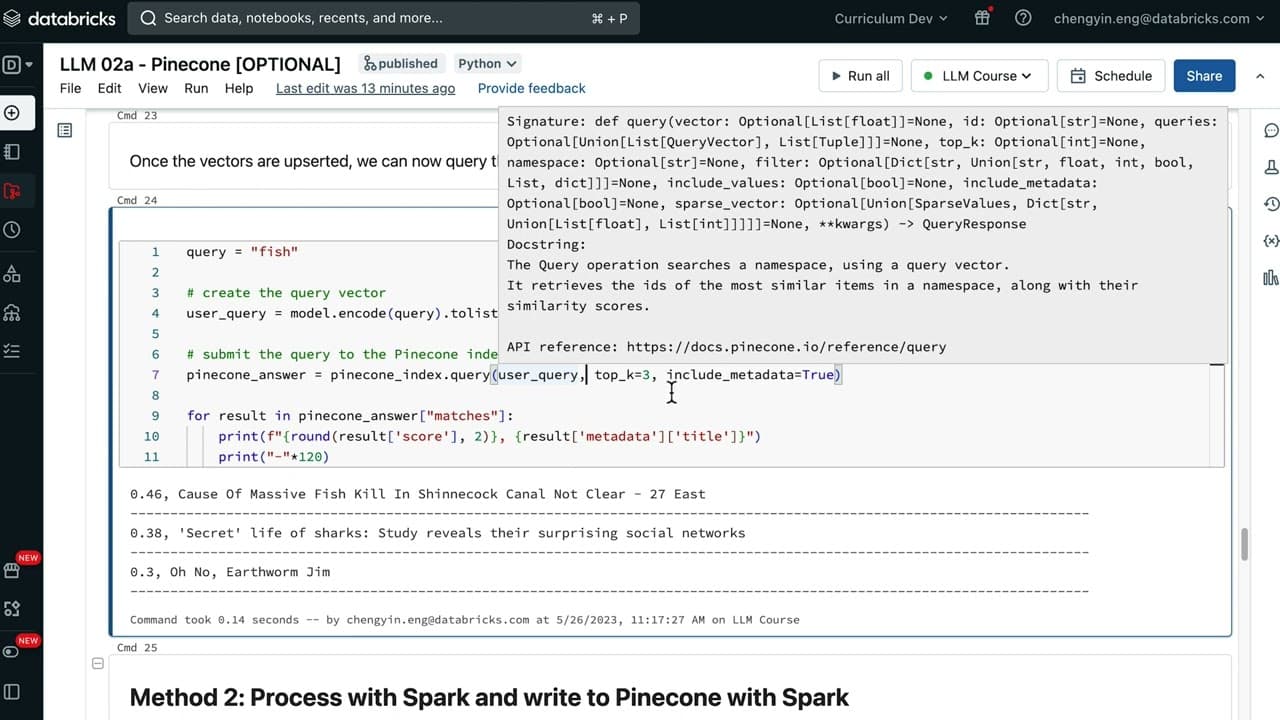
English lm02a notebook we are going to be using a cloud-based Vector database called Pinecone it has a freight here that we can gain access to which is what we'll be doing shortly it's a cloud-based database solution that offers us a lot of Simplicity and scalable similarity search before we get going make sure that you have a couple of dependencie... Read More
Key Insights
- 😶🌫️ Pinecone is a cloud-based vector database that simplifies and scales similarity search.
- 😒 Installation of Pinecone dependencies and setting up a free tier account is required to use it.
- 🖼️ Two methods of generating embeddings and saving them to Pinecone are using pandas data frame or Spark data frame with pandas UDFs.
- 🫰 Querying the Pinecone index can be done by converting the query into a vector and retrieving the top matching neighbors.
- 👨🔬 Pinecone is efficient for storing and searching vectors, making it useful for various applications.
- 🫰 The process of deleting and recreating the Pinecone index may take up to three minutes.
- ❓ Pinecone supports cosine similarity for measuring vector similarity.
Install to Summarize YouTube Videos and Get Transcripts
Explore YouTube Video Summarizer or Get YouTube Transcript Extractor
Questions & Answers
Q: What is Pinecone and what does it offer?
Pinecone is a cloud-based vector database that provides simplicity and scalability for similarity search. It allows users to store and search for vectors efficiently.
Q: How can I install the Pinecone dependencies and set up a free tier account?
To install the dependencies, you need to have Pinecone cayenne and the spark connector jar file. Follow the instructions in the documentation provided. To set up a free tier account, go to the Pinecone homepage, sign up, and obtain the API key.
Q: What are the two methods to generate embeddings and save them to Pinecone?
The first method is using a pandas data frame with a single node embedding model. The data is processed in batches and then written to Pinecone. The second method is using a Spark data frame with pandas UDFs, where the data is converted into vectors and directly written to Pinecone using Spark.
Q: How can I query the Pinecone index and retrieve relevant results?
To query the Pinecone index, you first need to convert the query into a vector representation. Submit the vector to Pinecone to retrieve the relevant results. The top matching neighbors based on similarity are returned.
Key Insights:
- Pinecone is a cloud-based vector database that simplifies and scales similarity search.
- Installation of Pinecone dependencies and setting up a free tier account is required to use it.
- Two methods of generating embeddings and saving them to Pinecone are using pandas data frame or Spark data frame with pandas UDFs.
- Querying the Pinecone index can be done by converting the query into a vector and retrieving the top matching neighbors.
- Pinecone is efficient for storing and searching vectors, making it useful for various applications.
- The process of deleting and recreating the Pinecone index may take up to three minutes.
- Pinecone supports cosine similarity for measuring vector similarity.
- The use of pandas UDFs in Spark allows for efficient processing of data frames and vectorization.
Summary & Key Takeaways
-
Pinecone is a cloud-based vector database solution that offers simplicity and scalability for similarity search.
-
The first step is to install the Pinecone cayenne and spark connector dependencies and set up a Pinecone free tier account.
-
There are two methods to generate embeddings and save them to Pinecone: using pandas data frame with single node embedding model or using a Spark data frame with pandas UDFs.
Read in Other Languages (beta)
Share This Summary 📚
Summarize YouTube Videos and Get Video Transcripts with 1-Click
Try YouTube Summary with ChatGPT & Claude or YouTube Transcript Generator
Explore More Summaries from Databricks 📚




Summarize YouTube Videos and Get Video Transcripts with 1-Click
Try YouTube Summary with ChatGPT & Claude or YouTube Transcript Generator