Products
Features
YouTube Video Summarizer
Summarize YouTube videos
Web & PDF Highlighter
Highlight web pages & PDFs
Chat with PDF
Ask any PDF questions with AI
Ask AI Clone
Chat with your highlights & memories
Audio Transcriber
Transcribe audio files to text
Glasp Reader
Read and highlight articles
Kindle Highlight Export
Export your Kindle highlights
Idea Hatch
Hatch ideas from your highlights
Integrations
Obsidian Plugin
Notion Integration
Pocket Integration
Instapaper Integration
Medium Integration
Readwise Integration
Snipd Integration
Hypothesis Integration
Apps & Extensions
Chrome Extension
Safari Extension
Edge Add-ons
Firefox Add-ons
iOS App
Android App
Discover
Discover
Ideas
Discover new ideas and insights
Articles
Curated articles and insights
Books
Book recommendations by great minds
Posts
Essays and notes from readers
Quotes
Inspiring quotes collection
Videos
Curated videos and summaries
Explore Glasp
Glasp Story
How we grew from 0 to 3 million users
Glasp Newsletter
Weekly insights and updates
Glasp Talk
Interview series with great minds
Glasp Blog
Latest news and articles
Glasp Use Cases
Learn how others use Glasp
Build & Support
Glasp API
Access Glasp's API for developers
MCP Connector
Connect Glasp to Claude & ChatGPT
Community
Glasp Reddit Community
Students
Student discount and benefits
FAQs
Frequently Asked Questions
AboutPricing
DashboardLog inSign up

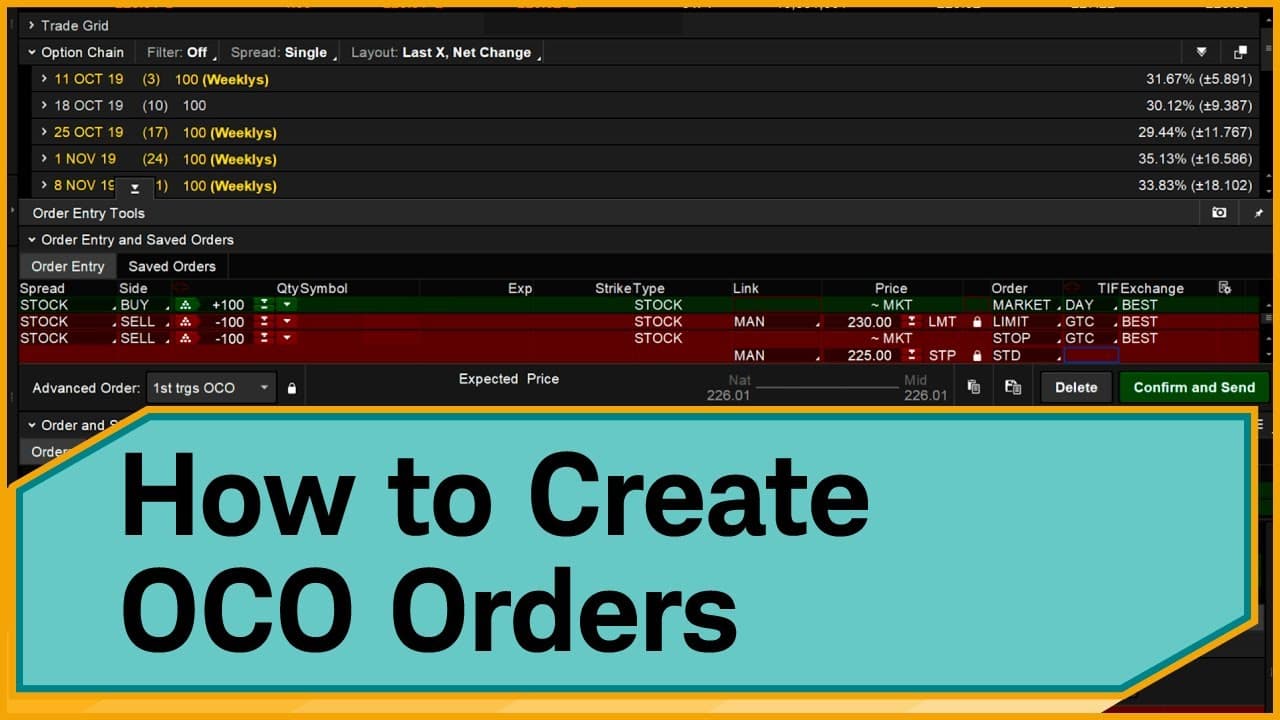
How to Create One-Cancels-Other Orders on thinkorswim
November 4, 2023
by
Charles Schwab
YouTube video player
How to Create One-Cancels-Other Orders on thinkorswim

TL;DR

To create a One-Cancels-Other (OCO) order on thinkorswim, select 'Buy custom' under the Trade tab, then choose 'with OCO Bracket.' Set your limit and stop prices, adjusting them to 'Good Till Canceled' to keep the orders active beyond one trading day. This setup helps manage risk by defining profit targets and stop-loss limits simultaneously.

Transcript

Hello, traders. I'm Anthony Panzeca. And I'm going to show you how to create a one-cancels-other order, also known as an OCO, on the thinkorswim® platform. Let's just jump right into it. An OCO is a pair of orders that are linked, meaning if one order executes, then the other order is automatically canceled. Specifically, an OCO order combines a st... Read More

Key Insights

  • 🪈 OCO orders link stop and limit orders, automating trading strategies.
  • 😫 Setting profit targets and stop losses simultaneously helps manage risk.
  • 👻 Customizing OCO orders on the thinkorswim platform allows for flexible trading strategies.
  • 💄 Utilizing OCO orders can streamline trade management and decision-making processes.
  • 📑 Monitoring OCO orders in the Trade tab and adjusting them in the Monitor tab offers control over trades.
  • 🪈 Leveraging chart features on thinkorswim enables visual adjustments to OCO orders.
  • 🪈 OCO orders are essential tools for efficient trade execution and risk management.

Install to Summarize YouTube Videos and Get Transcripts

Explore YouTube Video Summarizer or Get YouTube Transcript Extractor

Questions & Answers

Q: What is an OCO order, and how does it function?

An OCO order, or One-Cancels-Other, combines a stop order with a limit order, wherein if one order executes, the other gets canceled automatically.

Q: How can traders set profit targets and stop-loss orders simultaneously?

Traders can set profit targets and stop-loss orders simultaneously by creating linked OCO orders on platforms like thinkorswim.

Q: What are the benefits of using OCO orders in trading?

OCO orders help traders manage risk effectively by setting predefined profit targets and stop-loss levels simultaneously, providing a structured approach to trading.

Q: How can traders customize OCO orders for specific trades?

Traders can customize OCO orders by setting their desired quantity, price levels for profit targets and stop losses, and selecting order duration on platforms like thinkorswim.

Summary & Key Takeaways

  • An OCO order on thinkorswim links two orders, where if one executes, the other cancels, combining a stop order with a limit order.

  • By setting profit targets and stop-loss orders simultaneously, traders can manage risk and potential gains efficiently.

  • The tutorial guides traders through creating and customizing OCO orders step by step on the thinkorswim platform.


Read in Other Languages (beta)

English

Share This Summary 📚

Summarize YouTube Videos and Get Video Transcripts with 1-Click

Download browser extensions on:

Try YouTube Summary with ChatGPT & Claude or YouTube Transcript Generator

Explore More Summaries from Charles Schwab 📚
Jodi's Story: How Can You Prepare for a Career Change? thumbnail
Jodi's Story: How Can You Prepare for a Career Change?
Charles Schwab
Judge the Judges: With Guests Daniel Kahneman, James Hutchinson & G.M. Pucilowski thumbnail
Judge the Judges: With Guests Daniel Kahneman, James Hutchinson & G.M. Pucilowski
Charles Schwab
Not by a Long Shot: With Guests Katia Jordan & Craig Fox thumbnail
Not by a Long Shot: With Guests Katia Jordan & Craig Fox
Charles Schwab
(BONUS) From Ripple Effect: Does Diversity Training Work? with Katy Milkman thumbnail
(BONUS) From Ripple Effect: Does Diversity Training Work? with Katy Milkman
Charles Schwab
Unscrambling the Economy’s Mixed Messages thumbnail
Unscrambling the Economy’s Mixed Messages
Charles Schwab
A Sticky Situation: With Guests Richard Thaler, Wendy Wood & Susan Budowski thumbnail
A Sticky Situation: With Guests Richard Thaler, Wendy Wood & Susan Budowski
Charles Schwab

Summarize YouTube Videos and Get Video Transcripts with 1-Click

Download browser extensions on:

Try YouTube Summary with ChatGPT & Claude or YouTube Transcript Generator

Apps & Extensions

  • Chrome Extension
  • Safari Extension
  • Edge Add-ons
  • Firefox Add-ons
  • iOS App
  • Android App

Key Features

  • YouTube Video Summarizer
  • Web & PDF Summarizer
  • Web & PDF Highlighter
  • Chat with PDF
  • Ask AI Clone
  • Audio Transcriber
  • Glasp Reader
  • Kindle Highlight Export
  • Idea Hatch

Integrations

  • Obsidian Plugin
  • Notion Integration
  • Pocket Integration
  • Instapaper Integration
  • Medium Integration
  • Readwise Integration
  • Snipd Integration
  • Hypothesis Integration

More Features

  • APIs
  • MCP Connector
  • Blog & Post
  • Embed Links
  • Image Highlight
  • Personality Test
  • Quote Shots
  • Open Graph Checker

Company

  • About us
  • Our Story
  • Blog
  • Community
  • FAQs
  • Job Board
  • Newsletter
  • Pricing
Terms

•

Privacy

•

Guidelines

© 2026 Glasp Inc. All rights reserved.