Tentacle Rig | Let's Build It In Blender
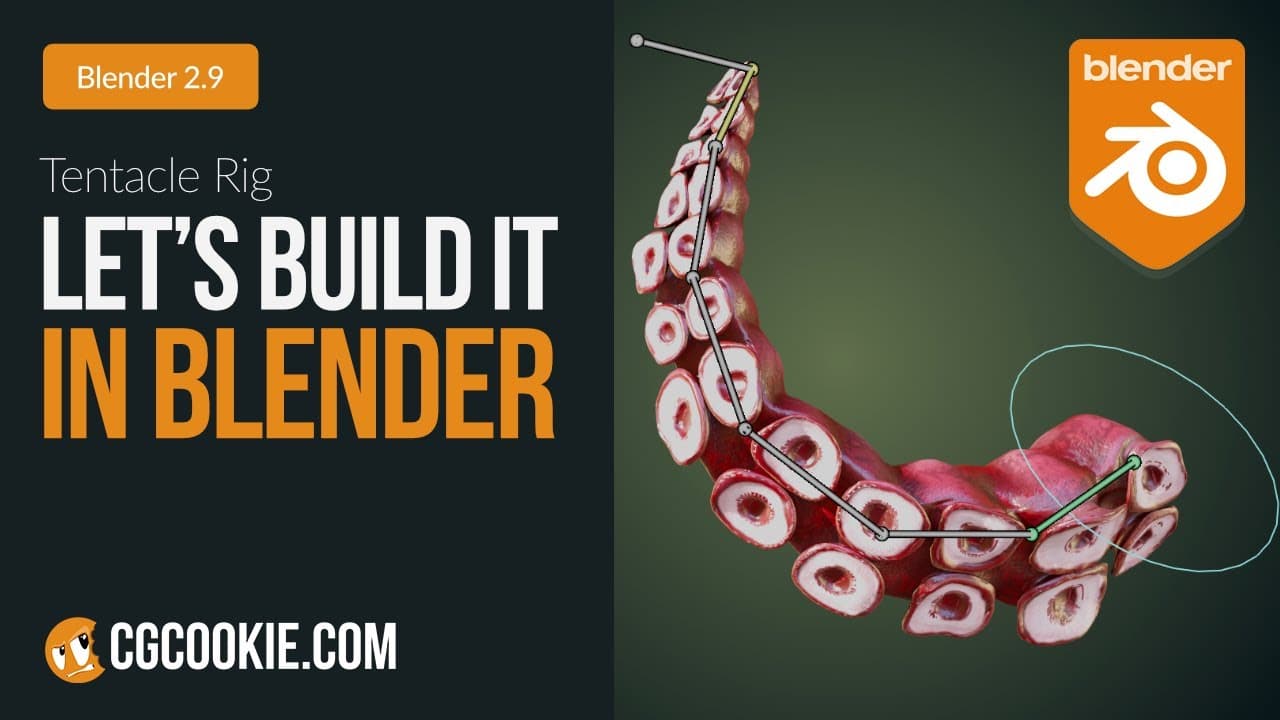
TL;DR
Learn to rig tentacles using Blender's Inverse Kinematics.
Transcript
so i'm not even gonna ask why you guys wanted to know how to rig tentacles uh we're just gonna build it and pretend this video never happened okay all right so uh cool well you're on your own to catch your own squid but if you're watching this video i'm sure you've probably got your own lined up anywa... Read More
Key Insights
- The tutorial focuses on creating a tentacle rig using Blender, utilizing Inverse Kinematics and Bone Constraints for fluid motion.
- A single bone is added to the tentacle's origin, with subsequent bones subdivided for uniform length, enhancing the rig's flexibility.
- Inverse Kinematics is applied with a controller bone, allowing for smooth movement across the tentacle rig when manipulated.
- The tutorial emphasizes automatic weight painting, leveraging Blender's capabilities for efficient weight distribution across the mesh.
- Aesthetic enhancements are made by adding a rotation bone with a custom circle mesh, improving visual representation in the viewport.
- Procedural animation techniques, such as noise modifiers, are used to create secondary motion for a more realistic animation outcome.
- The tutorial concludes with a demonstration of animating the rigged tentacle, showcasing the constraints and procedural techniques in action.
- The video marks the end of the first season of 'Let's Build It In Blender,' with plans for more content in the upcoming year.
Install to Summarize YouTube Videos and Get Transcripts
Explore YouTube Video Summarizer or Get YouTube Transcript Extractor
Questions & Answers
Q: How does the tutorial suggest starting the tentacle rigging process?
The tutorial suggests starting the tentacle rigging process by adding a single bone to the tentacle's origin. This bone serves as the base for the rig. From there, bones are subdivided rather than extruded to maintain uniform length, which is crucial for creating a flexible and manageable rig structure.
Q: What role does Inverse Kinematics play in this rigging tutorial?
Inverse Kinematics (IK) is central to the rigging process in this tutorial, allowing for smooth and realistic movement of the tentacle. By setting up an IK controller, users can manipulate the tentacle's movement efficiently. The IK setup ensures that the entire tentacle follows the controller's movement, simplifying animation tasks.
Q: Why is automatic weight painting recommended in the tutorial?
Automatic weight painting is recommended in the tutorial because it leverages Blender's advanced capabilities to distribute weights across the mesh efficiently. This method reduces manual effort and ensures a more accurate and balanced weight distribution, which is essential for achieving realistic deformations during animation.
Q: What aesthetic enhancements are introduced in the rigging process?
Aesthetic enhancements in the rigging process include adding a rotation bone with a custom circle mesh for better visual representation. This modification doesn't affect functionality but improves the viewport's visual clarity. It helps animators identify and manipulate the rotation bone more easily, enhancing the overall rigging experience.
Q: How does the tutorial incorporate procedural animation techniques?
Procedural animation techniques are incorporated by using noise modifiers on the IK bone's transforms. By adjusting the scale and strength of these modifiers, the tutorial achieves secondary motion that adds realism to the animation. This approach simplifies creating complex motion patterns that would be difficult to animate manually.
Q: What is the significance of the tutorial's conclusion?
The tutorial's conclusion marks the end of the first season of 'Let's Build It In Blender,' highlighting the series' educational journey. It reflects on the learning experiences shared and teases future content, promising more in-depth tutorials and explorations in Blender rigging and animation, keeping the community engaged and eager for more.
Q: What future content is hinted at in the video?
The video hints at future content by mentioning plans for the next season of 'Let's Build It In Blender.' It suggests that new and exciting topics will be explored, potentially expanding on the techniques covered in the current season. This teaser aims to maintain viewer interest and anticipation for upcoming tutorials.
Q: How does the tutorial address performance issues in rigging?
Performance issues in rigging are addressed by balancing the number of bones and the rig's complexity. While adding more bones can improve animation smoothness, it may impact performance. The tutorial advises users to find a balance that suits their needs, suggesting that performance can be managed by adjusting bone count and animation complexity.
Summary & Key Takeaways
-
This Blender tutorial guides users through the process of rigging a tentacle using Inverse Kinematics. Starting with a single bone, the rig is built by subdividing bones for even length and adding a controller for smooth movement. The tutorial focuses on efficient rigging techniques and aesthetic enhancements.
-
Inverse Kinematics and Bone Constraints are key components in this tentacle rigging tutorial. Users learn to apply automatic weight painting for effective mesh manipulation and use procedural animation techniques to add secondary motion, resulting in a fluid and realistic animation of the tentacle.
-
The video concludes the first season of 'Let's Build It In Blender,' highlighting the tutorial's focus on creating a tentacle rig. Future content is teased, promising more in-depth tutorials and explorations in Blender rigging and animation techniques, engaging the Blender community further.
Read in Other Languages (beta)
Share This Summary 📚
Summarize YouTube Videos and Get Video Transcripts with 1-Click
Try YouTube Summary with ChatGPT & Claude or YouTube Transcript Generator
Explore More Summaries from CG Cookie 📚
Summarize YouTube Videos and Get Video Transcripts with 1-Click
Try YouTube Summary with ChatGPT & Claude or YouTube Transcript Generator