Interactive Rendering with Iray for Maya
TL;DR
Learn how to use IRA for Maya for interactive rendering, speeding up content creation with real-time feedback.
Transcript
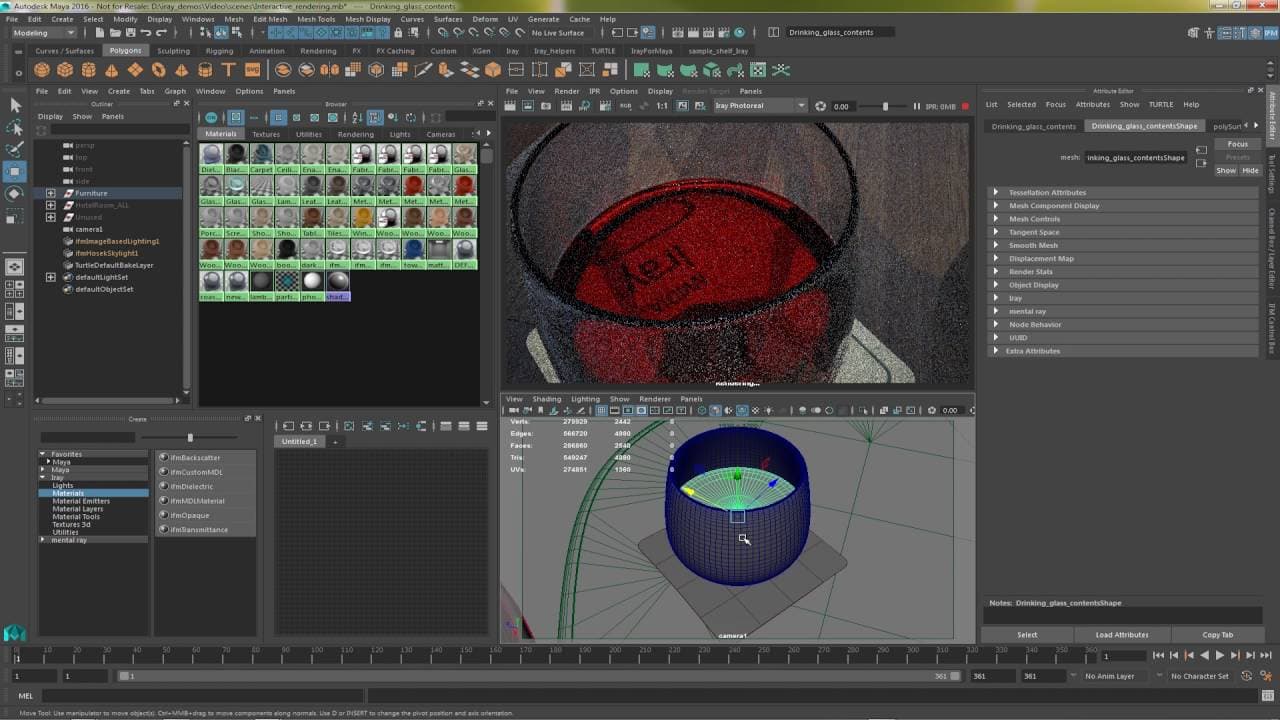
in this video we will cover how an interactive workflow can be achieved with IRA for Maya to speed up every step of content creation here I have a 3d scene that we will texture in light so to begin let's add an image based light an assign an EXR image file to light the scene now we'll select the eye ray renderer we have two choices I refer to real ... Read More
Key Insights
- 💨 IRA for Maya offers two rendering modes: IRA Interactive for fast, interactive rendering and IRA Photo Real for photo-realistic results.
- ⚾ Utilize image-based lighting and physically-based materials from the Nvidia V Material Catalog to enhance realism in your 3D scenes.
- 👻 Interactive rendering in IRA for Maya allows for quick adjustments to exposure, lighting, and materials, speeding up content creation.
- 👀 Fine-tune your renders by adjusting parameters like tone mapping, lighting angles, and material properties to achieve the desired look.
- 💨 Fast feedback cycles in interactive rendering make it easier to iterate on designs and make real-time adjustments.
- 😑 Save time and resources by using pre-defined materials from the Nvidia library and adjusting them interactively to fit your scene.
- 🎨 Interactive rendering with IRA for Maya is beneficial for industrial design, architectural visualization, and other projects requiring realistic renderings.
Install to Summarize YouTube Videos and Get Transcripts
Explore YouTube Video Summarizer or Get YouTube Transcript Extractor
Questions & Answers
Q: What are the key differences between IRA Interactive and IRA Photo Real rendering modes?
IRA Interactive is optimized for fast, interactive rendering, ideal for initial look development, while IRA Photo Real simulates global illumination for photo-realistic results.
Q: How can you fine-tune exposure and lighting in your scene using IRA for Maya?
You can use a tone mapper to adjust image exposure and add directional lighting, such as a Sun and sky system, to enhance realism.
Q: How can you easily apply predefined materials like glass or leather textures in your scene?
By using the V Material Catalog from Nvidia, you can quickly access and apply physically-based materials like glass or leather with adjustable colors and textures.
Q: What are the benefits of interactive rendering in IRA for Maya?
Interactive rendering provides fast feedback, allowing you to iterate on designs quickly, adjust lighting and materials in real-time, and achieve high-quality renders efficiently.
Summary & Key Takeaways
-
Use IRA for Maya for interactive rendering, choosing between interactive and photo-real rendering modes based on your project's needs.
-
Utilize image-based lighting and physically-based materials to create realistic textures and lighting in your 3D scenes.
-
Take advantage of fast feedback cycles to iterate quickly on your designs and achieve high-quality renders efficiently.
Read in Other Languages (beta)
Share This Summary 📚
Summarize YouTube Videos and Get Video Transcripts with 1-Click
Try YouTube Summary with ChatGPT & Claude or YouTube Transcript Generator
Explore More Summaries from NVIDIA 📚


Summarize YouTube Videos and Get Video Transcripts with 1-Click
Try YouTube Summary with ChatGPT & Claude or YouTube Transcript Generator