How To Calculate Loan Payments Using The PMT Function In Excel
TL;DR
Learn how to calculate loan payments using the PMT function in Excel and discover ways to save money on interest payments.
Transcript
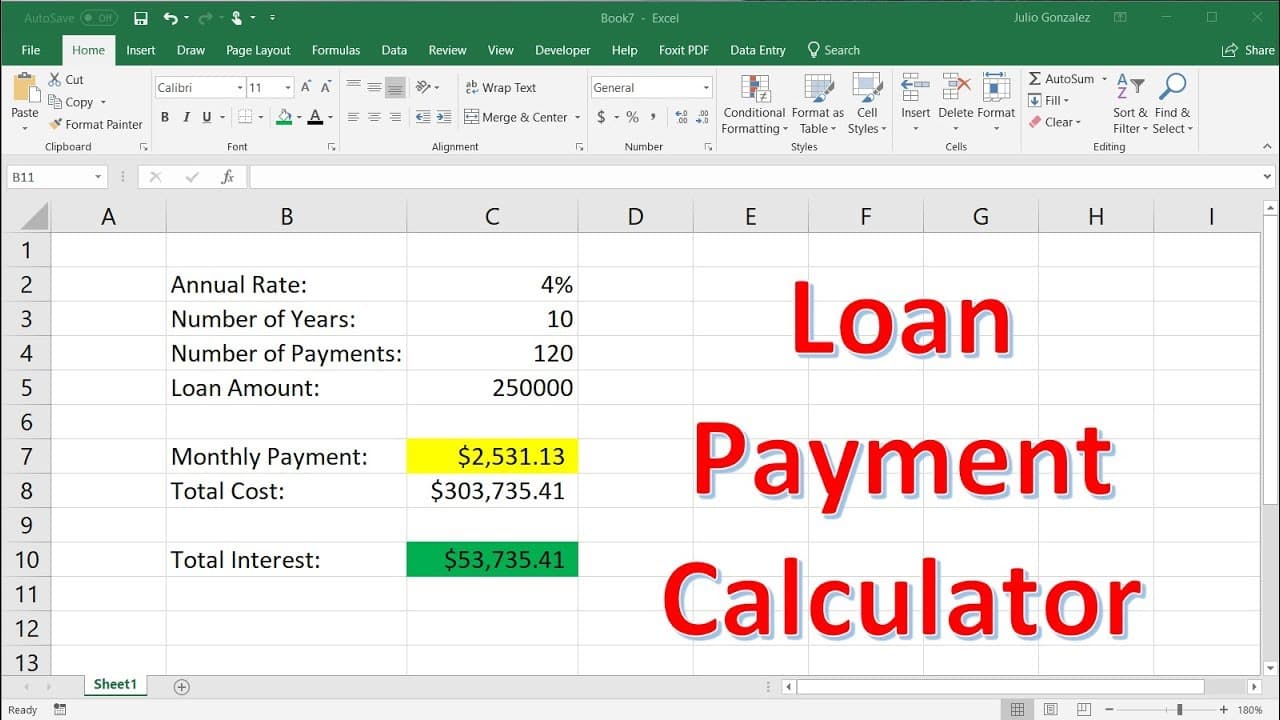
in this video we're going to talk about how to use the pmt function in excel in order to calculate loan payments so let's begin by zooming in so in column b i'm going to write the annual interest rate and then the number of years that we're going to pay off the loan and then the number of payments and also the principal or the loan amount and then ... Read More
Key Insights
- ❓ The PMT function in Excel simplifies loan payment calculations by automating the process and providing accurate results.
- ☠️ Higher interest rates significantly increase the total cost of loans, making it important to negotiate for lower rates whenever possible.
- 🥺 Paying off a loan quickly can lead to substantial savings by reducing the amount of interest paid over the loan term.
- ☠️ Variable interest rates can be risky as they can result in higher interest costs if rates increase.
- ⚖️ Balancing loan payments with personal budget limitations is crucial to avoid financial strain.
- 🤑 Saving money and paying cash for purchases instead of taking out loans can eliminate interest payments entirely.
- ❓ The total interest paid on a loan can sometimes exceed the initial loan amount, underscoring the importance of careful financial planning.
Install to Summarize YouTube Videos and Get Transcripts
Explore YouTube Video Summarizer or Get YouTube Transcript Extractor
Questions & Answers
Q: How can the PMT function in Excel be used to calculate loan payments?
To calculate loan payments, you need to use the PMT function in Excel. It requires inputting the monthly interest rate, the number of payments, and the loan amount. The function returns the monthly payment.
Q: Why is negotiating for a lower interest rate important?
Negotiating for a lower interest rate is crucial because it directly affects the total interest paid over the loan term. Even a small reduction in the interest rate can result in significant savings.
Q: How does paying off a loan quickly reduce total interest payments?
When you pay off a loan quickly, the overall duration of interest accumulation decreases. This effectively reduces the total interest paid over the loan term and saves you money.
Q: What are some strategies for saving money on loan payments?
Two key strategies are negotiating for a lower interest rate and paying off the loan faster. By combining these approaches, borrowers can significantly reduce their total interest payments.
Summary & Key Takeaways
-
The video demonstrates how to use the PMT function in Excel to calculate monthly loan payments, total loan cost, and total interest paid.
-
It emphasizes the importance of negotiating for lower interest rates and paying off the loan quickly to minimize interest payments.
-
Examples are provided for a car loan and a mortgage, showcasing the significant impact of interest rates and loan terms on total costs.
Read in Other Languages (beta)
Share This Summary 📚
Summarize YouTube Videos and Get Video Transcripts with 1-Click
Try YouTube Summary with ChatGPT & Claude or YouTube Transcript Generator
Explore More Summaries from The Organic Chemistry Tutor 📚



Summarize YouTube Videos and Get Video Transcripts with 1-Click
Try YouTube Summary with ChatGPT & Claude or YouTube Transcript Generator