Fun with Strings
TL;DR
Learn about the basics of strings in Python, including how to define them, concatenate them, find their length, split them into words, replace characters, and even evaluate them as expressions using the eval function.
Transcript
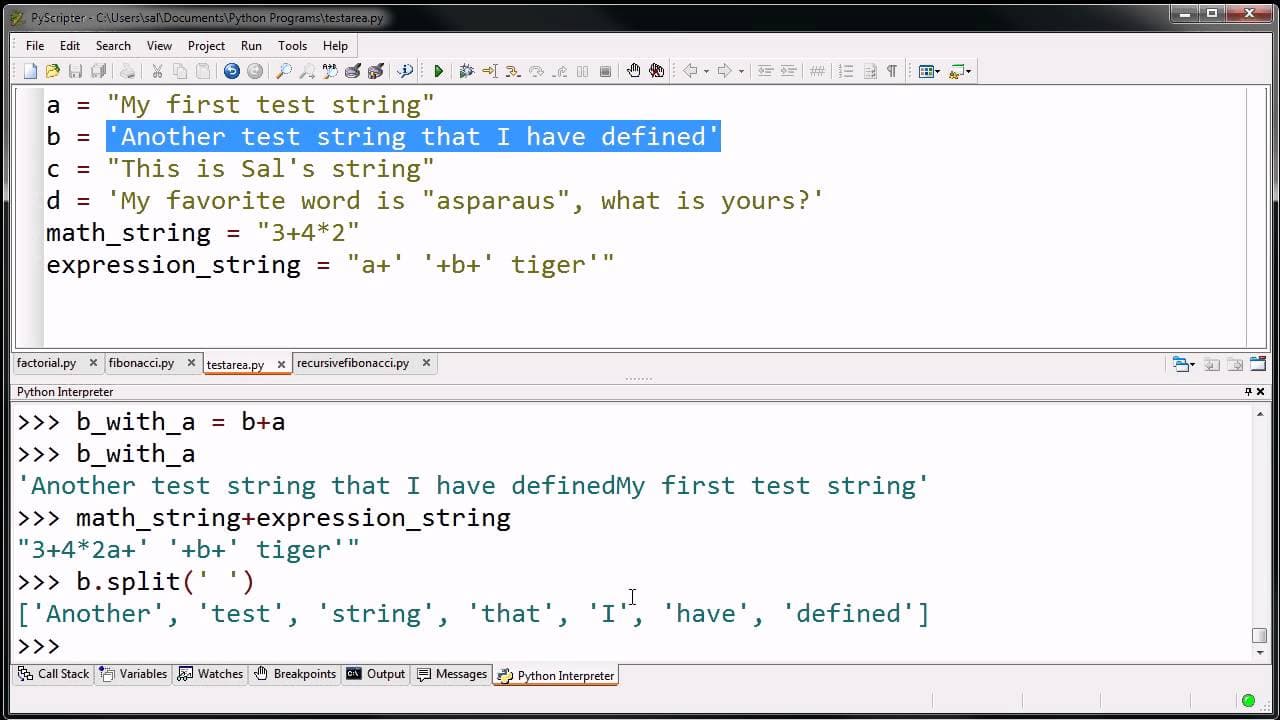
What I want to do in this video is get ourselves a little bit more comfortable with the idea of strings, and also see the power of strings and all the things we can do to them or do with them. So what I'm going to do up here is I'm going to write a little simple program that will essentially just define a bunch of strings for me. And then I'm going... Read More
Key Insights
- ‼️ Strings in Python are defined as sequences of characters and can be enclosed in single or double quotation marks.
- 👻 Quotations within a string are allowed as long as it is clear where the string begins and ends.
- ❓ Strings can be concatenated using the + operator.
- 🤫 The len() function can be used to determine the length of a string.
- 👂 The split() method can split a string into a list of words based on a specified delimiter.
- ❓ Characters within a string can be replaced using the replace() method.
- 🫰 The find() method can be used to find the index of a specific character within a string.
Install to Summarize YouTube Videos and Get Transcripts
Explore YouTube Video Summarizer or Get YouTube Transcript Extractor
Questions & Answers
Q: How are strings defined in Python?
Strings in Python are defined as sequences of characters enclosed in single or double quotation marks. For example, "My first test string" or 'Another test string that I have defined'.
Q: Can strings contain quotations within them?
Yes, strings can contain quotations within them as long as it is clear where the string begins and ends. For example, "This is Sal's string" is a valid string with an apostrophe within it.
Q: How can two strings be concatenated in Python?
Two strings can be concatenated using the + operator. For example, if string a is "Hello" and string b is "World", then a + b would result in the string "HelloWorld".
Q: How can the length of a string be determined in Python?
The length of a string can be determined using the len() function. For example, len("Hello") would return 5, as there are 5 characters in the string.
Q: How can a string be split into a list of words in Python?
A string can be split into a list of words using the split() method. For example, "Hello World" split with a space delimiter would result in the list ['Hello', 'World'].
Q: Can characters be replaced within a string in Python?
Yes, characters can be replaced within a string in Python using the replace() method. For example, "Hello" replaced with 'e' replaced by 'o' would result in the string "Hollo".
Q: How can the index of a specific character be found within a string in Python?
The index of a specific character can be found within a string using the find() method. For example, if the string is "Hello" and we want to find the index of 'l', find('l') would return 2.
Q: How can a string be evaluated as an expression in Python?
A string can be evaluated as an expression in Python using the eval() function. For example, if the string is "3+4*2", eval() would return 11, as it performs the mathematical calculation.
Summary & Key Takeaways
-
Strings in Python are defined as sequences of characters enclosed in single or double quotation marks.
-
Strings can be concatenated using the + operator, allowing two or more strings to be combined.
-
The len() function can be used to determine the length of a string, and the split() method can be used to split a string into a list of words.
-
Strings can also be manipulated by replacing characters using the replace() method, finding the index of a specific character with the find() method, and evaluating them as expressions using the eval() function.
Read in Other Languages (beta)
Share This Summary 📚
Summarize YouTube Videos and Get Video Transcripts with 1-Click
Try YouTube Summary with ChatGPT & Claude or YouTube Transcript Generator
Explore More Summaries from Khan Academy 📚
Summarize YouTube Videos and Get Video Transcripts with 1-Click
Try YouTube Summary with ChatGPT & Claude or YouTube Transcript Generator