Doing Boolean searches
TL;DR
Learn how to use Boolean operators in advanced search to refine search results and find specific information.
Transcript
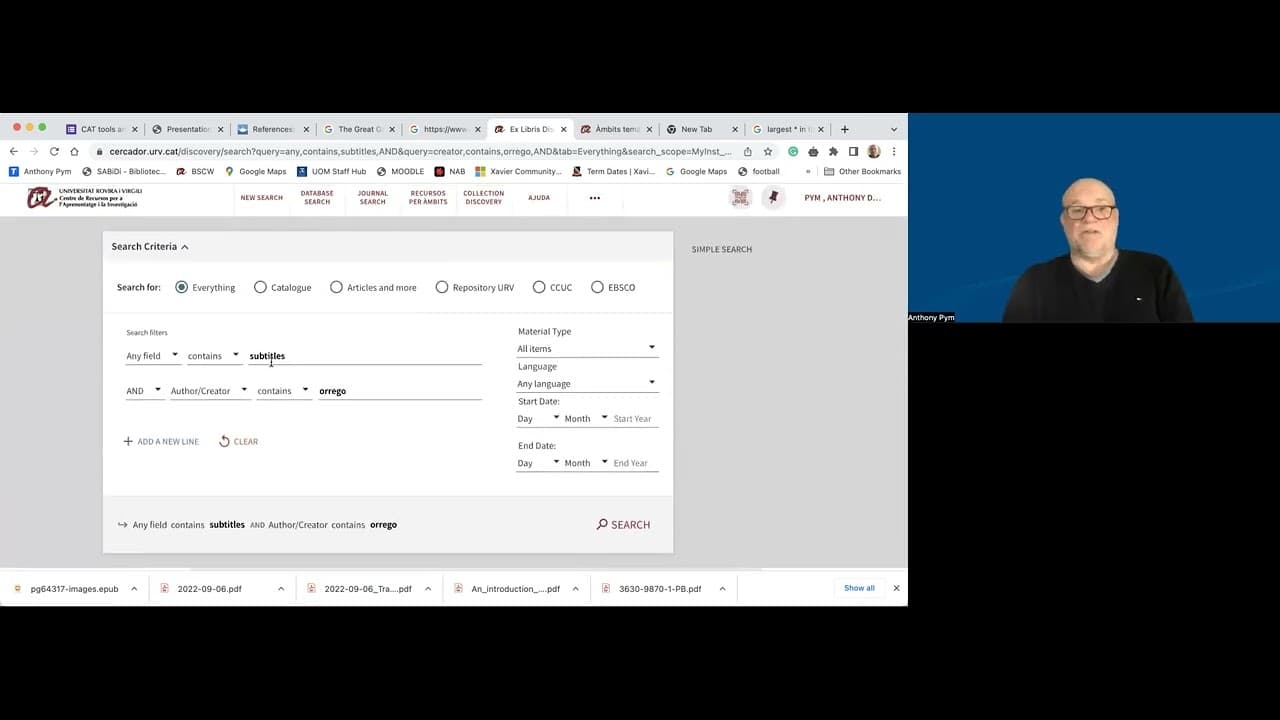
just a note now on what are called Boolean searches or Boolean operators named after George boole who invented the logic uh in the mid-19th century so it's been around for a long time and to do that we we go out of the simple search and go into advanced search okay and here we see we can search for subtitles in any field if we like and then we can ... Read More
Key Insights
- 👨🔬 Boolean operators have been around since the mid-19th century and are widely used in advanced search to refine search results.
- 👨🔬 Advanced search allows users to search for specific keywords in subtitles and apply Boolean operators such as "and," "or," and "not" to combine or exclude search terms.
- 💦 Boolean operators can be used in any field of search, enabling users to find works by specific authors or narrow down results based on different criteria.
- 🤲 By using Boolean operators, users can refine their search to find information on specific topics without getting overwhelmed by irrelevant results.
- 👨🔬 Combining Boolean operators with other search filters can further refine search results to meet specific criteria.
- 😨 Boolean operators are helpful in differentiating between multiple meanings of a term, such as "Jaguar" as an animal or a car.
- 👻 Boolean operators provide more control and precision in search, allowing users to find the desired information efficiently.
Install to Summarize YouTube Videos and Get Transcripts
Explore YouTube Video Summarizer or Get YouTube Transcript Extractor
Questions & Answers
Q: What are Boolean operators and when were they invented?
Boolean operators are logic operators named after George Boole, who invented them in the mid-19th century. They are used to combine search terms and refine search results.
Q: How can Boolean operators be used in advanced search?
In advanced search, Boolean operators allow users to search for specific keywords in subtitles and apply operators like "and," "or," and "not" to combine or exclude different search terms, refining the search results.
Q: Can Boolean operators be used in any field of search?
Yes, Boolean operators can be used in any field. For example, if you are looking for a particular work on subtitles by a specific author, you can simply enter the author's name in the appropriate field along with the search term for subtitles.
Q: How can Boolean operators help in finding specific information?
Boolean operators help in narrowing down search results and finding specific information by allowing users to combine or exclude search terms. They help to refine the search and get more accurate and relevant results.
Summary & Key Takeaways
-
Boolean operators, named after George Boole, allow for more advanced searches by combining search terms and specifying what should be included or excluded from the results.
-
In advanced search, users can search for specific keywords in subtitles, and use "and," "or," and "not" to combine or exclude different search terms.
-
Boolean operators can be used in any field, enabling users to find works by specific authors or narrow down results based on different criteria.
Read in Other Languages (beta)
Share This Summary 📚
Summarize YouTube Videos and Get Video Transcripts with 1-Click
Try YouTube Summary with ChatGPT & Claude or YouTube Transcript Generator
Explore More Summaries from Anthony Pym 📚





Summarize YouTube Videos and Get Video Transcripts with 1-Click
Try YouTube Summary with ChatGPT & Claude or YouTube Transcript Generator