How to Use the Kanban Plugin in Obsidian
TL;DR
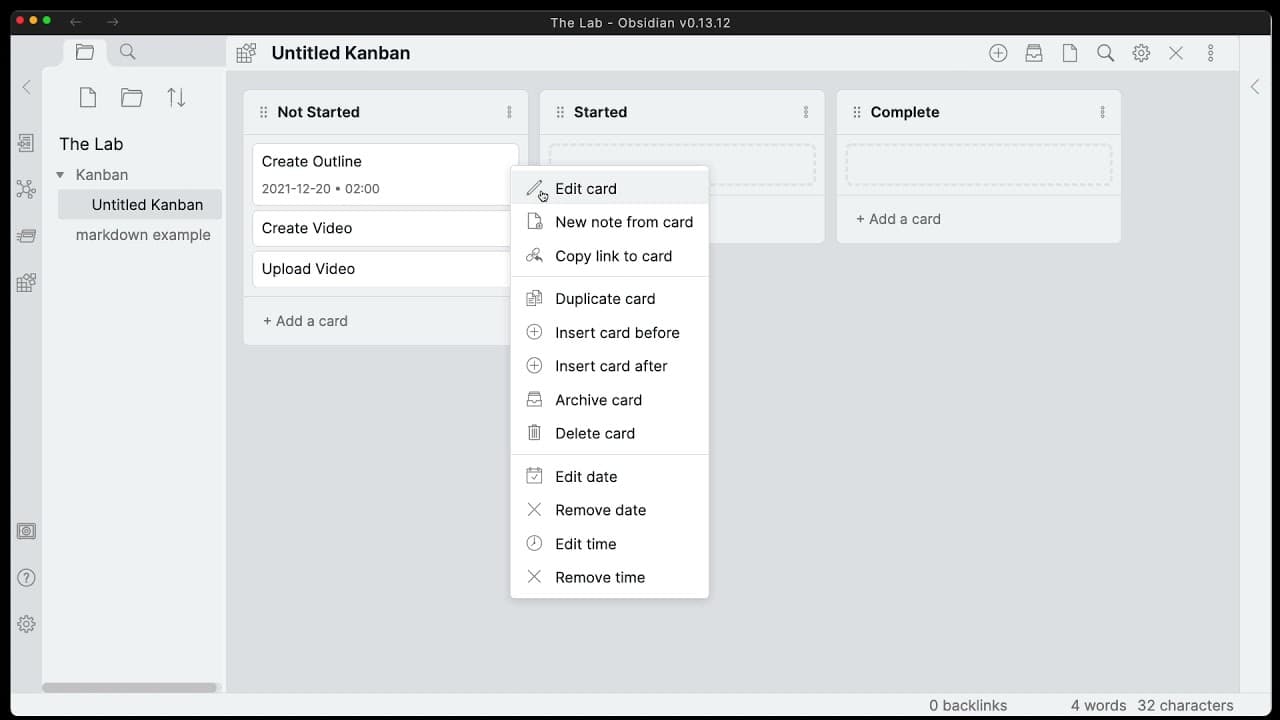
To use the Kanban plugin in Obsidian, install it via the community plugins section, then create a new board using methods like the command window or hotkeys. Customize your kanban board by adding lists and tasks, setting completion statuses, and linking dates to enhance productivity.
Transcript
hello everyone my name is anton and today i want to get into the plug-in kanban so let's take a look at how we can do kanban on obsidian using one of the best community plug-ins for kanban that's out there and let's go ahead and install it we'll go ahead to community plugins in our settings area we'll browse we'll type in con and first in the list ... Read More
Key Insights
- 😀 The Obsidian Kanban plugin is a powerful tool for managing workflow within the Obsidian note-taking app.
- 🏂 Users can customize their kanban boards with various options for dates, notes, and completion status.
- 👻 The plugin allows for easy creation, organization, and progression of tasks, enhancing productivity.
- 📟 The developer, Matthew Myers, has an active GitHub page and accepts support through the "Buy Me a Coffee" feature.
Install to Summarize YouTube Videos and Get Transcripts
Explore YouTube Video Summarizer or Get YouTube Transcript Extractor
Questions & Answers
Q: How do you create a new kanban board in Obsidian using the Kanban plugin?
There are multiple ways to create a kanban board, including using the command window, setting hotkeys, or right-clicking on a folder. The video demonstrates each method.
Q: Can you customize kanban cards in Obsidian using the plugin?
Yes, the plugin offers options like adding dates, notes, and completion status to kanban cards. Users can easily edit and format these details within the plugin.
Q: How can you archive completed cards on the kanban board?
The plugin allows users to archive completed cards, either manually or automatically when moving them to specific lists. Archived cards can be accessed in the markdown file or within the plugin's settings.
Q: Is the Obsidian Kanban plugin actively maintained?
Yes, the plugin is actively maintained by Matthew Myers, as seen on the GitHub page. There is a roadmap for future updates and refinements to improve the functionality.
Key Insights:
- The Obsidian Kanban plugin is a powerful tool for managing workflow within the Obsidian note-taking app.
- Users can customize their kanban boards with various options for dates, notes, and completion status.
- The plugin allows for easy creation, organization, and progression of tasks, enhancing productivity.
- The developer, Matthew Myers, has an active GitHub page and accepts support through the "Buy Me a Coffee" feature.
- There are a few minor issues, such as the lack of secure links on some instructional pages and the inability to label specific dates on cards.
Summary & Key Takeaways
-
The video introduces the Obsidian Kanban plugin and demonstrates how to install and configure it.
-
The plugin provides various options for customizing kanban cards, including dates, notes, and completion status.
-
Users can create, organize, and progress tasks on the kanban board, making it a powerful tool for managing workflow.
Read in Other Languages (beta)
Share This Summary 📚
Summarize YouTube Videos and Get Video Transcripts with 1-Click
Try YouTube Summary with ChatGPT & Claude or YouTube Transcript Generator
Explore More Summaries from Antone Heyward 📚


Summarize YouTube Videos and Get Video Transcripts with 1-Click
Try YouTube Summary with ChatGPT & Claude or YouTube Transcript Generator