How I Listen AND Take Notes on Podcasts INSIDE Obsidian
TL;DR
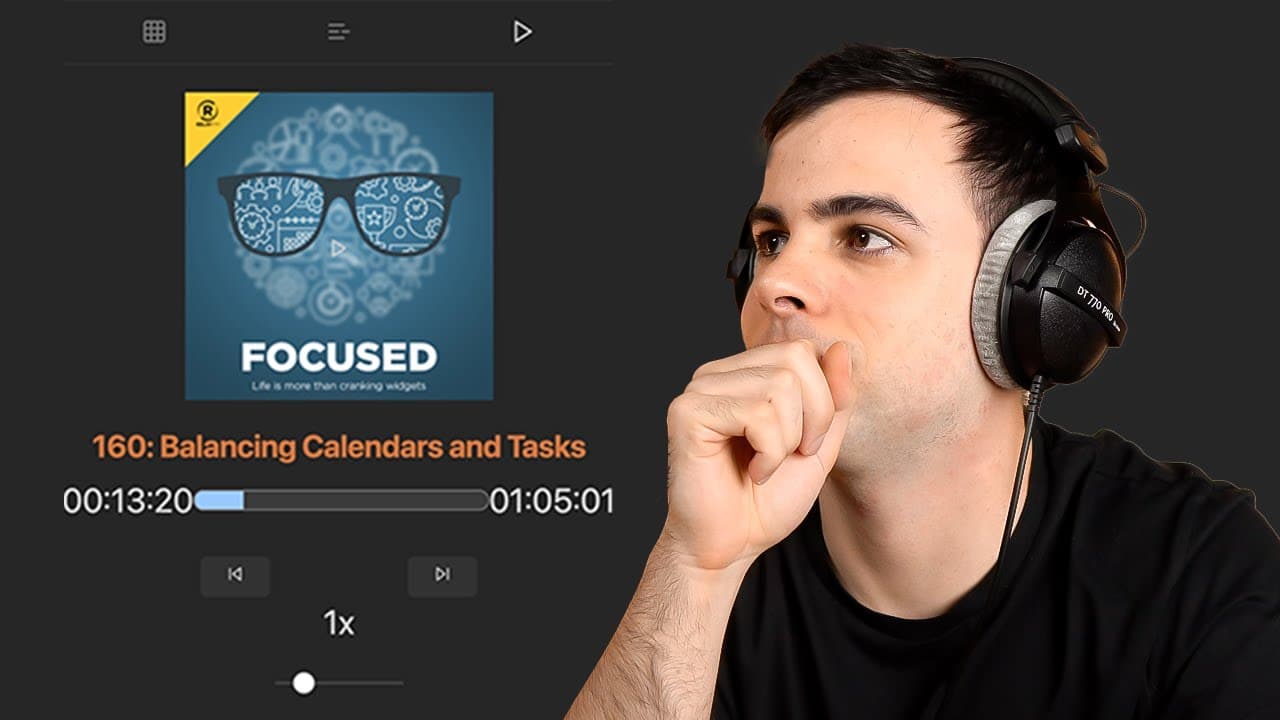
Learn how to use the Pod Notes plugin in Obsidian to listen to and take notes on podcasts, making it a powerful podcast aggregator.
Transcript
we have yet another massive addition to obsidian today we're going over using obsidian as a podcast aggregator where you can both listen and take notes on different podcasts this is all made possible with the help of a fantastic plugin created by Christian called pod notes Christian for those are not aware is also the creator of the very popular qu... Read More
Key Insights
- 🎙️ The Pod Notes plugin in Obsidian allows users to listen to and take notes on podcasts, effectively turning Obsidian into a podcast aggregator.
- 🎙️ The plugin uses the iTunes podcast repository, making it easy to add any podcast to the aggregator.
- ☠️ Users can customize playback rates, create playlists, and easily navigate through episodes.
- 🎵 Note creation settings enable automatic note generation for each podcast episode, with customizable templates.
- 🥳 With the ability to capture timestamps and create hyperlinks to specific podcast moments, users can easily refer back to important parts of episodes.
- 🛀 Assigning a hotkey for capturing timestamps can significantly speed up the note-taking process.
- 🫵 Aggregation notes can be created to view and organize podcasts based on different parameters.
Install to Summarize YouTube Videos and Get Transcripts
Explore YouTube Video Summarizer or Get YouTube Transcript Extractor
Questions & Answers
Q: How do I install and enable the Pod Notes plugin in Obsidian?
To install the plugin, go to "Settings," select "Community plugins," browse for "Pod Notes," click on it to install, and then enable it. You will then have a podcast player in your sidebar.
Q: Can I add multiple podcasts to the Pod Notes plugin?
Yes, you can add any podcast from the iTunes podcast repository by typing their names in the plugin's settings. You can also create folders for each podcast and view the episodes in chronological order.
Q: Is it possible to create custom playlists in the Pod Notes plugin?
Yes, you can add custom playlists by going to the plugin settings, selecting a playlist icon and name, and manually adding episodes to the playlist. This allows you to organize and easily access specific episodes.
Q: How can I automatically create notes for podcast episodes in Obsidian?
You need to set up the note settings in the plugin. Specify the file path for the new notes and use syntax options like podcast name and episode title in the note creation template. This will generate notes with the desired information for each podcast episode.
Key Insights:
- The Pod Notes plugin in Obsidian allows users to listen to and take notes on podcasts, effectively turning Obsidian into a podcast aggregator.
- The plugin uses the iTunes podcast repository, making it easy to add any podcast to the aggregator.
- Users can customize playback rates, create playlists, and easily navigate through episodes.
- Note creation settings enable automatic note generation for each podcast episode, with customizable templates.
- With the ability to capture timestamps and create hyperlinks to specific podcast moments, users can easily refer back to important parts of episodes.
- Assigning a hotkey for capturing timestamps can significantly speed up the note-taking process.
- Aggregation notes can be created to view and organize podcasts based on different parameters.
- The Pod Notes plugin enhances the functionality of Obsidian for podcast listeners who want to integrate note-taking into their podcast listening experience.
Summary & Key Takeaways
-
The video demonstrates how to install and configure the Pod Notes plugin in Obsidian to listen to and take notes on podcasts.
-
The plugin utilizes the iTunes podcast repository, allowing users to add and play different podcasts directly from their Obsidian vault.
-
Users can create playlists, customize playback rates, and set up note creation templates to automatically generate notes for each podcast episode.
Read in Other Languages (beta)
Share This Summary 📚
Summarize YouTube Videos and Get Video Transcripts with 1-Click
Try YouTube Summary with ChatGPT & Claude or YouTube Transcript Generator
Explore More Summaries from FromSergio 📚
Summarize YouTube Videos and Get Video Transcripts with 1-Click
Try YouTube Summary with ChatGPT & Claude or YouTube Transcript Generator