How To Use The IFERROR Function In Excel - The Easy Way!
TL;DR
Learn how to use the IFERROR function in Excel to handle errors and display alternative values.
Transcript
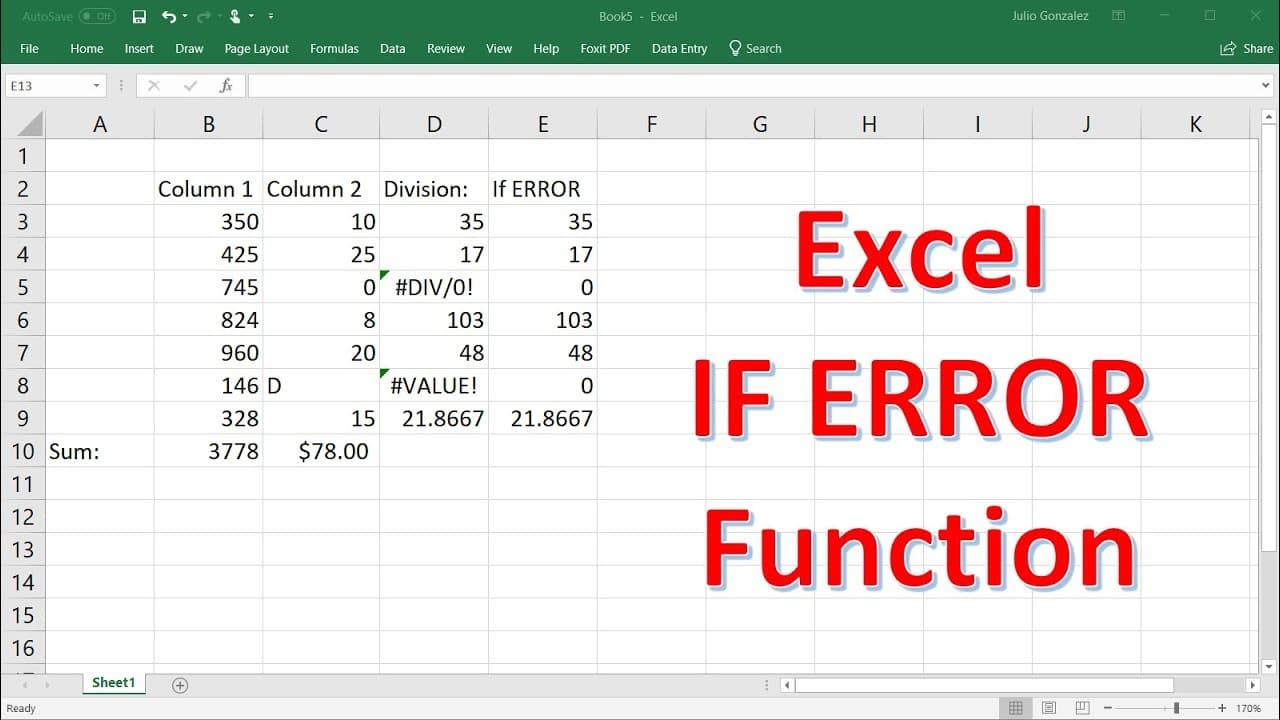
in this video we're going to talk about how to use the if error function in excel so let's say we have two columns of data column one and column two and we're going to divide the numbers in these columns which i'm about to put it in so let's say we have the numbers 350 425 745 824 960 146 and 328 so let's divide the first number by 10 the second on... Read More
Key Insights
- 🍵 The IFERROR function in Excel can be used to handle division errors caused by zero or non-numeric values.
- 👤 By specifying a value or text string as the result of an error, users can control how errors are displayed in their calculations.
- 💨 The IFERROR function provides a way to replace error values with alternative values or messages, improving the accuracy and readability of spreadsheet calculations.
- 🍵 The function can be used to handle errors in various mathematical operations, making it a versatile tool for data analysis and manipulation.
- 💦 The IFERROR function is particularly useful when working with large datasets where errors may be common and need to be managed effectively.
- ❓ Using conditional formatting in conjunction with the IFERROR function can further enhance the visual representation of errors in Excel spreadsheets.
- 👻 The ability to customize the displayed value or message when an error occurs allows users to communicate the specific nature of the error or provide additional context.
Install to Summarize YouTube Videos and Get Transcripts
Explore YouTube Video Summarizer or Get YouTube Transcript Extractor
Questions & Answers
Q: What is the purpose of the IFERROR function in Excel?
The IFERROR function in Excel allows you to handle errors that may occur during calculations and replace them with a specified value or text string.
Q: How do you use the IFERROR function to handle division by zero errors?
To handle division by zero errors, you can use the IFERROR function together with a division calculation. If an error is encountered, you can specify a value, such as 0, to be displayed instead.
Q: Can the IFERROR function be used to handle errors caused by non-numeric values?
Yes, the IFERROR function can be used to handle errors caused by non-numeric values. You can specify a value or text string to be displayed when an error occurs, such as a letter being used in a division calculation.
Q: Is it possible to use the IFERROR function to display custom error messages instead of values?
Yes, by using the IFERROR function with a text string instead of a numeric value, you can display custom error messages when errors occur in Excel calculations.
Summary & Key Takeaways
-
The video demonstrates how to divide two columns of numbers in Excel and calculate their sum, even when there are errors or non-numeric values.
-
By using the IFERROR function, users can specify a value to display when there is an error, such as dividing by zero or by a non-numeric value.
-
The IFERROR function can also be used to display a text string instead of a numeric value when an error occurs.
Read in Other Languages (beta)
Share This Summary 📚
Summarize YouTube Videos and Get Video Transcripts with 1-Click
Try YouTube Summary with ChatGPT & Claude or YouTube Transcript Generator
Explore More Summaries from The Organic Chemistry Tutor 📚



Summarize YouTube Videos and Get Video Transcripts with 1-Click
Try YouTube Summary with ChatGPT & Claude or YouTube Transcript Generator