Motherboards Explained
TL;DR
Motherboards are essential for connecting computer components.
Transcript
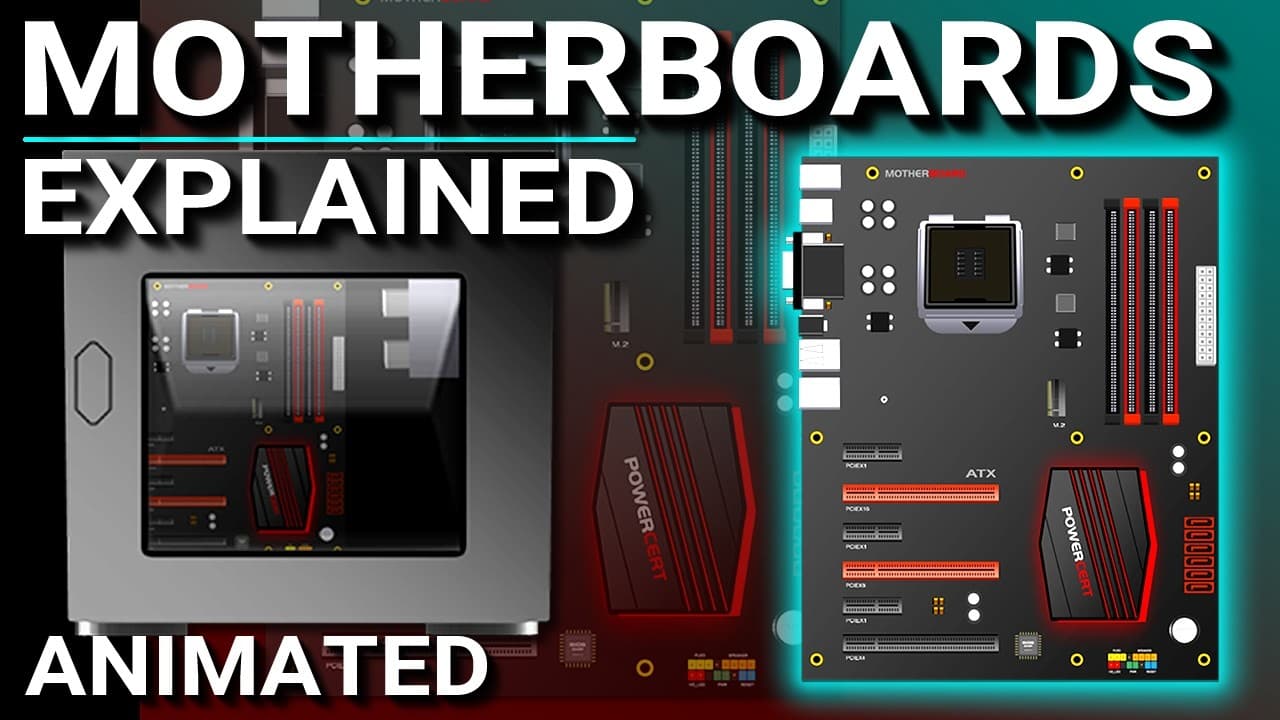
What is a motherboard? So that's what we're going to talk about in this video. Now the motherboard is the main component of a computer. It's often referred to as the main board or mobo for short. It's basically a large circuit board that fits into the computer case and it's where all the computer components ... Read More
Key Insights
- A motherboard, often called a mobo, is the central circuit board in a computer where all components connect.
- The CPU socket on a motherboard is where the central processing unit is placed, crucial for processing tasks.
- Memory slots on the motherboard are used for inserting RAM, which is vital for the computer's short-term memory.
- Expansion slots allow users to add components like video cards and sound cards to enhance computer capabilities.
- Modern motherboards feature SATA connectors for storage devices and M.2 slots for newer solid-state drives.
- The Platform Controller Hub (PCH) has replaced older chipset architectures, integrating functions of the northbridge and southbridge.
- Motherboards have various input/output interfaces, including USB ports, video adapters, and network interface cards.
- Motherboards come in different form factors, with ATX being the most common, followed by micro ATX for smaller setups.
Install to Summarize YouTube Videos and Get Transcripts
Explore YouTube Video Summarizer or Get YouTube Transcript Extractor
Questions & Answers
Q: What is the primary function of a motherboard?
A motherboard serves as the main circuit board in a computer, connecting all essential components such as the CPU, RAM, and storage devices. It provides the necessary slots and connectors for expansion and peripheral devices, enabling the computer to perform a wide range of tasks and functions efficiently.
Q: How has the chipset architecture evolved in modern motherboards?
Modern motherboards have transitioned from using separate northbridge and southbridge chips to a unified Platform Controller Hub (PCH) architecture. This change integrates the functions of the northbridge into the CPU itself, while the PCH handles tasks previously managed by the southbridge, leading to improved communication and performance.
Q: What are the differences between ATX and micro ATX motherboards?
ATX motherboards are larger and offer more features and expansion slots, making them suitable for high-performance builds. Micro ATX motherboards are smaller, cost-effective, and designed for compact cases, providing fewer expansion options but consuming less power. Both form factors cater to different user needs and space constraints.
Q: Why might someone choose to use an expansion video card over integrated video?
Integrated video on motherboards is sufficient for basic tasks but lacks the power needed for demanding graphic applications like gaming or video editing. Users often opt for expansion video cards to gain enhanced graphics performance, allowing for smoother gameplay, higher resolutions, and better overall visual quality in intensive applications.
Q: What role do USB ports play on a motherboard?
USB ports on a motherboard provide connectivity for a wide range of peripherals, such as keyboards, mice, cameras, and external drives. They offer both data transfer and power supply to connected devices, making them essential for expanding a computer's functionality and accommodating various user needs.
Q: What storage options are available on modern motherboards?
Modern motherboards offer various storage options, including SATA connectors for traditional hard drives and SSDs, as well as M.2 slots for newer solid-state drives. These options allow users to choose between different storage technologies based on their speed, capacity, and performance requirements, enhancing overall system efficiency.
Q: How does the PCH architecture improve motherboard efficiency?
The PCH architecture improves motherboard efficiency by consolidating functions that were previously distributed between the northbridge and southbridge chips. This integration reduces latency and enhances data transfer speeds, allowing for more efficient communication between the CPU and other components, ultimately improving system performance and responsiveness.
Q: What are some common peripherals connected via USB ports?
Common peripherals connected via USB ports include input devices like keyboards and mice, external storage solutions such as flash drives and external hard drives, and multimedia devices like cameras and printers. USB ports facilitate easy connectivity and interoperability between the computer and a wide array of external devices, enhancing user experience.
Summary & Key Takeaways
-
Motherboards serve as the main hub in a computer, connecting all components such as the CPU, RAM, and storage devices. They feature various slots and connectors to expand capabilities and accommodate different peripherals. Modern motherboards have evolved with integrated chipsets, replacing older architectures to enhance efficiency and performance.
-
The Platform Controller Hub (PCH) architecture has streamlined motherboard functionality by integrating the roles of the northbridge and southbridge chips. This change allows for more efficient communication between the CPU and other components. Motherboards also offer integrated video and sound options, though these are often bypassed for more powerful expansion cards.
-
Motherboards are available in different form factors, with ATX being the most widely used due to its balance of size and functionality. Micro ATX offers a smaller, cost-effective alternative, suitable for compact builds. The choice of motherboard impacts the computer's capabilities, power consumption, and expansion potential.
Read in Other Languages (beta)
Share This Summary 📚
Summarize YouTube Videos and Get Video Transcripts with 1-Click
Try YouTube Summary with ChatGPT & Claude or YouTube Transcript Generator
Explore More Summaries from PowerCert Animated Videos 📚
Summarize YouTube Videos and Get Video Transcripts with 1-Click
Try YouTube Summary with ChatGPT & Claude or YouTube Transcript Generator