Products
Features
YouTube Video Summarizer
Summarize YouTube videos
Web & PDF Highlighter
Highlight web pages & PDFs
Chat with PDF
Ask any PDF questions with AI
Ask AI Clone
Chat with your highlights & memories
Audio Transcriber
Transcribe audio files to text
Glasp Reader
Read and highlight articles
Kindle Highlight Export
Export your Kindle highlights
Idea Hatch
Hatch ideas from your highlights
Integrations
Obsidian Plugin
Notion Integration
Pocket Integration
Instapaper Integration
Medium Integration
Readwise Integration
Snipd Integration
Hypothesis Integration
Apps & Extensions
Chrome Extension
Safari Extension
Edge Add-ons
Firefox Add-ons
iOS App
Android App
Discover
Discover
Ideas
Discover new ideas and insights
Articles
Curated articles and insights
Books
Book recommendations by great minds
Posts
Essays and notes from readers
Quotes
Inspiring quotes collection
Videos
Curated videos and summaries
Explore Glasp
Glasp Newsletter
Weekly insights and updates
Glasp Talk
Interview series with great minds
Glasp Blog
Latest news and articles
Glasp Use Cases
Learn how others use Glasp
Build & Support
Glasp API
Access Glasp's API for developers
MCP Connector
Connect Glasp to Claude & ChatGPT
Community
Glasp Reddit Community
Students
Student discount and benefits
FAQs
Frequently Asked Questions
AboutPricing
DashboardLog inSign up

How To Calculate Percentages In Excel Using a Personal Budget Template
August 19, 2022
by
The Organic Chemistry Tutor
YouTube video player
How To Calculate Percentages In Excel Using a Personal Budget Template

TL;DR

Learn how to calculate percentages in Excel by dividing the value of an expense by the total budget.

Transcript

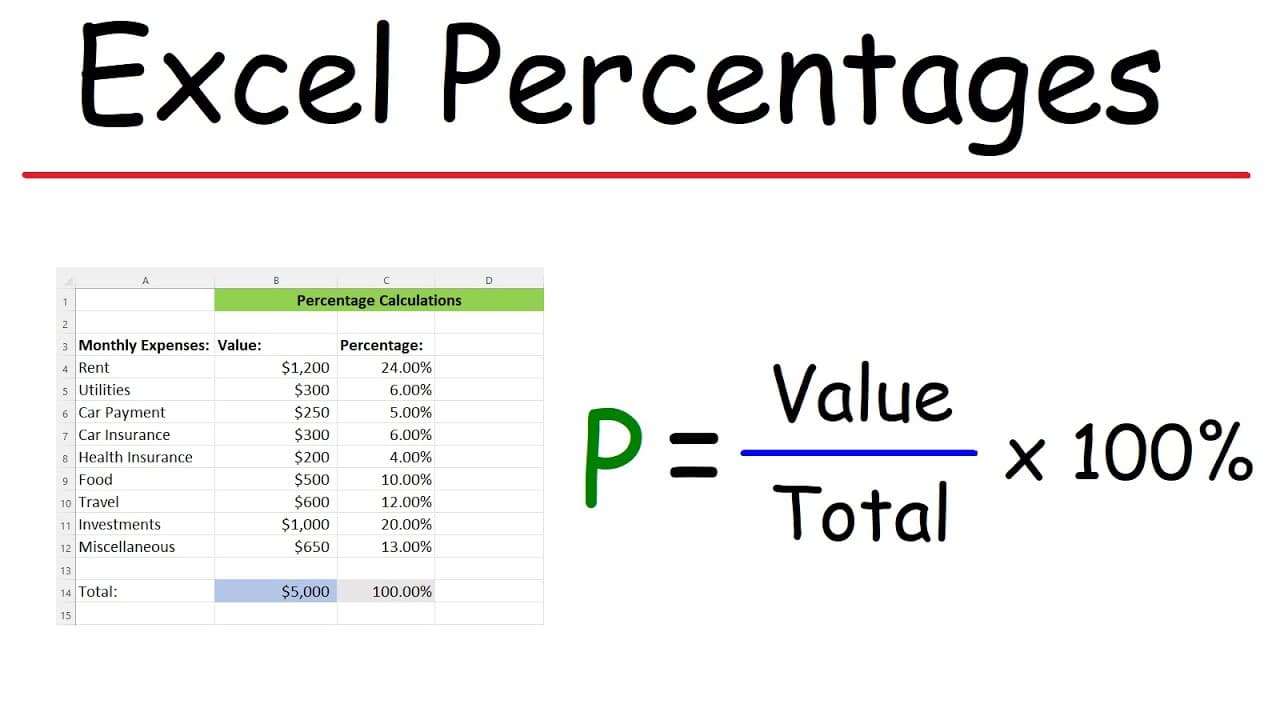
in this video we're going to talk about how to calculate percentages using Excel so what I have here is a personal budget of monthly expenses so for someone living in an apartment I have first rents going at 1200 utilities this can include the water bill the electric bill cable internet cell phone bill so that's at 300. we got the car payment car i... Read More

Key Insights

  • ❓ The provided content demonstrates how to calculate percentages in Excel using a personal budget as an example.
  • 🈷️ The total monthly expense is determined by using the SUM function in Excel.
  • 🗂️ To calculate the percentage of each expense, divide the expense value by the total budget.
  • 💁 Formatting the result as a percentage can be done by changing the number format to percentage.
  • 💁 Multiplying by 100 is not necessary when changing the format to percentage in Excel.
  • 🅰️ Percentages can be calculated for any type of data, not just expenses.
  • 🏛️ Excel simplifies the process of calculating percentages by providing built-in functions.

Install to Summarize YouTube Videos and Get Transcripts

Explore YouTube Video Summarizer or Get YouTube Transcript Extractor

Questions & Answers

Q: How do you calculate the total monthly expense in Excel?

To calculate the total monthly expense in Excel, use the SUM function and select the column of expense data. This will give you the sum of all the expenses.

Q: How do you calculate the percentage of an expense relative to the total budget in Excel?

To calculate the percentage of an expense, divide the expense value by the total budget and format it as a percentage. You can do this by dividing the value of the expense by the total budget and multiplying by 100.

Q: Is it necessary to multiply by 100 when calculating percentages in Excel?

It depends on the formatting. If you change the number format to percentage, Excel will automatically multiply the value by 100. However, if you want to manually multiply by 100, you can include the multiplication in the formula.

Q: Can percentages be calculated for any type of data in Excel?

Yes, percentages can be calculated for any type of data in Excel. Whether it's expenses, sales, or any other numerical data, the process of calculating percentages remains the same.

Summary & Key Takeaways

  • The video explains how to calculate percentages in Excel using a personal budget as an example.

  • The total monthly expense is determined by using the SUM function in Excel.

  • To calculate the percentage of each expense, divide the expense value by the total budget and format it as a percentage.


Read in Other Languages (beta)

English

Share This Summary 📚

Summarize YouTube Videos and Get Video Transcripts with 1-Click

Download browser extensions on:

Try YouTube Summary with ChatGPT & Claude or YouTube Transcript Generator

Explore More Summaries from The Organic Chemistry Tutor 📚

Photoelectric Effect, Work Function, Threshold Frequency, Wavelength, Speed & Kinetic Energy, Electr thumbnail
Photoelectric Effect, Work Function, Threshold Frequency, Wavelength, Speed & Kinetic Energy, Electr
The Organic Chemistry Tutor
How To Calculate Your Mortgage Payment thumbnail
How To Calculate Your Mortgage Payment
The Organic Chemistry Tutor
How to Solve Simple Quadratic Equations Step by Step thumbnail
How to Solve Simple Quadratic Equations Step by Step
The Organic Chemistry Tutor
Integral of tan^5(x) thumbnail
Integral of tan^5(x)
The Organic Chemistry Tutor
Distance, Displacement, Average Speed, Average Velocity - Physics thumbnail
Distance, Displacement, Average Speed, Average Velocity - Physics
The Organic Chemistry Tutor
Standing Waves on a String, Fundamental Frequency, Harmonics, Overtones, Nodes, Antinodes, Physics thumbnail
Standing Waves on a String, Fundamental Frequency, Harmonics, Overtones, Nodes, Antinodes, Physics
The Organic Chemistry Tutor

Summarize YouTube Videos and Get Video Transcripts with 1-Click

Download browser extensions on:

Try YouTube Summary with ChatGPT & Claude or YouTube Transcript Generator

Apps & Extensions

  • Chrome Extension
  • Safari Extension
  • Edge Add-ons
  • Firefox Add-ons
  • iOS App
  • Android App

Key Features

  • YouTube Video Summarizer
  • Web & PDF Summarizer
  • Web & PDF Highlighter
  • Chat with PDF
  • Ask AI Clone
  • Audio Transcriber
  • Glasp Reader
  • Kindle Highlight Export
  • Idea Hatch

Integrations

  • Obsidian Plugin
  • Notion Integration
  • Pocket Integration
  • Instapaper Integration
  • Medium Integration
  • Readwise Integration
  • Snipd Integration
  • Hypothesis Integration

More Features

  • APIs
  • MCP Connector
  • Blog & Post
  • Embed Links
  • Image Highlight
  • Personality Test
  • Quote Shots

Company

  • About us
  • Blog
  • Community
  • FAQs
  • Job Board
  • Newsletter
  • Pricing
Terms

•

Privacy

•

Guidelines

© 2026 Glasp Inc. All rights reserved.