Sony LinkBuds S Best Custom EQ Settings! 🤔 One Year Later [Tutorial]
TL;DR
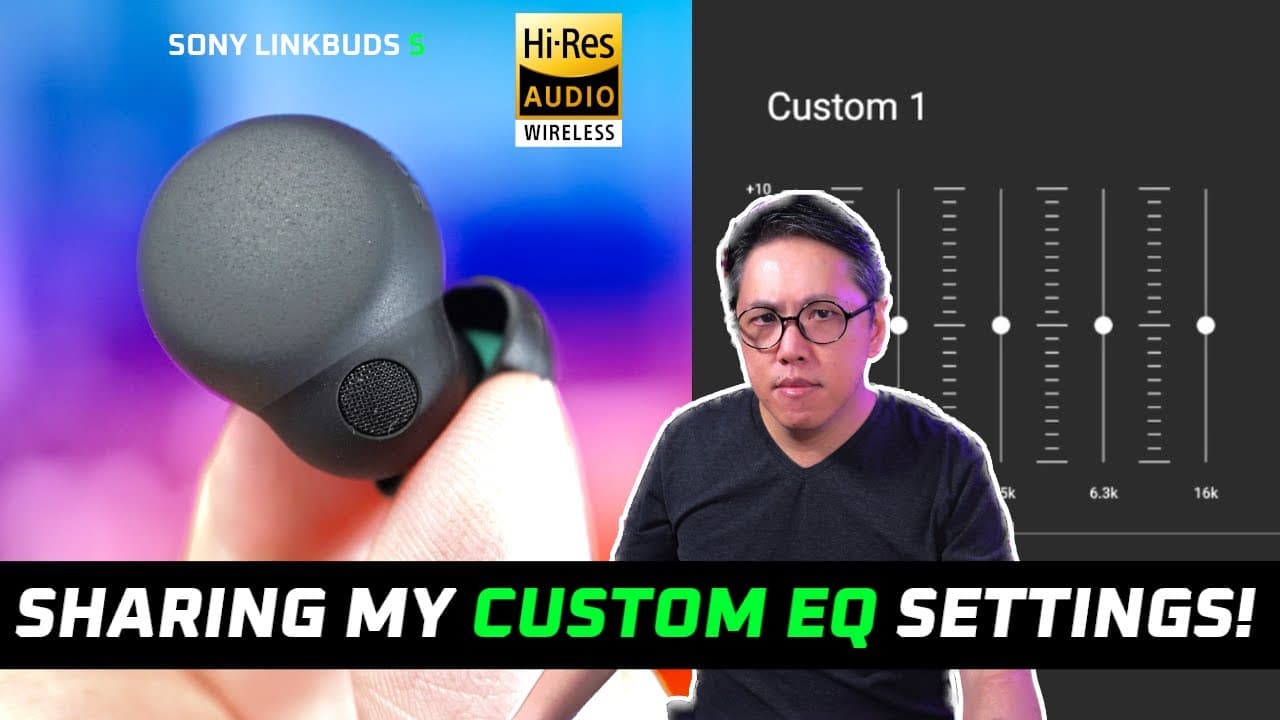
This video explores personal EQ settings for Sony Link Buds S and tips for optimizing sound quality.
Transcript
I got so many requests about what are my own custom EQ settings for the Sony link bus as that I'm gonna make a video about it right even though it's so much easier now than ever to arrive at a custom EQ because of the new find my equalizer feature which literally helps you create a custom EQ preset I admit that it's still not perfect the end result... Read More
Key Insights
- 🎅 The Sony Link Buds S come with customizable EQ settings that can significantly enhance audio quality based on personal preferences.
- 🧡 Understanding how different frequency ranges affect sound is essential for effectively using the graphic equalizer.
- 🧡 The mid-range frequencies between 400 Hertz and 2.5 kilohertz are critical for fine-tuning vocals in music.
- 🎮 The clear bass dial helps control bass intensity but requires cautious adjustment to avoid muddiness in vocals.
- 👂 Preferences for sound signatures can vary widely, making it important for listeners to experiment with EQ settings.
- 👂 Sharing EQ settings amongst users can foster a community of sound enthusiasts eager to optimize their listening experiences.
- 🧑🦽 Users should utilize features like the "find my equalizer" tool to discover custom EQ presets, although manual adjustments may be necessary.
Install to Summarize YouTube Videos and Get Transcripts
Explore YouTube Video Summarizer or Get YouTube Transcript Extractor
Questions & Answers
Q: What is the purpose of the graphic equalizer in the Sony headphones Connect app?
The graphic equalizer allows users to customize their audio experience by adjusting various frequency bands. It helps tailor sound profiles according to individual preferences, which is particularly beneficial for new users who may not understand how these adjustments impact overall sound quality.
Q: Can you explain the importance of the 400 Hertz frequency in EQ settings?
The 400 Hertz frequency is crucial as it affects the fullness and body of vocals. By increasing this dial, you can achieve a richer vocal sound, making it resonate more, while reducing it can thin out vocal quality. Therefore, this setting is essential for those who prioritize vocal clarity in music.
Q: How does the clear bass dial affect the sound quality of the Sony Link Buds S?
The clear bass dial adjusts the intensity of bass frequencies, which range from 20 Hertz to 250 Hertz. While maximizing the bass can enhance the listening experience for bass lovers, it is essential to be cautious, as excessive bass may lead to muddier vocals by bleeding into mid-range frequencies.
Q: Why might someone prefer a darker sound signature with these EQ settings?
A darker sound signature can provide a smoother listening experience by reducing brightness and sibilance, which some listeners find uncomfortable. By adjusting the EQ settings to favor lower frequencies, users can create a more mellow, richer sound that enhances the enjoyment of various music genres.
Q: What are the recommended settings for those who find vocals too bright or sibilant?
For those who find vocals overly bright, it is recommended to boost the 400 Hertz band for added vocal body while reducing the 1 kilohertz and 2.5 kilohertz levels to soften the brightness. Making these adjustments can help achieve a more relaxed and pleasant vocal presentation.
Q: How does the 6.3 kilohertz dial impact the overall listening experience?
The 6.3 kilohertz frequency impacts the presence of string and wind instruments, influencing whether music feels intimate or more relaxed. Careful adjustment of this dial is crucial; dialing it up can lead to a more engaging sound, but too much can make music feel overly bright and intense.
Summary & Key Takeaways
-
The video introduces a guide on personal EQ settings for Sony Link Buds S, emphasizing the importance of customizing sound based on individual preferences.
-
It describes the graphic equalizer's six dials, detailing how each frequency band influences audio characteristics like vocal fullness and bass intensity.
-
Personal EQ settings are shared, showcasing adjustments made for a darker sound signature, while encouraging viewers to experiment and share their own preferences.
Read in Other Languages (beta)
Share This Summary 📚
Summarize YouTube Videos and Get Video Transcripts with 1-Click
Try YouTube Summary with ChatGPT & Claude or YouTube Transcript Generator
Explore More Summaries from Aaron X Loud and Wireless Reviews 📚




Summarize YouTube Videos and Get Video Transcripts with 1-Click
Try YouTube Summary with ChatGPT & Claude or YouTube Transcript Generator