How to Create Pixel Art Visualizers Using Adobe Photoshop and After Effects
TL;DR
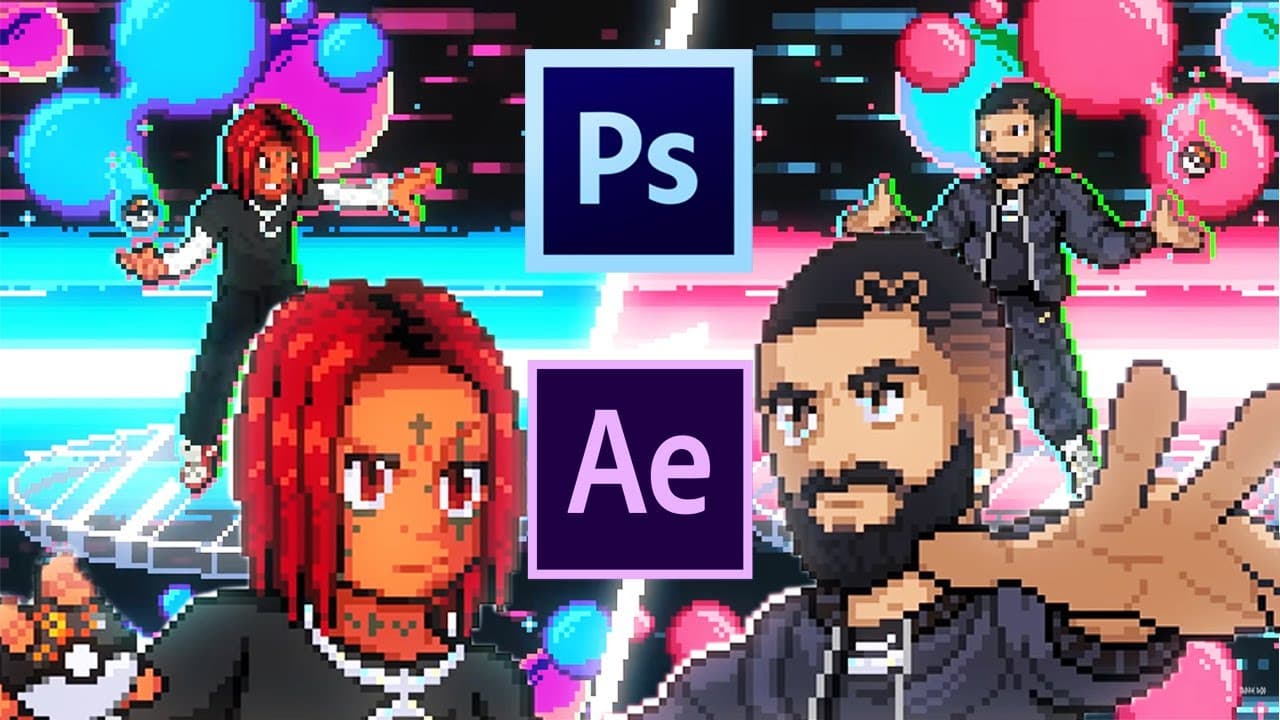
To create pixel art visualizers, start by using Adobe Photoshop to design pixel art characters on a small canvas. Utilize reference images to trace and customize your designs, then animate them by duplicating layers and adjusting silhouettes. Finally, integrate your pixel art with backgrounds in Adobe After Effects for a professional finish.
Transcript
what's going on guys welcome back to another video today we're talking all about pixel art visualizers i've been enjoying a lot of the visualizers that are being put out by trippy red he's really collaborating with a bunch of really cool artists whether you see this kind of pokemon style pixel which we're going to be focusing on today some of these... Read More
Key Insights
- 🥰 Pixel art visualizers can be created using Adobe Photoshop and Adobe After Effects, even for beginners without artistic ability.
- 🥰 Reference images and templates can be used to trace and customize pixel art characters.
- 👤 Animations can be created by duplicating and adjusting silhouette layers, and backgrounds can be added using Photoshop and integrated into After Effects compositions.
- 🥰 Adding shadows, highlights, and details can enhance the overall appearance and depth of the pixel art visualizers.
Install to Summarize YouTube Videos and Get Transcripts
Explore YouTube Video Summarizer or Get YouTube Transcript Extractor
Questions & Answers
Q: Is artistic ability necessary to create pixel art visualizers?
No, the tutorial provides beginner-friendly methods, including using reference images and templates to create pixel art characters.
Q: What software is required for creating pixel art visualizers?
Adobe Photoshop and Adobe After Effects are used in the tutorial.
Q: Can the pixel art characters be customized?
Yes, after creating the base silhouette, users can use their creative decisions to customize the look and feel of their pixel art characters.
Q: How can animations be added to the pixel art visualizers?
The tutorial demonstrates how to create a walking animation by duplicating and adjusting the silhouette layers in Adobe Photoshop, which can then be imported into After Effects for further editing.
Q: Can backgrounds be created for the pixel art visualizers?
Yes, the tutorial covers creating backgrounds in Photoshop and incorporating them into the After Effects composition.
Q: Is it possible to add additional details, such as shadows and highlights, to the pixel art characters?
Yes, the tutorial explains how to add shadows and highlights to make the pixel art characters look more detailed and three-dimensional.
Q: Can the pixel art visualizers be exported for use in music videos or other projects?
Yes, the final animated pixel art visualizers can be exported as video files or saved as project files for further editing or integration into other projects.
Q: Is there a part two to this tutorial series?
The creator mentions the possibility of a part two, which may dive deeper into pixel art techniques and styles. Viewer input is requested to determine interest in a continuation of the tutorial series.
Key Insights:
- Pixel art visualizers can be created using Adobe Photoshop and Adobe After Effects, even for beginners without artistic ability.
- Reference images and templates can be used to trace and customize pixel art characters.
- Animations can be created by duplicating and adjusting silhouette layers, and backgrounds can be added using Photoshop and integrated into After Effects compositions.
- Adding shadows, highlights, and details can enhance the overall appearance and depth of the pixel art visualizers.
- The final animated visualizers can be exported for use in music videos or other creative projects.
Summary & Key Takeaways
-
The tutorial focuses on creating pixel art visualizers using Adobe Photoshop and Adobe After Effects.
-
It starts with the basics of pixel art, including creating a small canvas in Photoshop and using the pencil tool to draw pixel art.
-
Reference images are recommended for beginners, and templates can be used to trace and customize pixel art characters.
-
The tutorial also covers adding shadows, highlights, and animations to the pixel art characters, as well as creating backgrounds and incorporating them into After Effects.
Read in Other Languages (beta)
Share This Summary 📚
Summarize YouTube Videos and Get Video Transcripts with 1-Click
Try YouTube Summary with ChatGPT & Claude or YouTube Transcript Generator
Explore More Summaries from Max Novak 📚
Summarize YouTube Videos and Get Video Transcripts with 1-Click
Try YouTube Summary with ChatGPT & Claude or YouTube Transcript Generator