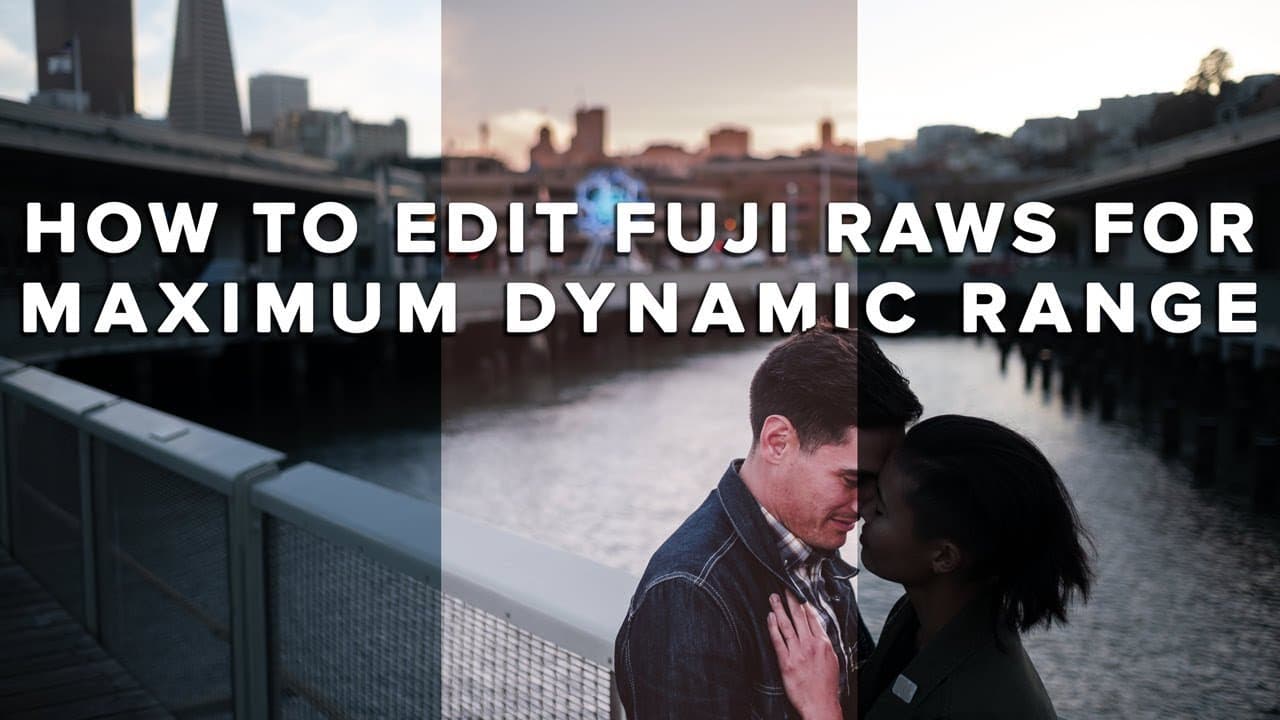
HOW to EDIT FUJI RAW Files in Lightroom for MAXIMUM DYNAMIC RANGE
TL;DR
Learn to maximize dynamic range in Fujifilm RAW photos using Lightroom editing techniques.
Transcript
are you trying to maximize a dynamic range of your Fujifilm RAW files well in today's video I'm gonna walk you through how I edit my Fujifilm RAW files in Lightroom specifically how I use the graduated filter luminance range mask and filter adjustment brush to turn a picture that looks like this into this all right let's get it what's up guys Reggi... Read More
Key Insights
- 📁 Effective editing of Fujifilm RAW files requires a solid foundational understanding of camera settings, particularly ISO and file format.
- ⚾ The importance of base ISO: shooting at base ISO yields the cleanest files with maximum dynamic range for further edits.
- 😷 Graduated filters and luminance masks can significantly enhance image quality by allowing targeted adjustments in highly contrasted images.
- 🪡 Consistent initial presets streamline the editing process but do not replace the need for individual adjustments for each photograph.
- 🧘 Using adjustment brushes and overlays can help refine edits, protecting important subjects from unwanted alterations.
- 🏣 The tutorial showcases the balance between artistic choices and technical proficiency in post-processing for photographers.
- 🥺 Regular practice with tools in Lightroom will build familiarity and efficiency, leading to better results over time.
Install to Summarize YouTube Videos and Get Transcripts
Explore YouTube Video Summarizer or Get YouTube Transcript Extractor
Questions & Answers
Q: Why is it important to shoot in RAW for editing?
Shooting in RAW files is essential because it retains the most information from the camera sensor, offering greater flexibility in exposure adjustments and color correction during post-processing. Unlike JPEGs, RAW files allow for more significant alterations without compromising image quality, especially in high-contrast scenarios.
Q: What settings should be adjusted in-camera to optimize RAW files?
To optimize RAW files, photographers should shoot at their camera's base ISO, typically ISO 160 or 200 for Fujifilm cameras. Additionally, it is crucial to monitor the histogram and highlight warnings to avoid clipping shadows and highlights, which ensures the maximum amount of data is retained for editing.
Q: How does using a graduated filter improve a photo during editing?
Using a graduated filter allows photographers to selectively apply adjustments to specific areas of an image, such as darkening a bright sky while maintaining the exposure of the subject. This technique effectively evens out exposure in high-contrast scenes, leading to more balanced and visually appealing photos.
Q: What is the significance of using the luminance range mask in Lightroom?
The luminance range mask in Lightroom helps target specific brightness levels when applying edits, allowing for precise adjustments that avoid over-processing certain areas. This feature is particularly beneficial for enhancing details in highlights while preserving the integrity of darker regions in the photo.
Summary & Key Takeaways
-
The video demonstrates effective Lightroom techniques to process Fujifilm RAW files, focusing on maximizing dynamic range and even exposure in high-contrast scenes.
-
Reggie Ballesteros emphasizes the importance of shooting in RAW at base ISO to retain image quality and flexibility in post-processing.
-
The tutorial includes specific editing steps for two sunset engagement photos, showcasing tools like the graduated filter and luminance range mask in Lightroom.
Read in Other Languages (beta)
Share This Summary 📚
Summarize YouTube Videos and Get Video Transcripts with 1-Click
Try YouTube Summary with ChatGPT & Claude or YouTube Transcript Generator
Explore More Summaries from Reggie Ballesteros 📚


Summarize YouTube Videos and Get Video Transcripts with 1-Click
Try YouTube Summary with ChatGPT & Claude or YouTube Transcript Generator