Products
Features
YouTube Video Summarizer
Summarize YouTube videos
Web & PDF Highlighter
Highlight web pages & PDFs
Chat with PDF
Ask any PDF questions with AI
Ask AI Clone
Chat with your highlights & memories
Audio Transcriber
Transcribe audio files to text
Glasp Reader
Read and highlight articles
Kindle Highlight Export
Export your Kindle highlights
Idea Hatch
Hatch ideas from your highlights
Integrations
Obsidian Plugin
Notion Integration
Pocket Integration
Instapaper Integration
Medium Integration
Readwise Integration
Snipd Integration
Hypothesis Integration
Apps & Extensions
Chrome Extension
Safari Extension
Edge Add-ons
Firefox Add-ons
iOS App
Android App
Discover
Discover
Ideas
Discover new ideas and insights
Articles
Curated articles and insights
Books
Book recommendations by great minds
Posts
Essays and notes from readers
Quotes
Inspiring quotes collection
Videos
Curated videos and summaries
Explore Glasp
Glasp Newsletter
Weekly insights and updates
Glasp Talk
Interview series with great minds
Glasp Blog
Latest news and articles
Glasp Use Cases
Learn how others use Glasp
Build & Support
Glasp API
Access Glasp's API for developers
MCP Connector
Connect Glasp to Claude & ChatGPT
Community
Glasp Reddit Community
Students
Student discount and benefits
FAQs
Frequently Asked Questions
AboutPricing
DashboardLog inSign up

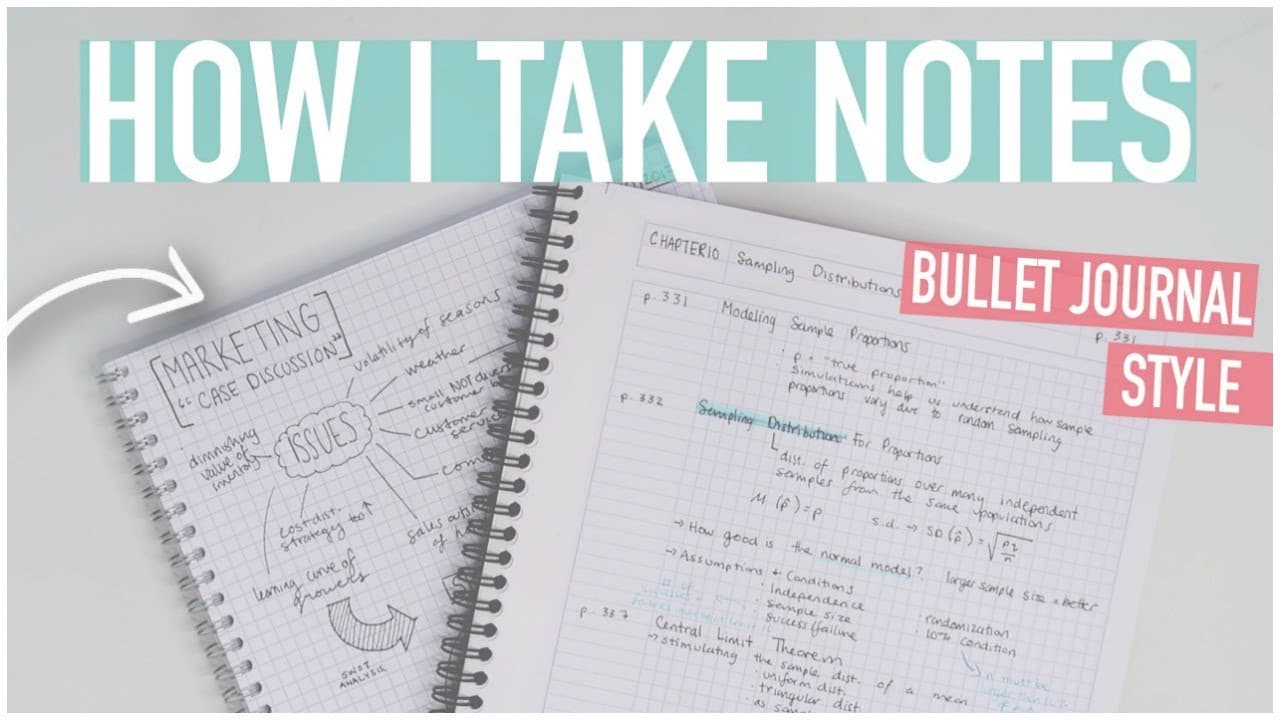
HOW TO TAKE THE BEST NOTES | Bullet Journal Style, Digital + More!
July 13, 2017
by
Caitlin's Corner
YouTube video player
HOW TO TAKE THE BEST NOTES | Bullet Journal Style, Digital + More!

TL;DR

This video discusses different methods of note-taking, including using grid paper, sticky notes, colored pens, and digital tools.

Transcript

hello everybody those of you who watched my student bullet journaling video know that I promised that I would be doing an entire video dedicated to note-taking my goal for this video is to show a variety of different methods of note-taking I can classify my notes into three big categories selection OHS reading notes and homework I'm going to start ... Read More

Key Insights

  • ๐Ÿ›€ Using grid paper can provide a more organized layout for note-taking, especially for math-based courses.
  • ๐Ÿ’ Sticky notes can be helpful for flagging important information or as a reference tool.
  • ๐Ÿ’˜ Different colors, arrows, and other visuals can aid in organization and memory recall.
  • ๐Ÿ’ฌ Date your notes to keep them organized and add extra information or comments for future reference.
  • ๐Ÿ›€ Digital note-taking offers convenience, accessibility, and the ability to add visuals or multimedia.
  • ๐Ÿ’ฆ Finding a note-taking system that works for each course is crucial, as different subjects may require different methods.
  • ๐Ÿค— Experimenting with different techniques, such as using colored pens or adding visuals, can help differentiate and improve memory recall.

Install to Summarize YouTube Videos and Get Transcripts

Explore YouTube Video Summarizer or Get YouTube Transcript Extractor

Questions & Answers

Q: What are the benefits of using grid paper for note-taking?

Grid paper provides a more organized layout and can help with drawing diagrams or graphs. It also works well for math-based courses, allowing for neat equations and formulas.

Q: How can sticky notes be useful in note-taking?

Sticky notes can be used to write down areas that need review or as a reference for formulas. They can also be used to flag important slides or information during lectures.

Q: What are some tips for effective lecture note-taking?

It is important to take notes quickly and use arrows to connect related information. Adding the date helps with organization, and highlighting keywords and definitions aids in later review.

Q: Why would someone choose digital note-taking over handwritten notes?

Digital note-taking allows for easy access from any device with internet access and the ability to add visuals or multimedia. It can be particularly useful for courses with many slides or fast-paced lectures.

Summary & Key Takeaways

  • The content explores three categories of note-taking: homework, lecture notes, and reading notes.

  • The presenter demonstrates using grid paper, sticky notes, colored pens, and different organization techniques to enhance note-taking.

  • Different methods such as arrows, highlighters, and visuals are used to improve organization and understanding of the material.


Read in Other Languages (beta)

English

Share This Summary ๐Ÿ“š

Summarize YouTube Videos and Get Video Transcripts with 1-Click

Download browser extensions on:

Try YouTube Summary with ChatGPT & Claude or YouTube Transcript Generator

Explore More Summaries from Caitlin's Corner ๐Ÿ“š

WEEK IN MY LIFE: girls night, coffee calendar & holiday stress ๐Ÿ™ƒ thumbnail
WEEK IN MY LIFE: girls night, coffee calendar & holiday stress ๐Ÿ™ƒ
Caitlin's Corner
STATIONERY HAUL | book annotating tools, custom kindle & to-do lists thumbnail
STATIONERY HAUL | book annotating tools, custom kindle & to-do lists
Caitlin's Corner
Bullet Journal PLAN WITH ME May 2018 | HEXAGON WEEKLY SPREAD thumbnail
Bullet Journal PLAN WITH ME May 2018 | HEXAGON WEEKLY SPREAD
Caitlin's Corner
WHAT'S IN MY BACKPACK ๐Ÿ“‹๐Ÿ–Šuniversity + work supplies thumbnail
WHAT'S IN MY BACKPACK ๐Ÿ“‹๐Ÿ–Šuniversity + work supplies
Caitlin's Corner
organize your life with NOTION (step-by-step tutorial for beginners) thumbnail
organize your life with NOTION (step-by-step tutorial for beginners)
Caitlin's Corner
Bullet Journal SEPTEMBER PLAN WITH ME 2018 | Dutch Door Weekly Spread thumbnail
Bullet Journal SEPTEMBER PLAN WITH ME 2018 | Dutch Door Weekly Spread
Caitlin's Corner

Summarize YouTube Videos and Get Video Transcripts with 1-Click

Download browser extensions on:

Try YouTube Summary with ChatGPT & Claude or YouTube Transcript Generator

Apps & Extensions

  • Chrome Extension
  • Safari Extension
  • Edge Add-ons
  • Firefox Add-ons
  • iOS App
  • Android App

Key Features

  • YouTube Video Summarizer
  • Web & PDF Summarizer
  • Web & PDF Highlighter
  • Chat with PDF
  • Ask AI Clone
  • Audio Transcriber
  • Glasp Reader
  • Kindle Highlight Export
  • Idea Hatch

Integrations

  • Obsidian Plugin
  • Notion Integration
  • Pocket Integration
  • Instapaper Integration
  • Medium Integration
  • Readwise Integration
  • Snipd Integration
  • Hypothesis Integration

More Features

  • APIs
  • MCP Connector
  • Blog & Post
  • Embed Links
  • Image Highlight
  • Personality Test
  • Quote Shots

Company

  • About us
  • Blog
  • Community
  • FAQs
  • Job Board
  • Newsletter
  • Pricing
Terms

โ€ข

Privacy

โ€ข

Guidelines

ยฉ 2026 Glasp Inc. All rights reserved.