How to Design an Email Invite System
TL;DR
This content explains how to implement an email-based invitation system for a project management application.
Transcript
so you might have seen this in a lot of different applications and that is the ability to send out invites via email so that people can join your projects and whatever SAS product that you're trying to use and that's something that was recently added to this project planner ai.com application if we go to create a plan I'm going to go ahead and crea... Read More
Key Insights
- 💌 The email invitation feature is a significant enhancement for seamless user onboarding and collaboration in project management applications.
- 👻 Fine-grained authorization allows applications to manage user access effectively without complex organizational structures.
- 💌 Ensuring that email delivery is reliable is vital for maintaining user engagement and facilitating smooth collaboration.
- 😒 The use of unique tokens enhances security, preventing unauthorized access to sensitive project plans.
- 🧑💻 Logging checks are fundamental in maintaining a secure user experience while handling invitation responses.
- 💌 Utilizing modern libraries and APIs, such as React for email templates and cryptographic methods for token generation, aids in efficient development.
- 🔒 Cleaning up expired tokens after usage prevents potential security loopholes and maintains integrity within the database.
Install to Summarize YouTube Videos and Get Transcripts
Explore YouTube Video Summarizer or Get YouTube Transcript Extractor
Questions & Answers
Q: What are the main features of the email invitation system discussed in the content?
The email invitation system enables users to invite collaborators via email, generating unique tokens to ensure secure access. It distinguishes between admin roles and general users, allowing for fine-grained authorization on project plans. Additionally, it facilitates real-time messaging and management of team roles within the application, enhancing collaboration.
Q: How does the system handle token generation and validation?
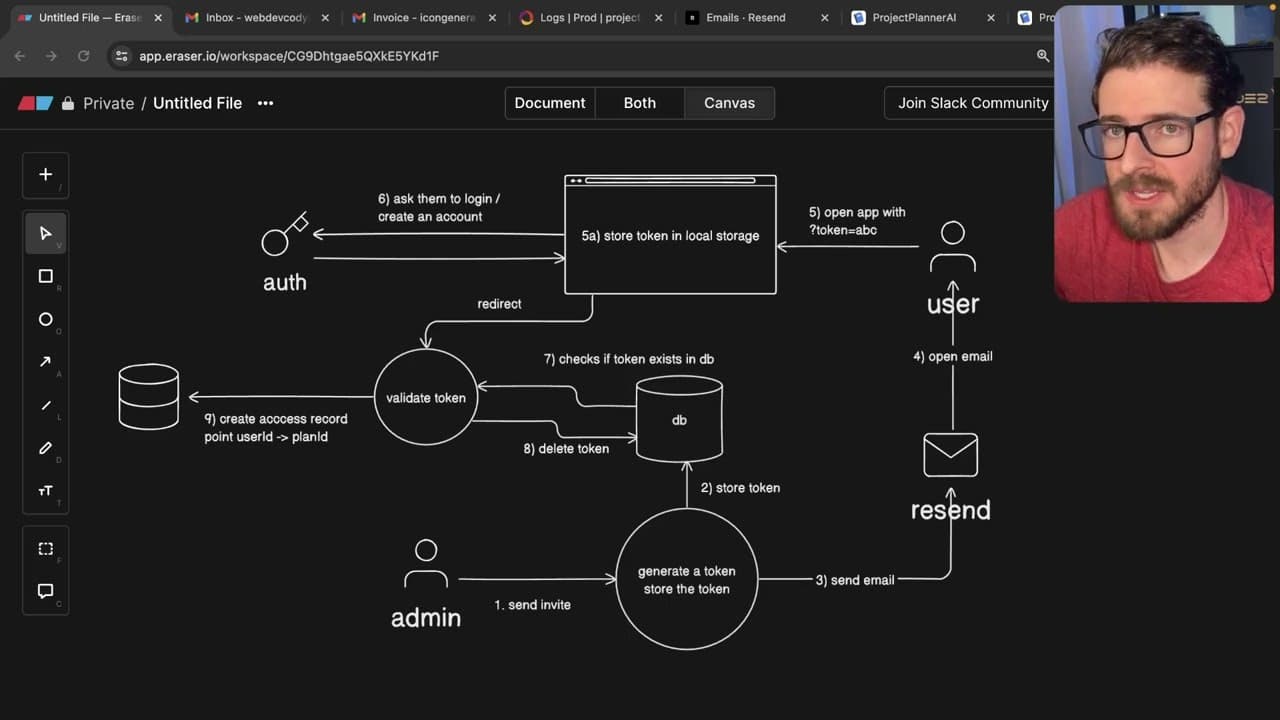
The system generates a unique, one-time-use token for each email invite. Upon receiving the invitation, the recipient must click the link that contains the token, which is checked against the database. If valid, the system deletes the token from the database and grants access to the corresponding project plan, ensuring only authorized users can collaborate.
Q: What potential issues might arise with the email delivery process?
Several issues can impact email delivery, such as SMTP configuration problems, server timeouts, or resource limits of the email service provider. In this case, the author experienced a delay in email delivery from the chosen service, suggesting that reliable solutions like AWS SES could be more efficient to mitigate these delivery challenges.
Q: Why is it important to check if a user is already logged in before granting access via a token?
It's crucial to verify if a user is logged in before granting access because it enhances security by preventing unauthorized access. If a user is authenticated, the system seamlessly redirects them to the project plan. If not, it prompts them to log in or create an account, ensuring that all interactions are securely managed.
Q: What coding practices were briefly mentioned for implementing this functionality?
The content emphasizes the use of secure token generation methods, efficient database management for token storage, and ensuring robust error handling during the invitation process. It specifically mentions using web APIs for token creation and React for building email templates, which contributes to a seamless user experience.
Q: How does the system manage user roles within project plans?
User roles are managed by creating an access record that links users to specific project plans. The admin of the plan holds the authority to grant or revoke access. If an admin decides to remove a user’s access, that user will no longer see the project in their teams page, maintaining control over collaboration.
Summary & Key Takeaways
-
This content describes the process of sending email invitations for collaboration within a project management application, highlighting the ease of inviting users via email, as well as managing their access.
-
Key features discussed include generating unique tokens for email invites, handling user authentication through email, and ensuring users are appropriately granted access to specific project plans.
-
The overview also covers the technical aspects of the implementation including backend processes, email communication integration, and token validation logic to manage user access dynamically.
Read in Other Languages (beta)
Share This Summary 📚
Summarize YouTube Videos and Get Video Transcripts with 1-Click
Try YouTube Summary with ChatGPT & Claude or YouTube Transcript Generator
Explore More Summaries from Web Dev Cody 📚





Summarize YouTube Videos and Get Video Transcripts with 1-Click
Try YouTube Summary with ChatGPT & Claude or YouTube Transcript Generator