4.4 Starting with MateCat
TL;DR
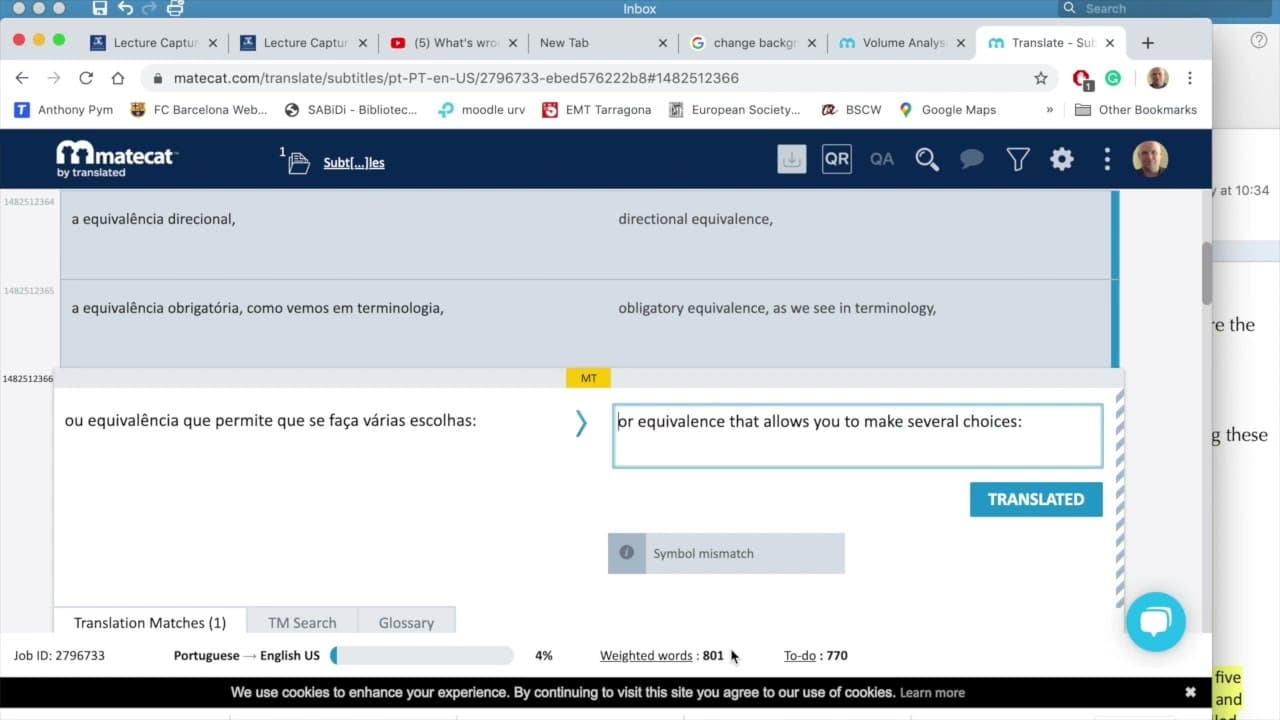
Learn how to use MateCat to translate subtitles using machine translation and translation memories.
Transcript
Going to see how use MateCat, Let's see, get into MateCat, open it up. Actually doesn't ask you to log in but I have logged in using my Google account. You can use any other account that you want. MateCat has a new Interface which is why I'm doing this new tutorial. We want to translate subtitles. Create a project: subtitles You could add other p... Read More
Key Insights
- 🎰 MateCat is a useful tool for translating subtitles, offering collaborative features and various machine translation options.
- ❓ Creating a translation memory in MateCat can improve accuracy and consistency in future translations.
- 😥 Machine translation in MateCat, such as from Google Translate, can be a reliable starting point for translations, especially for large volumes of text.
- 👤 Users can customize their translation preferences and settings in MateCat's advanced settings.
- 👣 MateCat provides analytics and progress tracking features to help translators keep track of their progress and workload.
- 🫥 Translators may need to manually adjust translations for subtitle-specific formatting or line breaks.
- 👻 MateCat supports multiple languages, allowing users to translate subtitles from and into various languages.
Install to Summarize YouTube Videos and Get Transcripts
Explore YouTube Video Summarizer or Get YouTube Transcript Extractor
Questions & Answers
Q: What is MateCat and how does it work?
MateCat is a translation tool that helps users translate subtitles. It allows you to create projects, add collaborators, and offers machine translation options. Users can also create their own translation memory for more accurate translations.
Q: Can multiple translators work on the same project in MateCat?
Yes, several translators can work on the same project in MateCat. Users can choose to split the workload or work on the translation together.
Q: Are machine translations in MateCat accurate?
The machine translations in MateCat, particularly from Google Translate and Microsoft Translator, are considered to be of good quality and can provide a solid starting point for the translation. However, post-editing may still be required for optimal accuracy.
Q: Can MateCat handle different subtitle file formats?
Yes, MateCat supports various subtitle file formats, including SRT files. Users can upload their files directly into the tool for translation.
Summary & Key Takeaways
-
MateCat is a translation tool that allows users to translate subtitles from one language to another.
-
Users can create a project, add other collaborators, and choose the source and target languages.
-
The tool provides machine translation options from Google Translate and Microsoft Translator and allows users to create their own translation memory.
Read in Other Languages (beta)
Share This Summary 📚
Summarize YouTube Videos and Get Video Transcripts with 1-Click
Try YouTube Summary with ChatGPT & Claude or YouTube Transcript Generator
Explore More Summaries from Anthony Pym 📚



Summarize YouTube Videos and Get Video Transcripts with 1-Click
Try YouTube Summary with ChatGPT & Claude or YouTube Transcript Generator