How Does a Computer Mouse Detect Movement?
TL;DR
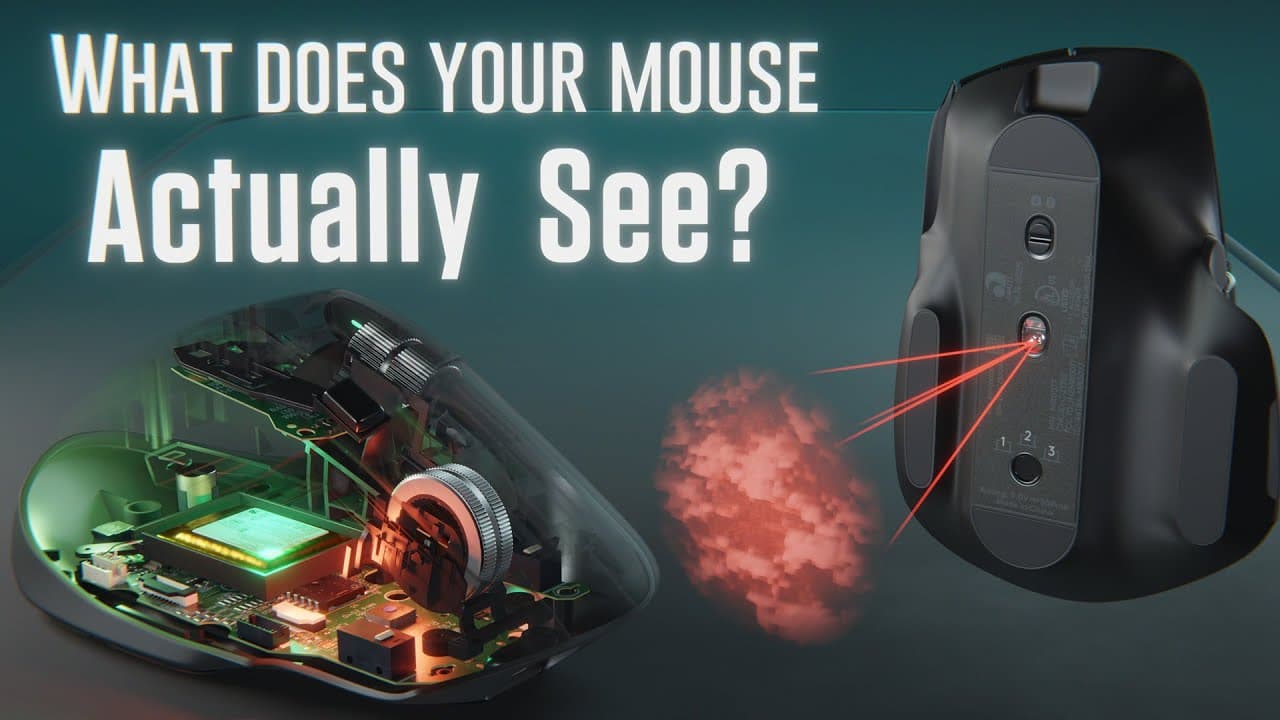
A computer mouse detects movement using an infrared LED, lenses, and an image sensor that captures thousands of images of the surface each second. By comparing these images, the mouse calculates the movement and communicates it to the computer. Higher DPI in gaming mice allows for more precision and quicker responses compared to standard mice.
Transcript
You’ve probably used a computer mouse for thousands of hours, and yet, have you ever stopped to wonder how it works? Well, essentially the modern computer mouse is a merger of 7 different technologies and some rather ingenious engineering. It would take over an hour to cover all these technologies in-depth, so in this video, we’re going to focus on... Read More
Key Insights
- 🖱️ The image sensor in a computer mouse uses infrared light, lenses, and an image pixel array to capture the texture and topography of the surface.
- 🥡 The image sensor takes thousands of pictures per second and compares them to determine movement.
- ✋ DPI represents how many units the cursor moves per inch of mouse movement, and higher DPI is achieved through pixel subdivision.
- ✋ Gaming mice have higher DPI, report movement more frequently, and have higher frame rates compared to non-gaming mice.
- 🖱️ There are various specifications and technologies in computer mice, including frame rate, resolution, pixel count, and illumination methods.
- 🎮 The video mentions the possibility of making a future video about scroll wheels if it receives enough likes.
Install to Summarize YouTube Videos and Get Transcripts
Explore YouTube Video Summarizer or Get YouTube Transcript Extractor
Questions & Answers
Q: How does the image sensor in a computer mouse work?
The image sensor in a mouse uses an infrared LED, lenses, and an image pixel array to capture the topographical and textural landscape of the surface. It takes pictures of the surface and compares them to determine the change in movement.
Q: Why do some computer mice not work well on glass surfaces?
Computer mice rely on imperfections in the surface to track movement. Smooth surfaces like glass don't have enough texture for the mouse to detect, causing it to struggle. Some mice are designed to better detect imperfections on glass surfaces.
Q: What is DPI and how does it relate to the image sensor?
DPI stands for dots per inch, and it represents how many units the cursor moves for every 1 inch of mouse movement. The image sensor's pixel count determines the DPI, and subdividing pixels through interpolation allows for higher DPI.
Q: What are the differences between gaming mice and non-gaming mice?
Gaming mice have higher DPI specifications ranging from 12,000 to 25,000, while non-gaming mice are typically around 850 to 4,000 DPI. Gaming mice also report movement more frequently and have higher frame rates.
Key Insights:
- The image sensor in a computer mouse uses infrared light, lenses, and an image pixel array to capture the texture and topography of the surface.
- The image sensor takes thousands of pictures per second and compares them to determine movement.
- DPI represents how many units the cursor moves per inch of mouse movement, and higher DPI is achieved through pixel subdivision.
- Gaming mice have higher DPI, report movement more frequently, and have higher frame rates compared to non-gaming mice.
- There are various specifications and technologies in computer mice, including frame rate, resolution, pixel count, and illumination methods.
- The video mentions the possibility of making a future video about scroll wheels if it receives enough likes.
- The sponsor of the video, PCBWay, offers PCB manufacturing and assembly services.
Summary & Key Takeaways
-
The modern computer mouse is made up of seven different technologies, and this video focuses on the image sensor technology that allows the mouse to track movement on a surface.
-
The image acquisition system in the mouse uses an infrared LED, lenses, and an image pixel array to capture a topographically and texturally complex landscape of the surface.
-
The image sensor takes thousands of pictures of the surface per second and compares them to determine the change in movement, which is then sent to the computer.
Read in Other Languages (beta)
Share This Summary 📚
Summarize YouTube Videos and Get Video Transcripts with 1-Click
Try YouTube Summary with ChatGPT & Claude or YouTube Transcript Generator
Explore More Summaries from Branch Education 📚





Summarize YouTube Videos and Get Video Transcripts with 1-Click
Try YouTube Summary with ChatGPT & Claude or YouTube Transcript Generator