What Is the Difference Between Raster and Random Scan Displays?
TL;DR
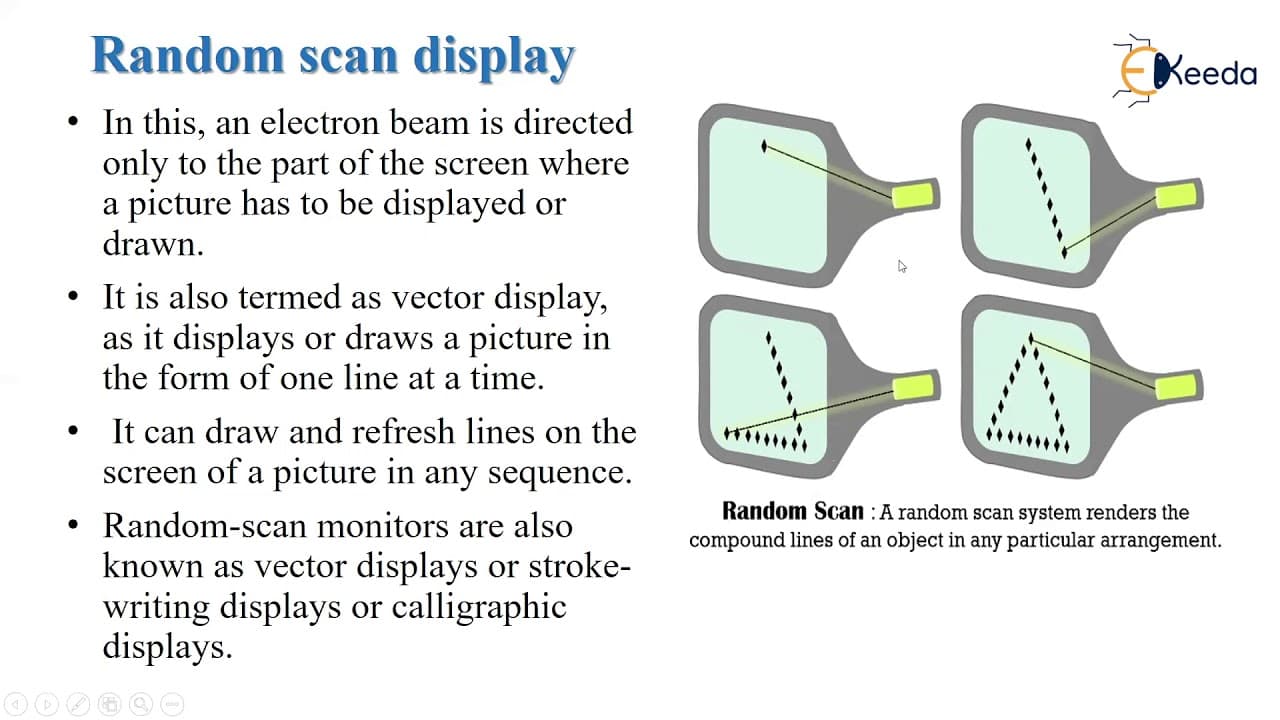
Raster scan displays use pixels and illuminate the entire screen in a zigzag pattern, while random scan displays use mathematical functions and draw only specific areas. Raster displays can create realistic shaded scenes at the cost of lower resolution, whereas random scan displays offer higher resolution and smoother line drawings, making them ideal for line art but not for shading.
Transcript
hello students today we are going to learn about the topic raster scan display and random scan display let's see the introduction this raster scan and random scan displays are the mechanism which are used to display for rendering of a picture of an object on a screen of a monitor means using this two displays that is raster scan and random scan dis... Read More
Key Insights
- 😒 Raster scan displays use electron beams and pixels to draw images on the entire screen, while random scan displays use mathematical functions and lines to draw images on a specific part of the screen.
- 🚥 Raster scan displays follow a zigzag pattern and have horizontal and vertical retraces, while random scan displays offer flexibility in drawing sequence.
- 🫥 Random scan displays have higher resolution and can produce smooth line drawings compared to raster scan displays.
- 🫥 Raster scan displays can create realistic shaded scenes, but random scan displays are primarily designed for line drawing applications.
Install to Summarize YouTube Videos and Get Transcripts
Explore YouTube Video Summarizer or Get YouTube Transcript Extractor
Questions & Answers
Q: How does a raster scan display draw images on the screen?
A raster scan display uses an electron beam that moves across the screen, illuminating spots row by row in a zigzag pattern to create an image. The intensity of the beam determines the spots that are illuminated.
Q: What is the difference between horizontal and vertical retraces in a raster scan display?
In a raster scan display, a horizontal retrace occurs when the electron beam reaches the end of a line and returns to the left side of the screen. A vertical retrace happens when the beam reaches the bottom of the screen and moves back to the top.
Q: How does a random scan display draw images on the screen?
A random scan display directs the electron beam only to the part of the screen where the image needs to be drawn. It uses lines and mathematical functions to create the image, allowing for flexibility in the drawing sequence.
Q: What are the advantages and disadvantages of raster scan displays?
Raster scan displays can produce realistic images with millions of colors and shading. However, they have low resolution and can be expensive due to the pixel-by-pixel operation.
Summary & Key Takeaways
-
Raster scan displays use electron beams that move across the screen in a zigzag pattern, illuminating spots to create a pattern of spots that form an image.
-
The process involves horizontal and vertical retraces, where the beam returns to the left side of the screen and moves from the bottom back to the top, respectively.
-
Random scan displays direct the electron beam only to the part of the screen where the image needs to be drawn, and it uses lines and mathematical functions to create the image.
Read in Other Languages (beta)
Share This Summary 📚
Summarize YouTube Videos and Get Video Transcripts with 1-Click
Try YouTube Summary with ChatGPT & Claude or YouTube Transcript Generator
Explore More Summaries from Ekeeda 📚






Summarize YouTube Videos and Get Video Transcripts with 1-Click
Try YouTube Summary with ChatGPT & Claude or YouTube Transcript Generator