10 top time-saving tech tips | David Pogue
TL;DR
This content discusses ten technological tips and tricks that many people are unaware of, covering topics such as web browsing, keyboard shortcuts, phone usage, and more.
Transcript
Translator: Joseph Geni Reviewer: Morton Bast I've noticed something interesting about society and culture. Everything risky requires a license. So, learning to drive, owning a gun, getting married. There's a certain -- (Laughter) That's true in everything risky, except technology. For some reason, there's no standard syllabus, there's no basic cou... Read More
Key Insights
- 🤔 Learning technology is often not given the same structured approach as other risky activities like driving or owning a gun.
- ️ Spacebar can be used to scroll down one page on the web, while the Shift key plus spacebar can scroll back up.
- 👆 Tab key can be used to jump between input boxes on online forms, and typing the first letter repeatedly can quickly select options from a pop-up menu.
- 🔍 Google can be used as a dictionary, FAA database, and for currency and unit conversion by simply typing "define" or the name of the airline or currency.
- 🤓 Double-clicking a word can quickly highlight it, and typing over the highlighted text avoids the need for deleting it first.
- 📷 Pre-focusing with a half-press on a camera can eliminate shutter lag when taking a photo.
- 💡 Hitting the "B" key in presentation software will black out the slide to direct attention to the speaker, while hitting "W" will white out the slide and hitting the same key again will un-blank it.
- 💻 The speaker offers to send a list of these tips to the audience if they missed anything.
Install to Summarize YouTube Videos and Get Transcripts
Explore YouTube Video Summarizer or Get YouTube Transcript Extractor
Questions & Answers
Q: What is a simple keyboard shortcut to scroll down one page on the web?
To scroll down one page on the web, simply hit the space bar. Holding down the Shift key allows you to scroll back up again. This shortcut works in every browser and on every type of computer. Instead of using the scroll bar, using the space bar is a more efficient and time-saving method.
Q: How can you quickly navigate through form fields on a web page?
Instead of using the mouse or clicking on each form field, you can use the Tab key to jump from box to box. This is a much faster method of navigation. However, when it comes to selecting options from pop-up menus, you can save even more time by typing the first letter of your desired option repeatedly, without even opening the pop-up menu.
Q: How can you adjust the text size on the web?
If the text on a web page is too small, you can easily make it larger by holding down the Control key (or Command key on a Mac) and pressing the plus (+) key. Each tap of the plus key increases the text size. To decrease the text size, you can use the minus (-) key. This keyboard shortcut works on every computer and web browser.
Q: How can you quickly type punctuation and capitalize the next letter on a mobile phone?
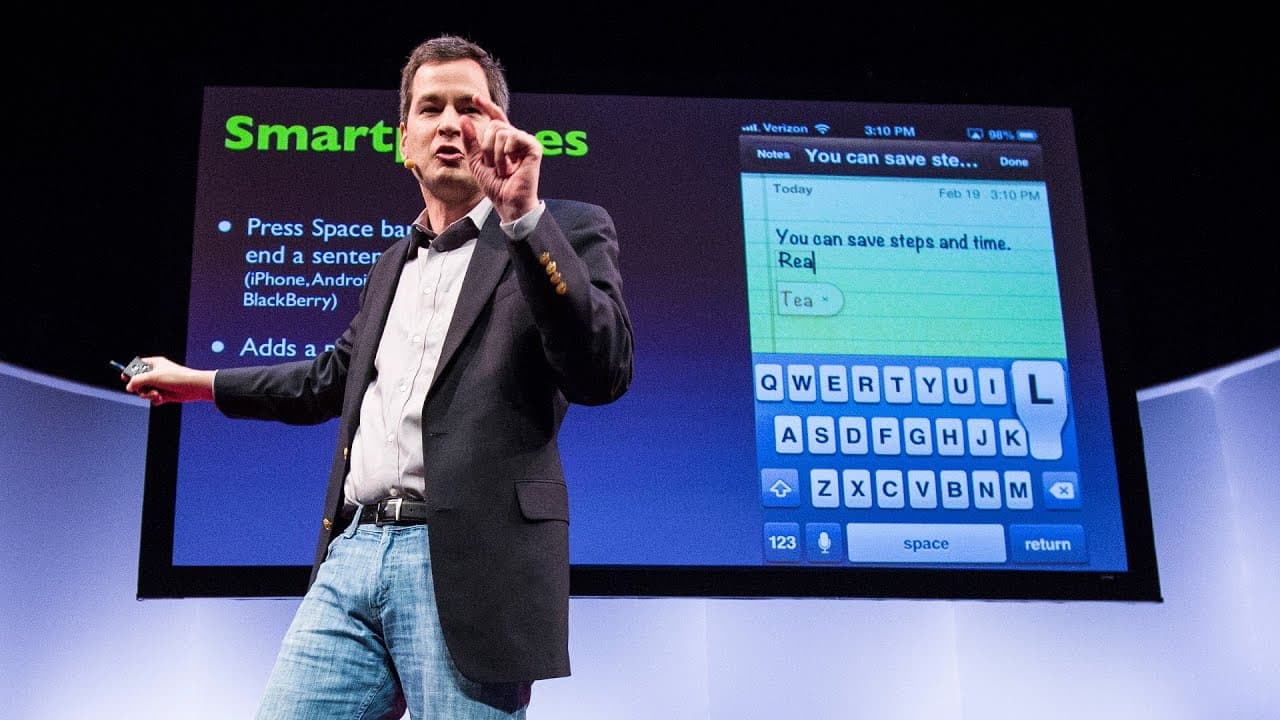
Rather than switching to the punctuation layout on your mobile phone's keyboard, you can simply hit the space bar twice. This will automatically insert a period, a space, and capitalize the next letter. It eliminates the need for navigating through different layouts and makes typing more efficient, especially when using devices such as Blackberry, Android, or iPhone.
Q: What is a useful keyboard shortcut when leaving a voice message on someone's voicemail?
When leaving a voice message, it can be frustrating to listen to the long instructions before the beep. However, there is a keyboard shortcut that allows you to jump directly to the beep. Unfortunately, the keystroke to accomplish this varies depending on the phone carrier. Therefore, it is necessary to learn the specific keystroke for the person you are calling.
Q: What are some additional functions of Google beyond searching the web?
In addition to being a search engine, Google can also serve as a dictionary. By typing the word "define" followed by the word you want to know, Google will immediately display the definition as you type, without the need to click anything. Google also functions as a complete FAA database, allowing you to retrieve flight information by typing the airline and flight number. It can also perform unit and currency conversions simply by typing the conversion into the search box.
Q: How can you efficiently highlight and edit text in various programs?
Instead of dragging the mouse across a word to highlight it, you can save time by simply double-clicking the word. This method neatly selects just the word without the need for manual dragging. When making edits, there is no need to delete the highlighted text. It can be overwritten just by typing over it. Additionally, you can go double-click and then drag to highlight text in one-word increments, resulting in more precise selections.
Q: What is a trick to eliminate shutter lag in cameras?
Shutter lag, the delay between pressing the shutter button and the camera capturing the image, can be frustrating, especially in cameras below $1,000. However, there is a simple trick to overcome this issue. By pre-focusing with a half-press of the shutter button and keeping your finger down, you can eliminate shutter lag. This trick allows you to achieve instant capturing every time, effectively enhancing the performance of your camera.
Q: How can you control slides during a presentation to draw attention to yourself?
When giving a presentation and wanting to draw the audience's attention back to yourself instead of continuously looking at the slides, you can use keyboard shortcuts. In programs like Keynote and PowerPoint, hitting the letter B key will black out the slide, redirecting the focus to the presenter. When ready to continue, pressing B again restores the slide. Additionally, hitting the W key provides a "whiteout" effect that can be used to emphasize certain points.
Summary & Key Takeaways
-
Society and culture require licenses for risky activities, but technology does not have a standard syllabus or basic course.
-
Tips for using technology include using the space bar to scroll down on webpages, typing the first letter of your state repeatedly to select it in a pop-up menu, and using keyboard shortcuts to simplify tasks.
-
Google can be used for more than just searching the web, including defining words, accessing flight information, and converting units and currencies.
Read in Other Languages (beta)
Share This Summary 📚
Summarize YouTube Videos and Get Video Transcripts with 1-Click
Try YouTube Summary with ChatGPT & Claude or YouTube Transcript Generator
Explore More Summaries from TED 📚





Summarize YouTube Videos and Get Video Transcripts with 1-Click
Try YouTube Summary with ChatGPT & Claude or YouTube Transcript Generator