How to Merge Multiple Columns in Excel
TL;DR
To merge data from multiple columns in Excel, you can use the CONCATENATE function, the ampersand symbol, or the TEXTJOIN feature. The CONCATENATE function requires manually adding spaces or characters between the columns, while TEXTJOIN streamlines the process, especially for large datasets. All methods yield the same result, allowing users to choose their preferred approach.
Transcript
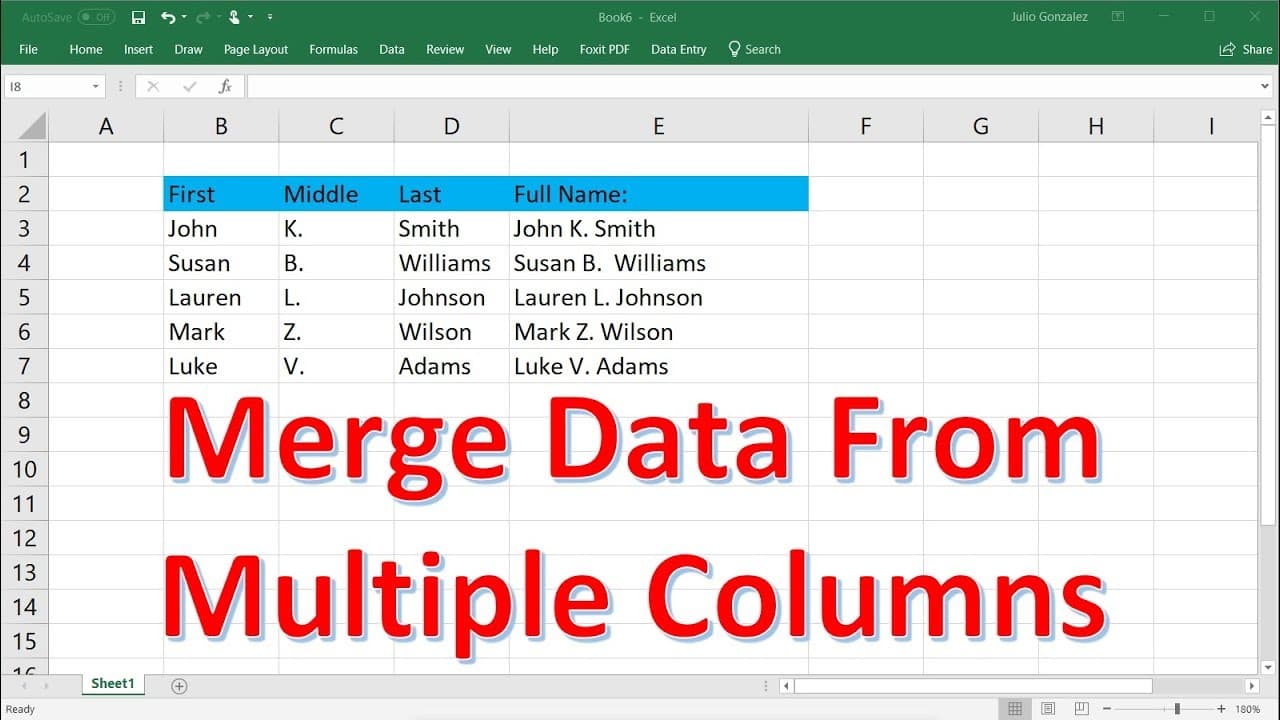
in this video tutorial we're going to talk about how to merge data from multiple columns into a single column using microsoft excel and so here we have three columns of data so we have the first name of an individual the middle initial and the last name and what we want to do in this tutorial is we want to combine these three columns of data into o... Read More
Key Insights
- 🤬 The concatenate function, ampersand symbol, and text join feature are all effective methods for merging data from multiple columns into a single column in Excel.
- 🤬 When using the concatenate function or ampersand symbol, you need to manually add spaces or any desired characters between the columns.
- 🤬 The text join feature is particularly useful when dealing with numerous columns, as it saves time by not requiring repetitive symbols or functions.
- 🧡 By dragging the formula or function across the cells, you can easily merge data for the entire column range.
- 👤 Each method discussed provides the same result, giving users flexibility in choosing their preferred approach.
- 👾 It's important to ensure accurate placement of commas, quotation marks, spaces, and other characters to avoid errors in merging the data.
- 🚨 The ability to merge data from multiple columns into a single column can improve data organization and simplify analysis in Excel.
Install to Summarize YouTube Videos and Get Transcripts
Explore YouTube Video Summarizer or Get YouTube Transcript Extractor
Questions & Answers
Q: What are the three methods discussed for merging data from multiple columns into a single column in Excel?
The three methods discussed are the concatenate function, ampersand symbol, and text join feature.
Q: How can the concatenate function be used to combine data from three columns?
By entering "=CONCATENATE" and specifying the cells containing the data, separated by commas, and adding a space within quotation marks, the concatenate function can merge the data.
Q: What is the purpose of the ampersand symbol in merging multiple columns?
The ampersand symbol acts as a concatenation operator in Excel, allowing you to combine data from different cells or columns by simply using "&" between them.
Q: How does the text join feature simplify the process of merging multiple columns in Excel?
The text join function in Excel allows you to merge multiple columns without the need for using the concatenate function or ampersand symbol repeatedly. You can specify the delimiter and choose whether to ignore or include empty cells.
Summary & Key Takeaways
-
This video tutorial demonstrates how to merge data from three columns (first name, middle initial, last name) into a single column in Excel.
-
The concatenate function can be used to combine the data by adding a space between each column.
-
Alternatively, the ampersand symbol or text join feature can also be used for merging multiple columns into one.
Read in Other Languages (beta)
Share This Summary 📚
Summarize YouTube Videos and Get Video Transcripts with 1-Click
Try YouTube Summary with ChatGPT & Claude or YouTube Transcript Generator
Explore More Summaries from The Organic Chemistry Tutor 📚




Summarize YouTube Videos and Get Video Transcripts with 1-Click
Try YouTube Summary with ChatGPT & Claude or YouTube Transcript Generator