Find Your Perfect Widgets: How To Choose The Right Ones For You!
TL;DR
Learn how to customize your blog by selecting the most relevant widgets that add functionality and design control to your WordPress theme.
Transcript
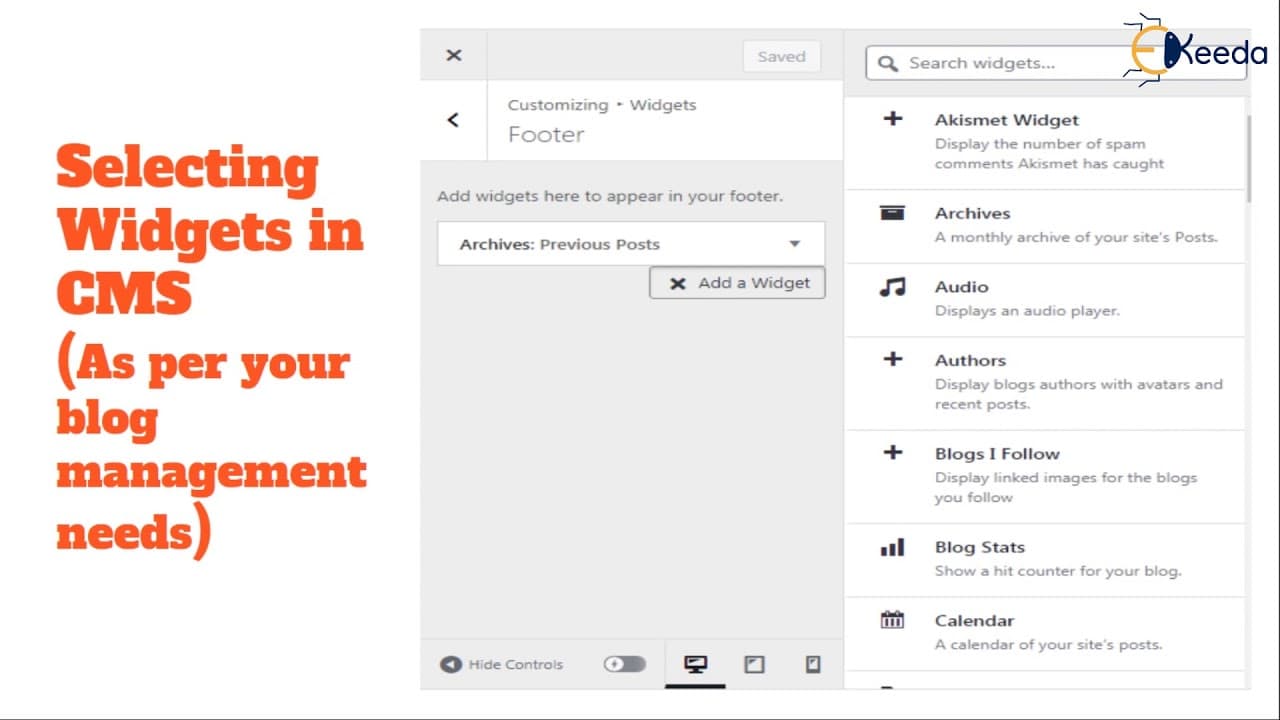
hello students this is your course on vlogging and tools in this video on learning the blog dashboard we are going to talk about selecting relevant widgets let's begin by understanding what exactly widgets are and how they are helpful for your blog so once you have set up your blog and you have start uh started by selecting a theme and you are cust... Read More
Key Insights
- 🎨 Widgets are software tools designed to add specific functions and design control to your blog.
- 🪜 There are theme-specific widgets activated with the installation of a particular theme, and additional widgets can be added through plugins.
- 🥅 Selecting relevant widgets depends on understanding your blog's goals, content, and target audience.
- 💬 Widgets can enhance user experience by displaying spam comments, archives, audio players, author information, and more.
- 🗽 They can also help showcase blog stats, enable translation, display images, integrate social media, and provide various navigation options.
- 👻 Widgets can be managed and customized in the WordPress dashboard, allowing flexibility and adaptation to changing blog needs.
- ⌛ Spending time to learn about available widgets and their functionalities is essential for effective blog customization.
Install to Summarize YouTube Videos and Get Transcripts
Explore YouTube Video Summarizer or Get YouTube Transcript Extractor
Questions & Answers
Q: What are widgets in the context of blogging?
Widgets are software tools that add content and features to your blog's sidebars, providing design and structure control to your WordPress theme.
Q: How do you select relevant widgets for your blog?
You need to understand the functionalities each widget offers and consider your blog management needs. Activate widgets that are relevant to your content, target audience, and desired appearance.
Q: Can you add widgets from plugins to your blog?
Yes, WordPress plugins often come with additional widgets that can be activated on your blog. You can browse and install these plugins from the WordPress plugin browser.
Q: Can you customize the widgets on your blog?
Yes, widgets can be added, removed, and rearranged in the theme customizer or appearance section of WordPress. You have control over the data representation and appearance of your blog through widget selection.
Summary & Key Takeaways
-
Widgets are software tools designed to provide specific functions and control over the design and structure of your blog.
-
You can add, remove, and rearrange widgets in the theme customizer or appearance section of WordPress.
-
There are various theme-specific widgets and plugins that offer additional widgets for managing and customizing your blog.
Read in Other Languages (beta)
Share This Summary 📚
Summarize YouTube Videos and Get Video Transcripts with 1-Click
Try YouTube Summary with ChatGPT & Claude or YouTube Transcript Generator
Explore More Summaries from Ekeeda 📚



Summarize YouTube Videos and Get Video Transcripts with 1-Click
Try YouTube Summary with ChatGPT & Claude or YouTube Transcript Generator