Matplotlib Tutorial 24 - multi y axis plotting volume on stock chart
TL;DR
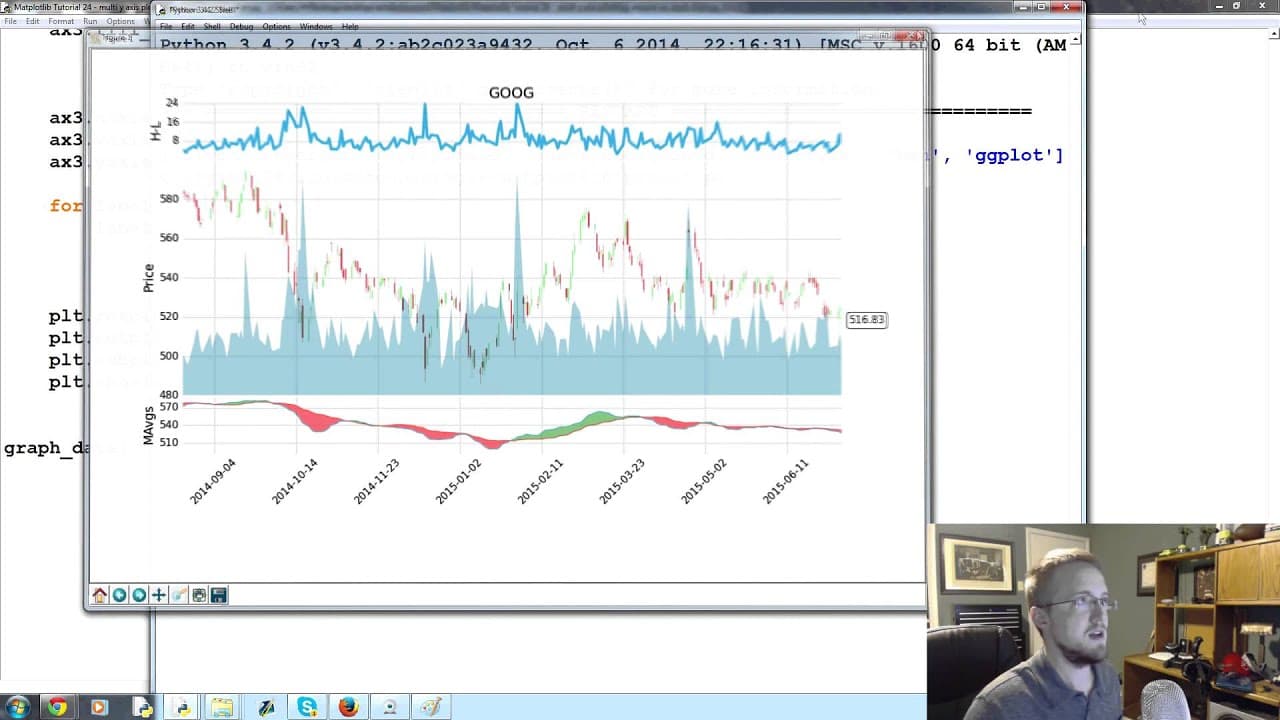
This tutorial demonstrates how to create a subplot with multiple y-axes in Matplotlib, specifically focusing on plotting price and volume data.
Transcript
what is going on everybody welcome to part 24 over matplotlib tutorial series in this part what we're gonna be talking about is a multiple y-axes so up into this point each little you know subplot is its own subplots own special butterfly where what we might want to do from time to time though is have a subplot that has two types of data on it but ... Read More
Key Insights
- 😀 Subplots with multiple y-axes are useful when plotting data with different scales, such as price and volume.
- ☺️ The
twinx()function in Matplotlib allows for the creation of additional axes that share the same x-axis. - 😫 The
fill_between()function can be used to visually represent the space between two sets of data. - 👻 Adjusting the alpha value of the fill color allows for better visibility of the underlying data.
- 🫥 Removing tick labels and grid lines can help simplify the visualization.
- 💹 Scaling the y-axis of certain data, such as volume, can prevent it from dominating the chart.
- 💁 Legends can be added to provide additional information about the plotted data.
Install to Summarize YouTube Videos and Get Transcripts
Explore YouTube Video Summarizer or Get YouTube Transcript Extractor
Questions & Answers
Q: Why would we want to create a subplot with multiple y-axes in Matplotlib?
Creating a subplot with multiple y-axes allows us to display and compare data that may have different scales, such as price and volume in financial charts.
Q: How do we define an additional axes for the volume data?
We can use the twinx() function to create another axes that shares the same x-axis with the main subplot.
Q: What is the purpose of the fill_between() function in this tutorial?
The fill_between() function is used to fill the space between the price and volume data, visually highlighting the fluctuations and spikes in volume.
Q: Why is the alpha parameter used when filling between the price and volume data?
Adding an alpha value to the fill color allows us to make it partially transparent, ensuring that the price data remains visible even when the volume data overlaps with it.
Summary & Key Takeaways
-
This tutorial discusses the concept of having subplots with different scales of data, using the example of plotting price and volume data together.
-
It explains how to define an additional axes for the volume data using the
twinx()function. -
The tutorial demonstrates how to fill the space between the price and volume data using the
fill_between()function, and how to customize the appearance by adjusting the alpha and face color. -
It also covers removing tick labels and grid lines, and scaling the y-axis of the volume data to prevent it from occupying too much space.
Read in Other Languages (beta)
Share This Summary 📚
Summarize YouTube Videos and Get Video Transcripts with 1-Click
Try YouTube Summary with ChatGPT & Claude or YouTube Transcript Generator
Explore More Summaries from sentdex 📚





Summarize YouTube Videos and Get Video Transcripts with 1-Click
Try YouTube Summary with ChatGPT & Claude or YouTube Transcript Generator