YouTube Settings You Need To Update
TL;DR
YouTube has made changes to channel layouts and features, including the importance of optimizing the about me section, organizing video playlists, adding branding watermarks, setting upload defaults, managing comments, and utilizing live stream trailers.
Transcript
- You may or may not have noticed that YouTube has made a lot of changes to the public facing side of YouTube, as well as the creator studio in YouTube that's for us content creators. So because of that, I'm going to share with you all of the different things that you need to make sure that you have set up on your channel to make sure that you are ... Read More
Key Insights
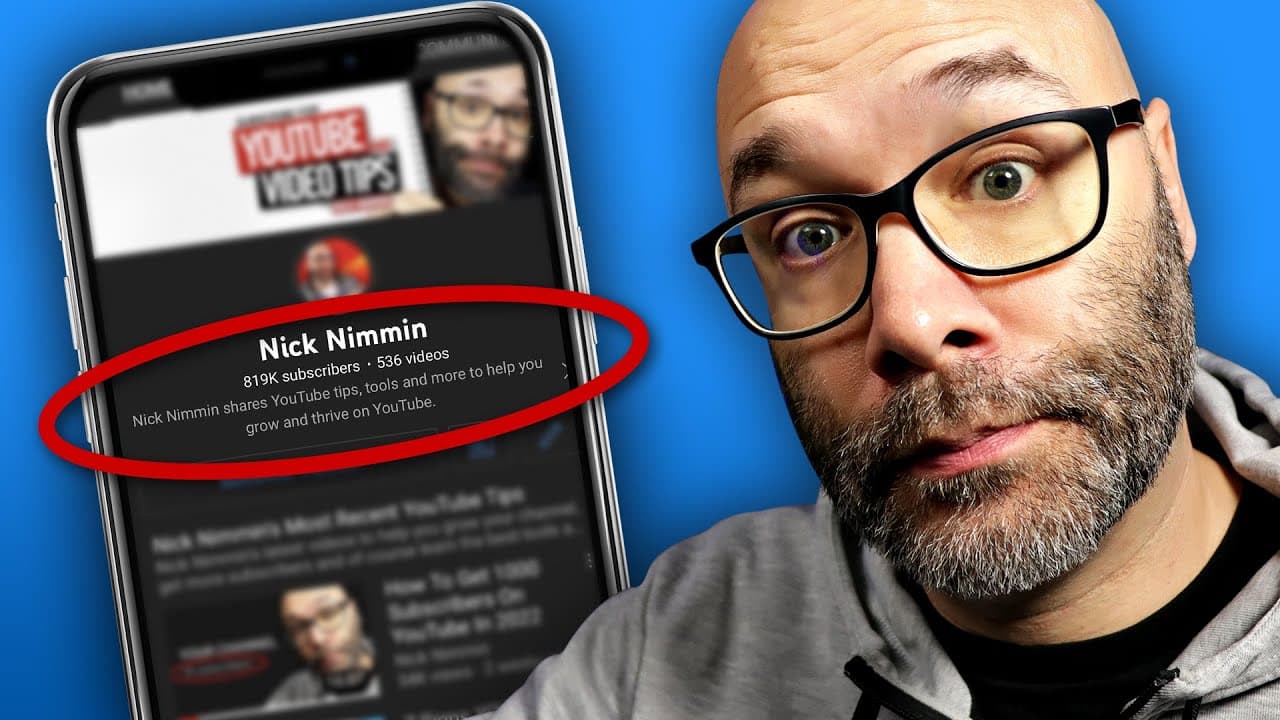
- 🚗 YouTube has made changes to channel layouts, prioritizing the about me section on mobile devices and moving it to the front page.
- 🫥 Channels with regular shorts uploads should keep them visible, while others should focus on prioritizing their primary content.
- 🆘 Adding branding watermarks as subscribe buttons can help increase visibility and drive subscriptions.
- 🍻 Refreshing upload defaults ensures consistent inclusion of links, tags, and proper video visibility settings.
- 😫 Consider enabling or disabling automatic chapters based on your content type and properly set the title and description language.
- 💬 Managing comments with blocked words and links helps maintain a clean comment section.
- 🫒 Utilize the live stream trailer function to create enticing videos that promote live stream content.
Install to Summarize YouTube Videos and Get Transcripts
Explore YouTube Video Summarizer or Get YouTube Transcript Extractor
Questions & Answers
Q: Why is the about me section important for channel optimization?
The about me section is now prominently displayed on mobile devices, providing viewers with an overview of your channel. It should be optimized to communicate what your content offers in about 115 characters.
Q: Should shorts be included on the channel page if uploading long-form content as well?
It's advisable to prioritize either shorts or long-form content based on your channel's focus. If uploading both, prioritize the most important type and keep it at the top of the channel page.
Q: How can I add branding watermarks to my YouTube channel?
You can create your own branding watermarks or purchase them from platforms like Tuber Tools. Add a subscribe graphic to draw attention to the subscription button on your videos.
Q: Why is it important to set videos as unlisted in upload defaults?
Uploading videos as unlisted allows you to fully prepare and optimize them before publishing. This avoids the hassle of going back and making adjustments after the video is published.
Summary & Key Takeaways
-
YouTube has moved the about me section to the front of channel pages on mobile devices, making it crucial to optimize the channel name, subscriber count, video count, and a brief description.
-
For channels uploading shorts regularly, keep them at the top of the channel page. Otherwise, prioritize long-form content and create playlists to showcase it.
-
Adding branding watermarks as a subscribe button helps draw attention to subscribing. Utilize available online resources or purchase them from Tuber Tools.
-
Refresh upload defaults to apply common links, tags, and ensure videos are set to unlisted for proper preparation before publishing.
-
Consider enabling or disabling automatic chapters and set the appropriate title and description language based on your type of content.
-
Keep comments clean by holding potentially inappropriate comments for review and blocking specific words or links.
-
Utilize the live stream trailer feature to create a video promoting the live stream's content or enticing viewers to participate.
-
New YouTube creators can refer to a playlist specifically designed to help them start strong on the platform.
Read in Other Languages (beta)
Share This Summary 📚
Summarize YouTube Videos and Get Video Transcripts with 1-Click
Try YouTube Summary with ChatGPT & Claude or YouTube Transcript Generator
Explore More Summaries from Nick Nimmin 📚


Summarize YouTube Videos and Get Video Transcripts with 1-Click
Try YouTube Summary with ChatGPT & Claude or YouTube Transcript Generator