10 - Navigation
TL;DR
Learn to navigate a robot using AMCL and move_base.
Transcript
so hi folks welcome back to our next session in this session I will show you how to navigate on the map which we recorded last time and therefore we have to add in our commander package some lunch files and some conflict order basically our navigation is based on the package move base which includes also a local and a global path planner and this i... Read More
Key Insights
- The session focuses on navigating a robot using the move_base package, which includes both local and global path planners. Installation of necessary packages is demonstrated.
- Localization of the robot is achieved using the AMCL package, a particle filter-based approach that uses recorded map data and lidar sensors for precise positioning within the environment.
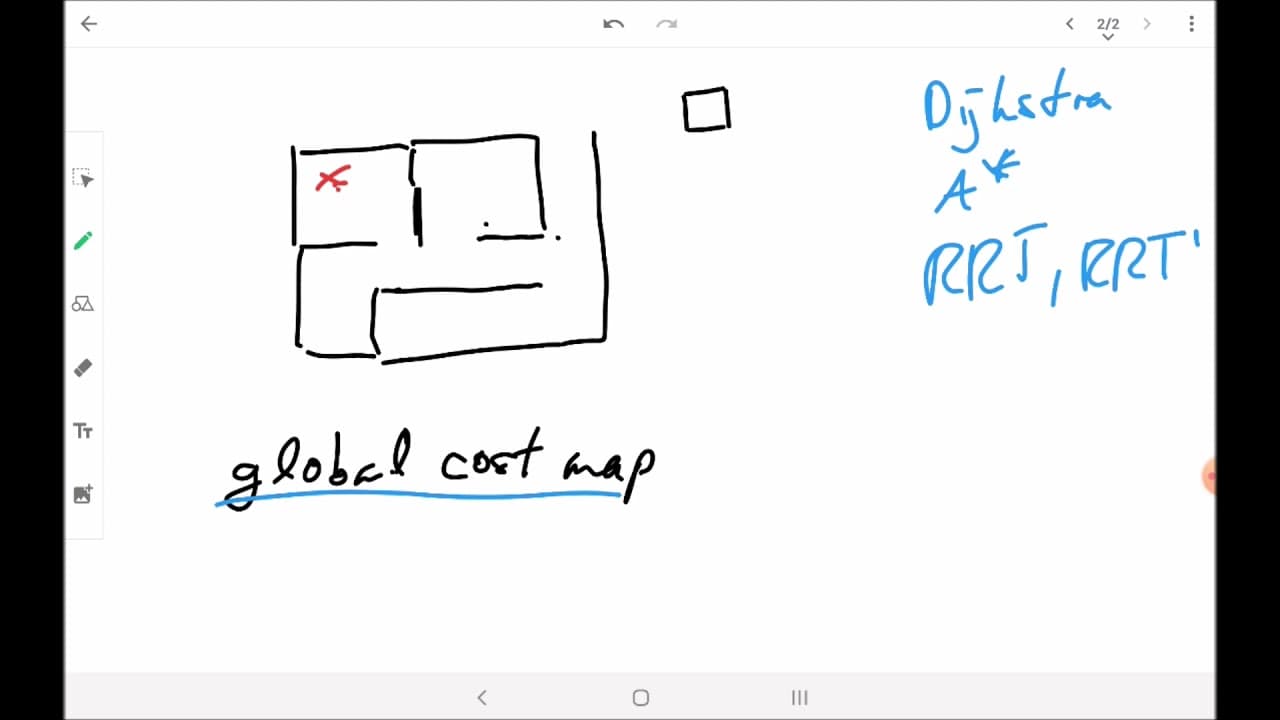
- The move_base package requires configuration of both local and global path planners, with options like Dijkstra, A*, and TEB planner available for optimal navigation.
- Local path planners are crucial for avoiding dynamic obstacles, using sensors like lidar to create a local cost map and adjust paths in real-time.
- Global path planners determine the most efficient route using a fixed global cost map, considering the entire environment to plot a path to the target location.
- Configuration files play a vital role in defining parameters for cost maps, sensors, and planner algorithms, which need to be tailored to the specific robot and environment.
- The session provides insights into setting up and launching navigation tasks using ROS, including how to visualize navigation paths and monitor robot movement via RViz.
- Understanding the interaction between global and local planners is essential for effective navigation, ensuring both static and dynamic obstacles are managed efficiently.
Install to Summarize YouTube Videos and Get Transcripts
Explore YouTube Video Summarizer or Get YouTube Transcript Extractor
Questions & Answers
Q: What is the main focus of this session?
The main focus of this session is to teach participants how to navigate a differential drive robot using the move_base package in ROS. It covers the installation and configuration of necessary packages, including AMCL for localization, and provides insights into using local and global path planners for effective navigation.
Q: How does the AMCL package contribute to robot navigation?
The AMCL package contributes to robot navigation by providing a particle filter-based localization system. It uses recorded map data and lidar sensor input to determine the robot's position within the environment accurately. This localization is crucial for ensuring that the robot can navigate effectively and reach its target destination.
Q: Why are both local and global path planners necessary?
Both local and global path planners are necessary because they serve different purposes in navigation. Global path planners determine the most efficient route using a fixed global cost map, considering the entire environment. Local path planners, on the other hand, adjust paths in real-time to avoid dynamic obstacles using a local cost map and sensor data, ensuring safe navigation.
Q: What role do configuration files play in robot navigation?
Configuration files play a crucial role in robot navigation by defining parameters for cost maps, sensors, and planner algorithms. These parameters need to be tailored to the specific robot and environment to ensure optimal navigation performance. The session provides guidance on setting these configurations for effective navigation using the move_base package.
Q: How is visualization used in this navigation setup?
Visualization is used in this navigation setup through RViz, a ROS visualization tool. RViz allows users to monitor the robot's movement, visualize navigation paths, and observe the interaction between local and global planners. This visualization helps in understanding how the robot navigates and adjusts to obstacles in real-time.
Q: What are some examples of global path planning algorithms?
Examples of global path planning algorithms include Dijkstra and A*. These algorithms are used to determine the most efficient route from the robot's current position to the target destination by analyzing the global cost map. They consider the entire environment to plot an optimal path, avoiding static obstacles.
Q: How do local path planners handle dynamic obstacles?
Local path planners handle dynamic obstacles by using sensor data, such as lidar, to create a local cost map. This map includes information about the robot's immediate surroundings, allowing the planner to adjust paths in real-time to avoid collisions with moving obstacles, ensuring safe navigation.
Q: What is the significance of the move_base package in this session?
The move_base package is significant in this session as it provides the framework for integrating both local and global path planners, enabling effective robot navigation. It manages the interaction between planners, ensuring the robot can reach its destination while avoiding obstacles, both static and dynamic, using configured cost maps and planner algorithms.
Summary & Key Takeaways
-
The session covers the setup and execution of robot navigation using ROS, focusing on the move_base package. It details the installation and configuration of necessary packages, including AMCL for localization and various path planners for navigation.
-
Key aspects include the differentiation between local and global path planners, their roles in navigation, and how they work together to ensure the robot reaches its destination while avoiding obstacles.
-
The session provides practical guidance on configuring ROS navigation stacks, launching navigation tasks, and visualizing the robot's path and movement using RViz, ensuring participants can effectively implement these techniques.
Read in Other Languages (beta)
Share This Summary 📚
Summarize YouTube Videos and Get Video Transcripts with 1-Click
Try YouTube Summary with ChatGPT & Claude or YouTube Transcript Generator
Explore More Summaries from Nils Rottmann 📚
Summarize YouTube Videos and Get Video Transcripts with 1-Click
Try YouTube Summary with ChatGPT & Claude or YouTube Transcript Generator