How to Use SEMrush Brand Monitoring Tool
TL;DR
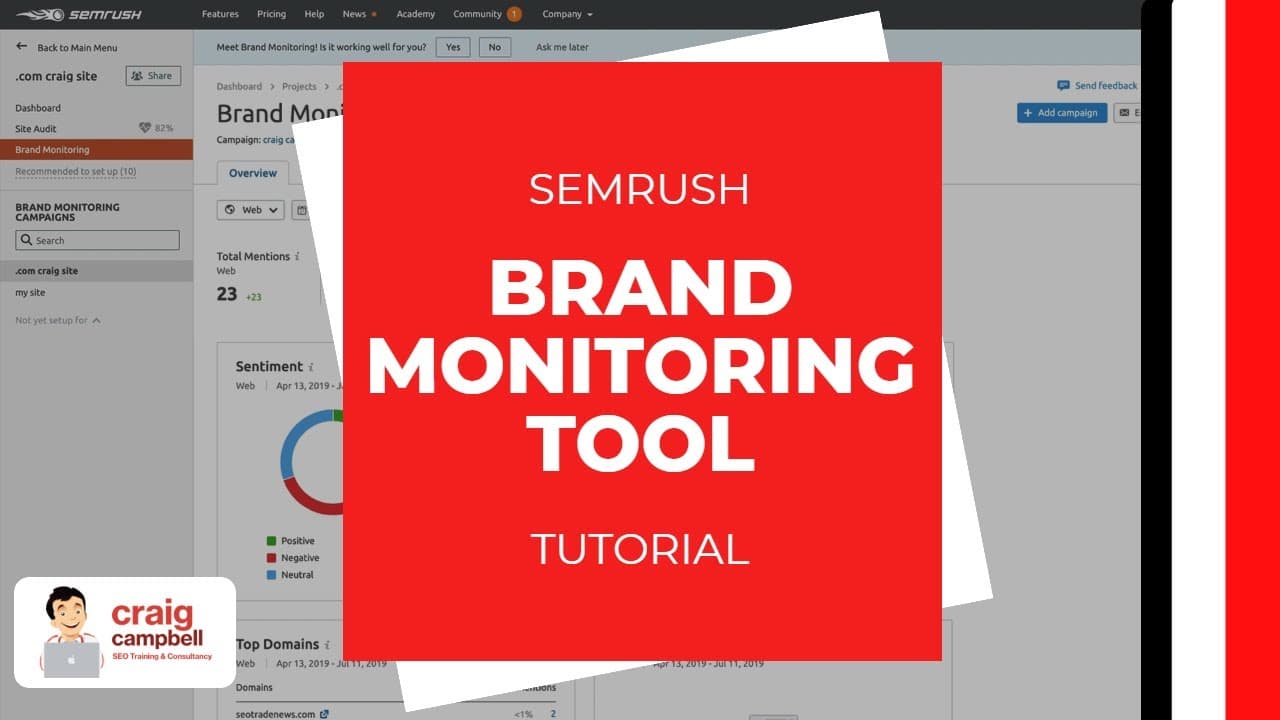
The SEMrush Brand Monitoring tool allows users to track mentions of their brand across the web, including social media and forums. It enables the setup of campaigns with specific keywords, exclusion of irrelevant terms, and email reporting. Users can analyze web mentions, sentiment, and link-building opportunities, making it a valuable tool for brand reputation management and SEO strategies.
Transcript
hi guys so I'm just going to show you the brand monstering to and which is the 15th episode and the same rush to box series so first of all I'm gonna show you where to find the brand months in two so under projects you're always going to create a project for a website in most cases so on the project's page you have a number of different tools wheth... Read More
Key Insights
- SEMrush Brand Monitoring allows tracking of brand mentions across web, forums, and social media.
- Users can set up campaigns with main keywords and exclude irrelevant terms.
- The tool provides email reports of mentions on a weekly, biweekly, or monthly basis.
- Sentiment analysis categorizes mentions as positive, negative, or neutral.
- Users can filter mentions by date, sentiment, and whether they include backlinks.
- The tool offers link-building opportunities by identifying mentions without backlinks.
- Statistics tab compares mention trends and allows competition analysis.
- Users can track up to ten additional resources for mentions of their brand.
Install to Summarize YouTube Videos and Get Transcripts
Explore YouTube Video Summarizer or Get YouTube Transcript Extractor
Questions & Answers
Q: How to set up a campaign in SEMrush Brand Monitoring?
To set up a campaign in SEMrush Brand Monitoring, navigate to the projects page and select the brand monitoring tool. Add your main keywords, which can include your brand name or variations, and exclude up to five irrelevant keywords. Specify the country and language, and set the frequency for email reports. This setup allows you to track relevant mentions across various platforms.
Q: What is the purpose of sentiment analysis in SEMrush Brand Monitoring?
Sentiment analysis in SEMrush Brand Monitoring categorizes mentions of your brand as positive, negative, or neutral. This feature helps users understand the general perception of their brand online. By reviewing sentiment, users can address negative mentions, capitalize on positive ones, and adjust their marketing strategies accordingly. It provides a comprehensive view of brand reputation across different channels.
Q: How can SEMrush Brand Monitoring assist in link building?
SEMrush Brand Monitoring assists in link building by identifying mentions of your brand that do not include backlinks. Users can filter mentions to find those without links and reach out to the authors or websites to request a backlink. This process not only strengthens SEO efforts but also enhances brand visibility and authority across the web.
Q: What are the benefits of tracking additional resources in SEMrush Brand Monitoring?
Tracking additional resources in SEMrush Brand Monitoring allows users to monitor mentions of their brand on specific websites or publications. By adding up to ten resources, users can receive notifications whenever their brand is mentioned, providing opportunities to engage with the content, request backlinks, or track brand perception among influential platforms. This feature enhances strategic brand management and visibility.
Q: How does the statistics tab in SEMrush Brand Monitoring work?
The statistics tab in SEMrush Brand Monitoring provides insights into the volume trends of mentions and backlinks over time. Users can compare multiple campaigns, including those of competitors, to evaluate their brand's online presence. This analysis helps identify areas for improvement, benchmark against competitors, and refine marketing strategies based on the data collected from various campaigns.
Q: Why is it important to filter mentions by sentiment in SEMrush Brand Monitoring?
Filtering mentions by sentiment in SEMrush Brand Monitoring is important because it allows users to quickly assess the nature of the feedback their brand is receiving. By categorizing mentions as positive, negative, or neutral, users can prioritize responses, address negative feedback proactively, and leverage positive mentions for marketing purposes. This filtering enhances brand reputation management and strategic decision-making.
Q: What role does email reporting play in SEMrush Brand Monitoring?
Email reporting in SEMrush Brand Monitoring provides users with regular updates on brand mentions across various platforms. Users can choose the frequency of these reports, such as weekly or monthly, to stay informed about their brand's online presence. This feature ensures that users can quickly respond to mentions, manage brand reputation, and make data-driven decisions without constantly checking the tool.
Q: How does SEMrush Brand Monitoring compare campaigns with competitors?
SEMrush Brand Monitoring allows users to compare campaigns with competitors by analyzing mention trends and sentiment across different brands. Users can identify which competitors are receiving more mentions and assess the sentiment associated with those mentions. This comparison provides valuable insights into competitive positioning, helping users refine their strategies to improve brand visibility and reputation.
Summary & Key Takeaways
-
The SEMrush Brand Monitoring tool helps users track mentions of their brand across various platforms, including social media and forums. It allows the creation of campaigns with specific keywords, exclusion of irrelevant terms, and provides regular email reports. Users can analyze mentions, sentiment, and identify link-building opportunities, enhancing brand reputation management and SEO strategies.
-
Setting up a campaign involves adding main keywords and excluding irrelevant ones. The tool provides insights into web, forum, and Instagram mentions, categorizing them by sentiment. Users can filter mentions and identify those without backlinks, offering potential link-building opportunities.
-
The statistics tab allows users to compare mention trends and analyze competition. Users can track additional resources and export data for client reporting. The tool is under continuous development, with feedback welcomed to improve its functionality.
Read in Other Languages (beta)
Share This Summary 📚
Summarize YouTube Videos and Get Video Transcripts with 1-Click
Try YouTube Summary with ChatGPT & Claude or YouTube Transcript Generator
Explore More Summaries from Craig Campbell SEO 📚



Summarize YouTube Videos and Get Video Transcripts with 1-Click
Try YouTube Summary with ChatGPT & Claude or YouTube Transcript Generator