Check Out This Amazing MACRO KEYPAD By JC Pro Macro Pad II
TL;DR
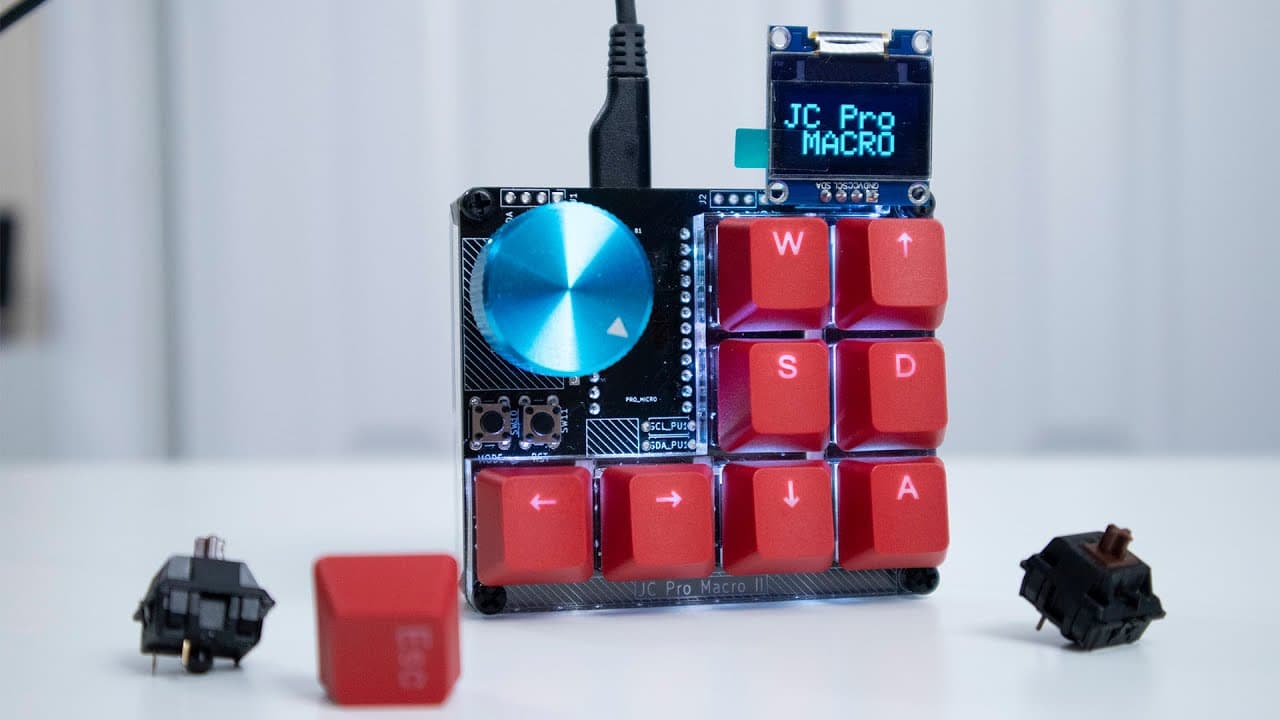
The JC Pro Macro Pad 2 offers customizable functionality, including a media dial and multiple programmable keys.
Transcript
hey guys what is going on it's don here from nova spare tech and welcome back to our channel and today we are going to be checking out jc pro macro pad 2 so let's get started now i do want to thank jeremy cook hence the jc for sending this over to me for review and he basically did everything i wanted to do on a macro keypad but didn't but did it b... Read More
Key Insights
- 👤 The JC Pro Macro Pad 2 incorporates an innovative media dial, enhancing the user experience and providing quick control for multimedia applications.
- 👻 Customizability is a significant theme, as the device allows users to program it according to their specific needs, making it adaptable for many purposes.
- 🎨 The device is designed to be affordable, costing significantly less than similar devices like Stream Decks, yet it provides comparable functionalities.
- 👤 Users can leverage programming knowledge to create various modes, such as browser navigation, audio control, or tasks related to graphic design software like DaVinci Resolve.
- 😒 Build quality is emphasized, ensuring the keypad remains stable during extensive use, preventing it from shifting unexpectedly.
- 🕴️ As a lightweight and portable option, it’s well-suited for users on the go who want a practical solution for managing multiple tasks seamlessly.
- 🧑💻 The device invites creativity in its application, providing tech-savvy users with a platform to experiment and design custom setups tailored to their preferences.
Install to Summarize YouTube Videos and Get Transcripts
Explore YouTube Video Summarizer or Get YouTube Transcript Extractor
Questions & Answers
Q: What makes the JC Pro Macro Pad 2 stand out in the macro keypad market?
The standout feature of the JC Pro Macro Pad 2 is its built-in media dial, which significantly enhances usability. This innovative design allows users to control volume and other functions quickly. Additionally, it offers eight programmable keys, allowing for extensive customization tailored to individual workflows, unlike other keypads that often have fewer customization options.
Q: How easy is it to program the JC Pro Macro Pad 2?
Programming the JC Pro Macro Pad 2 is designed to be user-friendly for those familiar with Arduino and C++. The device comes with helpful demo modes and source codes available online, enabling users to experiment and adapt its functions according to their needs. While beginners might face a learning curve, resources like online forums and code libraries can facilitate the process.
Q: Can the macro pad be used effectively with specific software applications?
Yes, the JC Pro Macro Pad 2 is incredibly versatile, suitable for various software applications. Users have reported successful integrations with video editing software like DaVinci Resolve and web browsers, where the media dial and customizable keys can streamline workflows significantly. The ability to program specific functionalities for each application enhances productivity significantly.
Q: What are some additional uses for the JC Pro Macro Pad 2 beyond a standard macro keypad?
Beyond standard macro key functions, the JC Pro Macro Pad 2 can be adapted for a variety of specialized uses, such as controlling CNC machines, MIDI devices, or even integrating with home automation systems. Its additional pinouts allow for creative implementations like attaching screens, fans, or other peripherals, making it an exciting tool for tech enthusiasts.
Summary & Key Takeaways
-
The JC Pro Macro Pad 2, created by Jeremy Cook, features an innovative media dial and eight programmable keys, enhancing user experience for various applications.
-
The device is built on Arduino, allowing users to customize its functionalities easily, with numerous demo modes and available source codes to assist in programming.
-
Compared to expensive alternatives like Stream Decks, this macro pad is affordable and adaptable for multiple use cases, such as video editing or web browsing.
Read in Other Languages (beta)
Share This Summary 📚
Summarize YouTube Videos and Get Video Transcripts with 1-Click
Try YouTube Summary with ChatGPT & Claude or YouTube Transcript Generator
Explore More Summaries from Novaspirit Tech 📚





Summarize YouTube Videos and Get Video Transcripts with 1-Click
Try YouTube Summary with ChatGPT & Claude or YouTube Transcript Generator