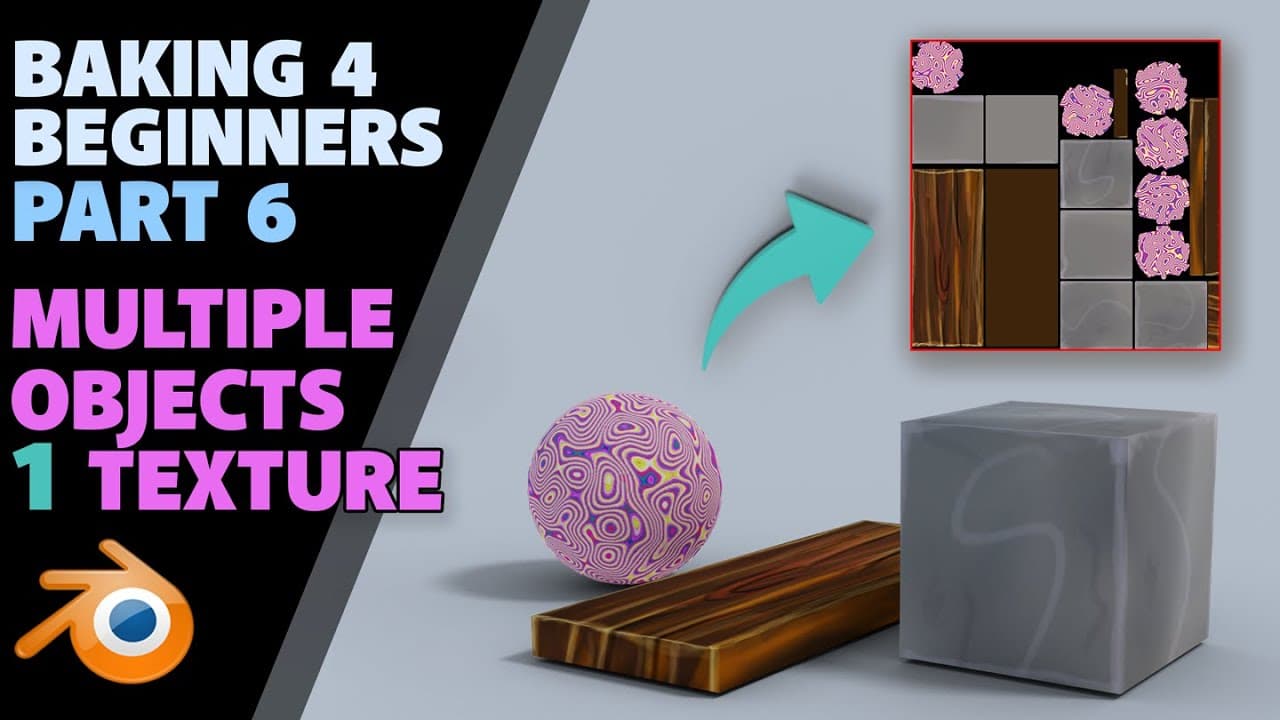
Beginners Guide to Baking | part 6 | Multiple textures into 1 | Blender 2.8
TL;DR
Guide on combining multiple textures into one map in Blender.
Transcript
hello and welcome to gambit media our grant abbott and today we're baking out multiple textures onto one map so taking textures from lots of different objects and combining them all onto one map so it can be efficient for games and lots of other things now I believe there are some add-ons that do this texture Atlas I'm not sure it&a... Read More
Key Insights
- Baking multiple textures onto one map can enhance efficiency in game development and other applications by consolidating resources.
- Blender offers tools for texture baking, but external add-ons like Texture Atlas may provide more streamlined solutions.
- Understanding the baking process in Blender is crucial for troubleshooting issues with add-ons and ensuring successful texture mapping.
- Creating new UV maps for each object is a necessary step in the process, which can be facilitated by plugins.
- Adjusting the margin settings is important to prevent overlapping textures during the baking process.
- The tutorial emphasizes the importance of selecting the correct UV map and texture in the shader editor for successful baking.
- After baking, it's essential to link the new texture to the material and delete the original UV map to finalize the process.
- The tutorial suggests saving work frequently to avoid data loss, especially before deleting original UV maps.
Install to Summarize YouTube Videos and Get Transcripts
Explore YouTube Video Summarizer or Get YouTube Transcript Extractor
Questions & Answers
Q: What is the main purpose of baking multiple textures onto one map?
The main purpose of baking multiple textures onto one map is to improve efficiency, particularly in game development. By consolidating different textures into a single map, it reduces the number of texture files needed, which can optimize performance and resource management.
Q: Why might external add-ons be useful for texture baking in Blender?
External add-ons like Texture Atlas can automate and simplify the process of texture baking, which can be complex and time-consuming in Blender. These add-ons may offer more user-friendly interfaces and additional features that streamline the creation of texture atlases, making the process more efficient.
Q: What are some challenges mentioned in the tutorial regarding texture baking?
Challenges in texture baking include managing UV maps, ensuring textures don't overlap by adjusting margins, and selecting the correct textures in the shader editor. The tutorial highlights the complexity of these tasks and the potential for errors if steps are not followed carefully.
Q: How does the tutorial suggest handling UV maps during the baking process?
The tutorial suggests creating new UV maps for each object and renaming them for clarity. It emphasizes the importance of selecting the correct UV map in both the viewport and the shader editor to ensure the textures bake correctly onto the new map.
Q: What role do margins play in the baking process?
Margins are crucial in the baking process to prevent texture overlaps. Setting an appropriate margin ensures that baked textures do not bleed into each other, which can cause visual artifacts. The tutorial advises adjusting the margin settings to avoid these issues.
Q: What is the significance of saving work frequently during the baking process?
Saving work frequently is important to prevent data loss, especially before making irreversible changes like deleting original UV maps. This precaution allows users to revert to previous states if errors occur, safeguarding the progress made in the baking process.
Q: What final steps are recommended after completing the texture baking?
After completing the texture baking, the tutorial recommends linking the new texture to the material and deleting the original UV maps to finalize the process. This ensures that the baked texture is used consistently across all objects and prepares the models for export or further use.
Q: Why is understanding the baking process beneficial even when using add-ons?
Understanding the baking process is beneficial because it equips users with the knowledge to troubleshoot issues that may arise with add-ons. If an add-on glitches or doesn't function as expected, a solid grasp of the process allows users to identify and resolve problems independently.
Summary & Key Takeaways
-
This tutorial demonstrates how to bake multiple textures from different objects onto one texture map in Blender. It explains the step-by-step process, including creating new UV maps, adjusting settings, and troubleshooting common issues.
-
Grant Abbott walks through the process of texture baking in Blender, highlighting the importance of understanding the underlying mechanics to effectively use or troubleshoot add-ons like Texture Atlas.
-
The video provides practical tips for managing UV maps and textures in Blender, emphasizing the need for careful selection and margin adjustments to avoid overlaps and ensure a clean final texture map.
Read in Other Languages (beta)
Share This Summary 📚
Summarize YouTube Videos and Get Video Transcripts with 1-Click
Try YouTube Summary with ChatGPT & Claude or YouTube Transcript Generator
Explore More Summaries from Grant Abbitt (Gabbitt) 📚
Summarize YouTube Videos and Get Video Transcripts with 1-Click
Try YouTube Summary with ChatGPT & Claude or YouTube Transcript Generator