Realistic Rubik's Cube Creation and Animation (Blender Tutorial)
TL;DR
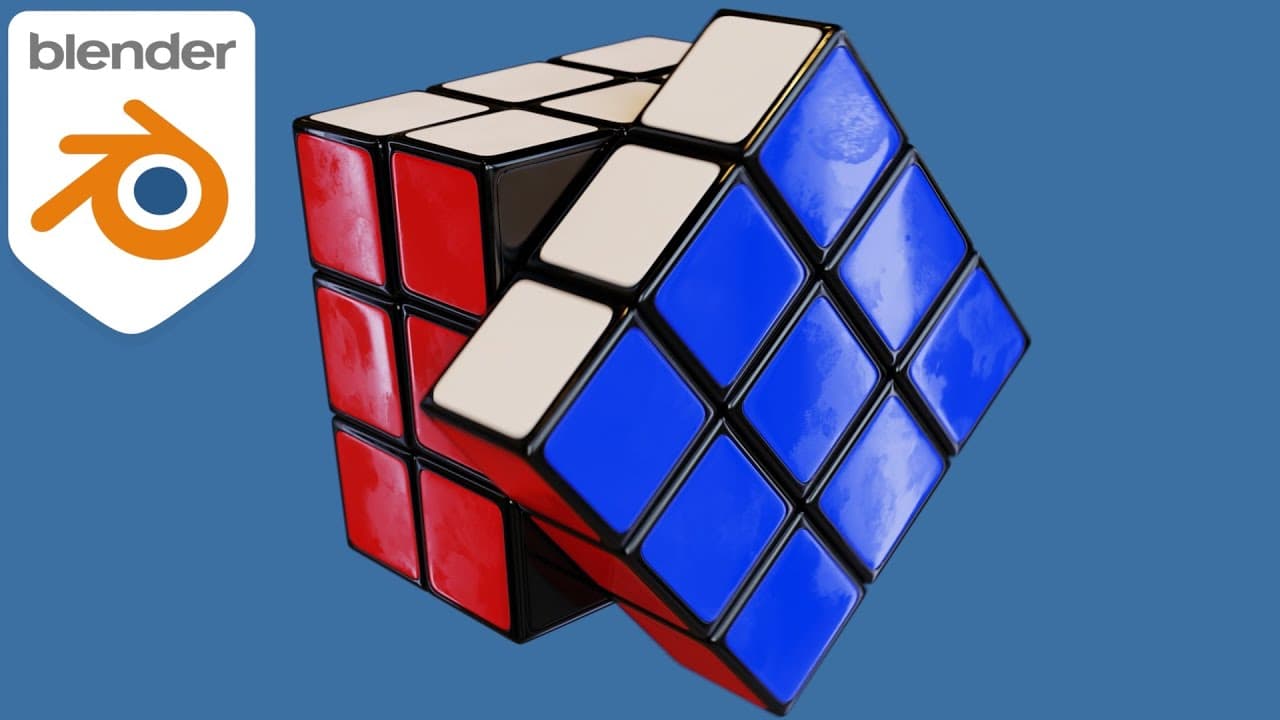
Learn how to create a photorealistic Rubik's Cube, complete with surface imperfections and animation, in this tutorial.
Transcript
hello everyone this is ryan king so over a year ago i created a tutorial on how to make a photorealistic rubik's cube and then i also showed you how to animate the cube now i made that tutorial over a year ago and since then i've gotten a lot better at making tutorials and so i decided to redo the tutorial so in this tutorial i'm going to show you ... Read More
Key Insights
- 🎥 The content creator has improved their tutorial-making skills and decided to redo a tutorial on creating a photorealistic Rubik's Cube, including surface imperfections like fingerprint textures and animation.
- 💡 The tutorial will use online resources like texture downloads from CC0 textures and HDRI lighting from HDRI Haven to enhance the photorealism of the Rubik's Cube.
- 🔎 For added realism, the tutorial suggests using a physical Rubik's Cube as a reference or finding reference images online if a physical cube is not available.
- 💰 The content creator asks for support through their Gumroad store and Patreon page, as they make Blender tutorials and content for a living.
- 🔦 The video is sponsored by Sketchfab, a 3D model site that allows users to preview, view, and purchase 3D models. Users can also apply to sell their own models on the platform.
- 📐 The tutorial begins by adding a cube in Blender, deleting unnecessary sides, and using the mirror modifier to work with just one corner as a reference.
- 🎨 The content creator explains how to add a bevel modifier to the edges of the cube, creating a smooth edge similar to a real Rubik's Cube.
- ✨ The tutorial demonstrates how to apply a subdivision surface modifier to further smooth out and refine the appearance of the Rubik's Cube. Additionally, the creator shows how to add loop cuts to sharpen certain edges for added realism.
Install to Summarize YouTube Videos and Get Transcripts
Explore YouTube Video Summarizer or Get YouTube Transcript Extractor
Questions & Answers
Q: How can I create a photorealistic Rubik's Cube with surface imperfections and animation?
In this tutorial, you will learn the step-by-step process of modeling a Rubik's Cube, adding surface imperfections like fingerprint textures, and animating the cube.
Q: What resources are used in the tutorial to enhance realism?
The tutorial utilizes a fingerprint texture from cc0 textures.com for adding surface imperfections and a realistic lighting HDRI from hdrihaven.com to achieve lifelike lighting effects.
Q: Can I create the Rubik's Cube without owning one?
While having a real Rubik's Cube for reference is recommended, online reference images can be used as well to recreate the cube accurately.
Q: What does the bevel modifier and subdivision surface modifier do to the cube model?
The bevel modifier adds smooth edges to the cube, enhancing realism. The subdivision surface modifier further smooths the cube and can be adjusted to achieve the desired level of detail.
Q: How can I create sharper edges on the cube model?
By adding loop cuts in specific areas and adjusting their positioning, you can create sharper edges on the cube model, providing a more realistic look.
Q: Is there a specific lighting setup for the photorealistic effect?
The tutorial suggests downloading a realistic lighting HDRI and configuring it in Blender to achieve lifelike lighting effects on the Rubik's Cube.
Q: Can I animate the Rubik's Cube being solved?
Yes, the tutorial covers how to animate the Rubik's Cube, allowing you to create an animation of the cube being solved using Blender's animation tools.
Q: How can I support the creator of the tutorial and access project files?
To support the content creator, viewers can visit their Gumroad store or Patreon page to access project files and show support for their Blender tutorials and content creation.
Summary & Key Takeaways
-
The tutorial focuses on recreating a photorealistic Rubik's Cube with surface imperfections and animation.
-
Resources used in the tutorial include a fingerprint texture and a realistic lighting HDRI.
-
Viewers are encouraged to have a Rubik's Cube for reference while modeling, but online reference images work as well.
Read in Other Languages (beta)
Share This Summary 📚
Summarize YouTube Videos and Get Video Transcripts with 1-Click
Try YouTube Summary with ChatGPT & Claude or YouTube Transcript Generator
Explore More Summaries from Ryan King Art 📚
Summarize YouTube Videos and Get Video Transcripts with 1-Click
Try YouTube Summary with ChatGPT & Claude or YouTube Transcript Generator