How to Set Up a CI/CD Pipeline with GitHub Actions
TL;DR
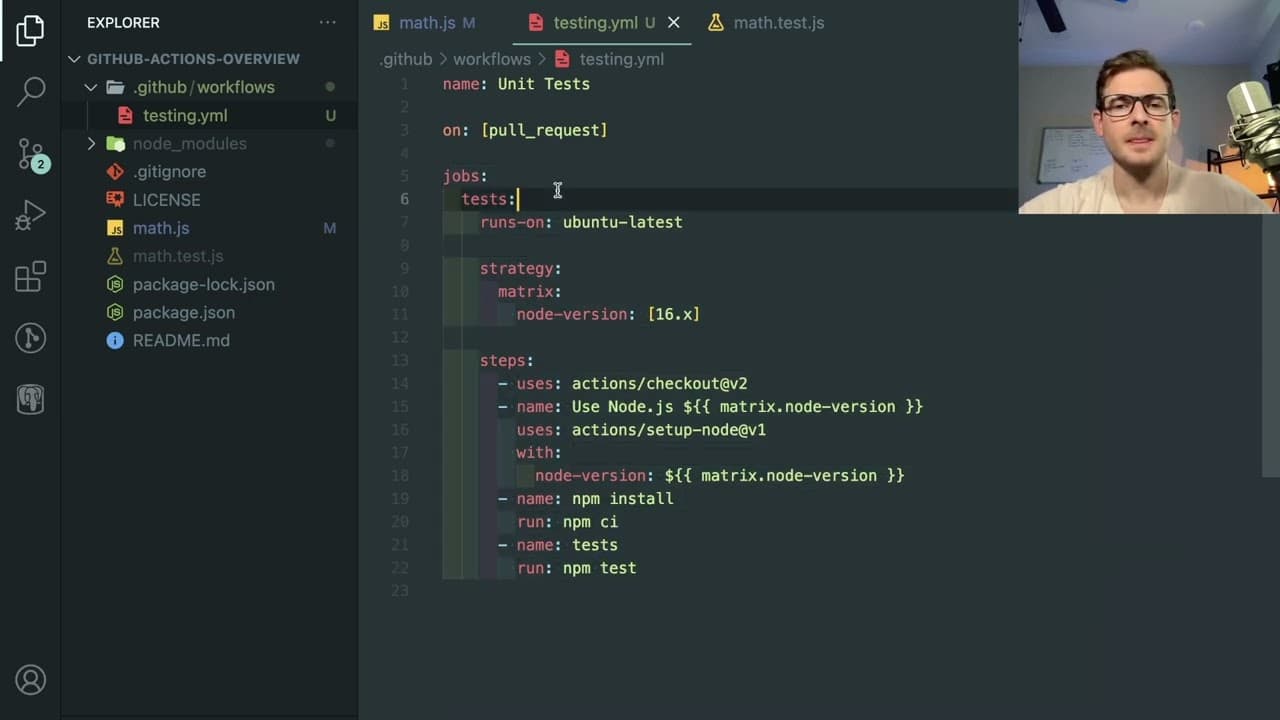
To set up a CI/CD pipeline using GitHub Actions, create a .github/workflows directory in your repository and define a workflow YAML file that specifies the tests to run on pull requests. This automation ensures that code changes don't introduce bugs by validating functionality with each submission, blocking merges until issues are resolved.
Transcript
I want to give a little overview of how you can use GitHub actions to kind of run tests on your pull requests as you make them to your git repo one of my Discord subscribers um sent me this little project that has some math.js and it has some tests associated with it and let's say when you had a team of people and they're all working on this code b... Read More
Key Insights
- 🐛 GitHub Actions automate the testing of pull requests, minimizing risks of bugs in the codebase.
- 📁 A workflow must be set up in a
.github/workflowsdirectory with a YAML file that defines triggers and actions. - 0️⃣ Understanding exit codes is vital; a zero indicates success while a non-zero indicates failure in tests.
- 👨💻 The ability to run tests across multiple Node versions ensures broader compatibility for code changes.
- 👨💻 A failed test will block a pull request from being merged until the issues are resolved, preserving code stability.
- 👨💻 Various testing strategies can be integrated into GitHub Actions, covering all critical areas of code quality.
- 🥺 Code review processes enhance team collaboration and lead to higher quality software through collective scrutiny.
Install to Summarize YouTube Videos and Get Transcripts
Explore YouTube Video Summarizer or Get YouTube Transcript Extractor
Questions & Answers
Q: What is the primary purpose of using GitHub Actions in this context?
GitHub Actions is utilized here to automate the testing process for pull requests in a collaborative coding environment. This ensures that every change is verified against a suite of tests, preventing errors from being merged into the main codebase. By leveraging automated testing, teams can maintain high code quality and reduce the chances of introducing bugs during development.
Q: How do you set up a workflow for GitHub Actions?
To set up a workflow, you create a hidden folder named .github in your repository, and within it, you add another folder called workflows. Inside this new folder, you create a YAML file like testing.yaml, where you define the events that trigger the workflow (such as pull requests), specify the environment (like Ubuntu), and list the steps for running tests such as checking out the code and running test commands.
Q: How do exit codes influence the GitHub Actions workflow?
Exit codes play a crucial role in determining the success or failure of the tests run by GitHub Actions. A zero exit code indicates that a test has passed successfully, while any non-zero exit code indicates a failure. This information allows the automation system to stop the merge process for pull requests that introduce errors, thereby protecting the integrity of the main codebase.
Q: Can GitHub Actions be configured to run tests across multiple versions of Node?
Yes, GitHub Actions can be configured to run tests across multiple versions of Node. In the workflow definition, you can specify a matrix for different Node versions. This allows the same set of tests to be executed in various environments, ensuring compatibility and preventing potential issues in different runtime versions.
Q: What happens if tests fail during a pull request?
If tests fail during a pull request, the GitHub Actions workflow will reflect this with an error indicator. The reviewer will see that there are issues with the code, and they will not be able to approve the pull request until the author fixes the errors and successfully passes the tests. This process maintains the quality and stability of the code before merging.
Q: What types of tests can be integrated into GitHub Actions workflows?
Developers can integrate various types of tests into GitHub Actions workflows, including unit tests, integration tests, end-to-end tests, and security audits. This flexibility allows teams to ensure comprehensive coverage on different aspects of their code, thereby improving overall software quality and reducing the chance of defects slipping through.
Q: Why is it important to review code before merging in a team setting?
Code review is important in a team setting as it helps ensure that changes are scrutinized for quality and correctness before being merged into the main codebase. This practice fosters collaboration, enhances code quality through shared knowledge, and decreases the likelihood of bugs and errors, ultimately leading to a more reliable software product.
Q: How can developers facilitate discussions about coding within a community after watching this content?
Developers can join coding communities, such as Discord servers, to engage in discussions, ask questions, or seek advice from peers and mentors. Participating in these communities encourages sharing experiences and solutions, which can help improve individual coding skills and foster a collaborative environment for tackling programming challenges.
Summary & Key Takeaways
-
The article explains how to use GitHub Actions to automate tests on pull requests, ensuring that code changes do not disrupt existing functionality in a collaborative environment.
-
It provides a hands-on demonstration of setting up workflows in a GitHub repository, including creating a hidden folder for configuration and defining the necessary YAML file for the test automation.
-
The content also outlines the importance of exit codes in determining the success or failure of tests and how to interpret the results of automated checks before merging code changes.
Read in Other Languages (beta)
Share This Summary 📚
Summarize YouTube Videos and Get Video Transcripts with 1-Click
Try YouTube Summary with ChatGPT & Claude or YouTube Transcript Generator
Explore More Summaries from Web Dev Cody 📚





Summarize YouTube Videos and Get Video Transcripts with 1-Click
Try YouTube Summary with ChatGPT & Claude or YouTube Transcript Generator