GPT-4 Tutorial: How to Chat With Multiple PDF Files (~1000 pages of Tesla's 10-K Annual Reports)
TL;DR
Learn how to use a chatbot to analyze multiple massive PDF documents, such as Tesla's annual reports, to extract insights and answer specific questions.
Transcript
is mayor from chartered data and today we're going to be talking about how do you chat with multiple massive PDF documents across multiple files say in this case we're looking at Tesla we're looking at annual reports for 2022 2021 2020 and each year the PDF files are huge like here is 2022 is 449 and then 20 20 21 is around 300 and you add it up yo... Read More
Key Insights
- 📚 The content discusses the challenges of analyzing large PDF documents, specifically annual reports for Tesla, which can be tedious and time-consuming.
- 📊 The chatbot mentioned in the content is able to answer specific questions about risk factors and analyze the past three years of Tesla's management performance.
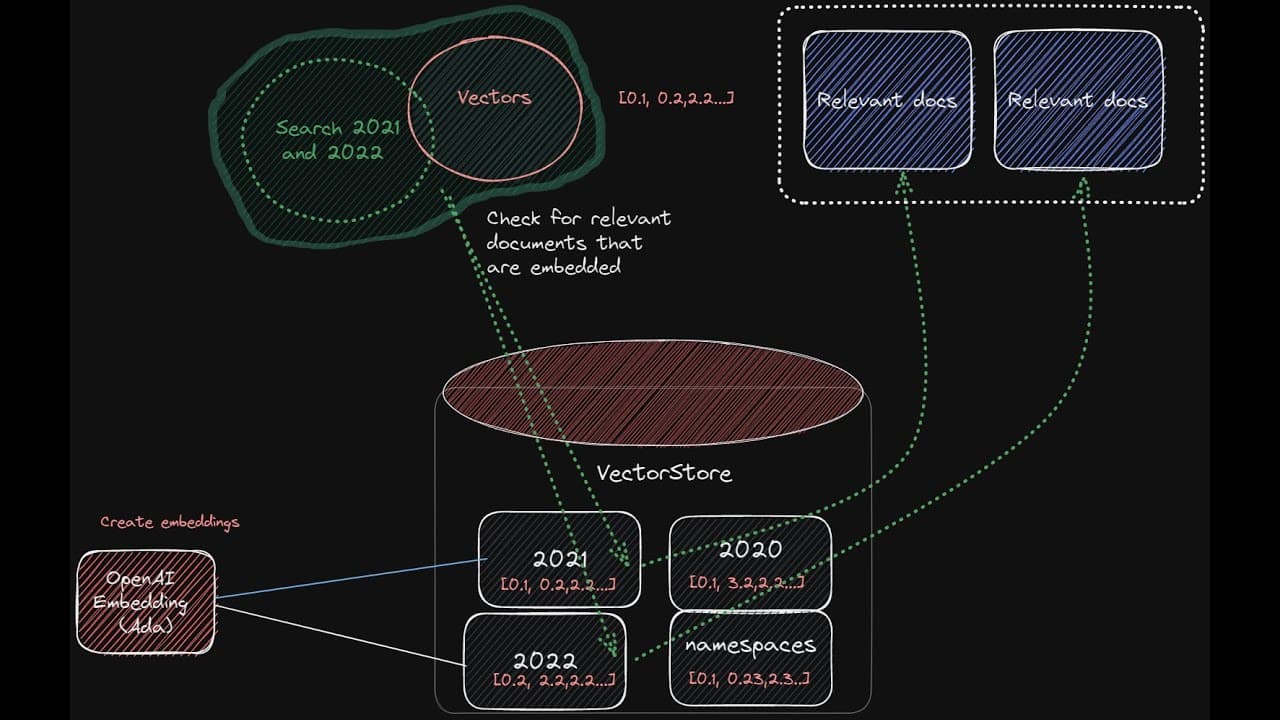
- 📁 The content explains the architecture of the multiple PDF chatbot, detailing the process of converting PDFs to text, splitting them into chunks, and creating embeddings for efficient search.
- ⚙️ The multiple PDF chatbot utilizes Lineage's OpenAI GPT-4 and Pinecone's vector store to facilitate document retrieval and question answering.
- 🧐 The chatbot is capable of extracting the relevant namespace (year) from a user's question and retrieve the necessary documents to provide a comprehensive response.
- 🔍 The chatbot demonstrates the ability to search across multiple PDF files and analyze trends, such as Tesla's gross profit margin and revenue growth, over the past three years.
- 🌐 The chatbot implementation includes a customizable front-end interface and leverages the functionality of Lineage's chat API for interactive communication with the chatbot.
- 🛠️ The content mentions ongoing improvements and future plans for the multiple PDF chatbot, including expanding the number of returned source documents and providing workshops for further understanding and implementation.
Install to Summarize YouTube Videos and Get Transcripts
Explore YouTube Video Summarizer or Get YouTube Transcript Extractor
Questions & Answers
Q: How does the chatbot analyze and extract information from multiple PDF files simultaneously?
The chatbot converts the PDFs into text, splits them into chunks, creates embeddings for each chunk, and stores them in a vector store or database. It then utilizes natural language processing and machine learning models to retrieve relevant information based on user queries.
Q: Can the chatbot analyze annual reports from different years and provide insights on the overall performance over time?
Yes, the chatbot can analyze annual reports from multiple years and provide insights on performance trends, growth rates, profitability, risk factors, and more. It utilizes the data from each year to compare and analyze the company's performance over time.
Q: What are some examples of questions that can be asked to the chatbot about Tesla's annual reports?
Users can ask questions like "What were the risk factors for Tesla in 2022?", "How has Tesla's gross margin changed over the past three years?", "What is the compound annual growth rate of Tesla's revenue over the past three years?", and "What is the growth potential of Tesla based on the past three years of annual reports?"
Q: How does the chatbot handle the extraction of information from specific namespaces or PDF files?
The chatbot utilizes the namespaces assigned to each PDF file to extract relevant information. It dynamically determines the namespace based on user queries and retrieves the specific documents and data from the corresponding namespace. This allows the chatbot to analyze and provide insights from multiple PDF files simultaneously.
Summary & Key Takeaways
-
Analyzing and extracting insights from multiple massive PDF documents, such as Tesla's annual reports, can be tedious and time-consuming.
-
By using a chatbot that utilizes natural language processing and machine learning, it is possible to ask specific questions and retrieve relevant information from the PDFs.
-
The chatbot can analyze multiple years of annual reports, extract relevant data, and provide insights on topics like risk factors, management, performance, and growth potential.
Read in Other Languages (beta)
Share This Summary 📚
Summarize YouTube Videos and Get Video Transcripts with 1-Click
Try YouTube Summary with ChatGPT & Claude or YouTube Transcript Generator
Explore More Summaries from Chat with data 📚
Summarize YouTube Videos and Get Video Transcripts with 1-Click
Try YouTube Summary with ChatGPT & Claude or YouTube Transcript Generator