How to build real time chat app with Svelte
TL;DR
Learn to create an online chat room using Svelte and Agora RTM.
Transcript
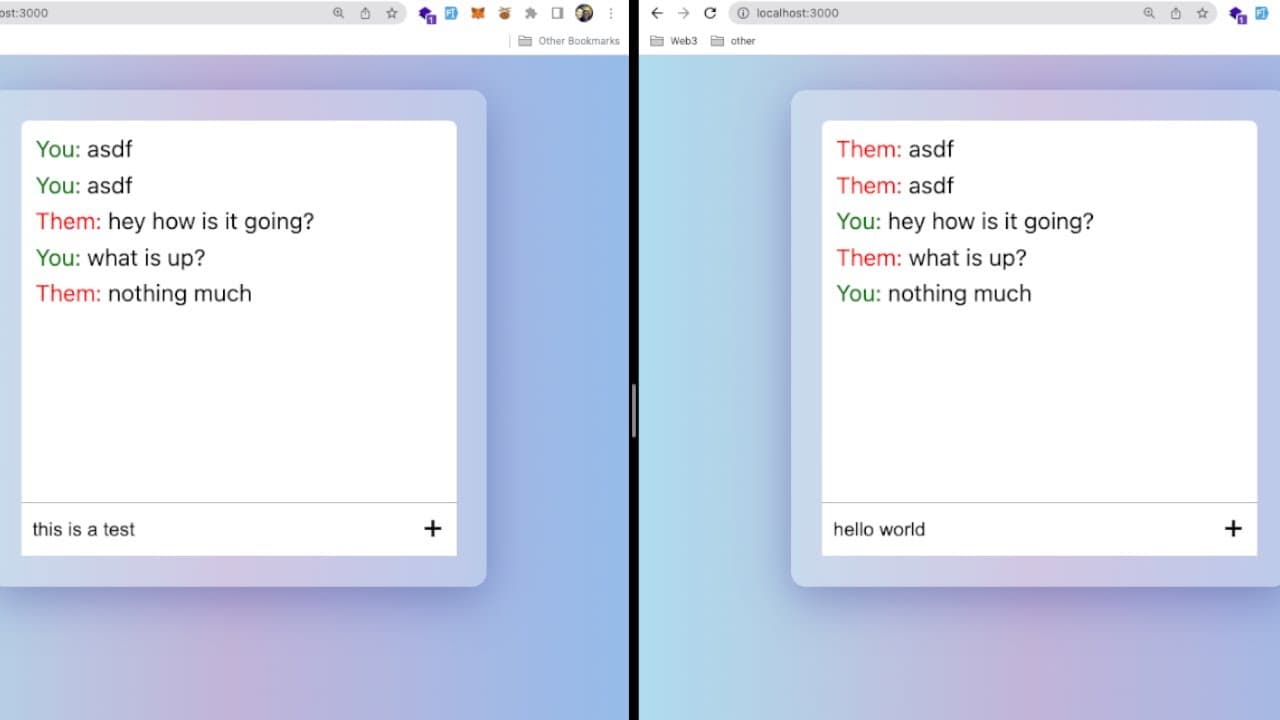
how's it going everyone so i want to show you how to build a online chat room by using a couple of libraries in the svelt framework so what i have here is i have two uis on the left i can simply type in a message i'll say hello world and as i enter that it's actually going to broadcast a message using a third-party library i'm using called agora to... Read More
Key Insights
- 👊 The tutorial provides a clear step-by-step approach to building a chat application, making it accessible for beginners and experienced developers alike.
- 💄 Svelte’s reactive programming model simplifies the management of UI state, making development quicker and less error-prone.
- 😒 Integrating third-party libraries like Agora RTM enhances the capabilities of the application, providing ready-to-use infrastructure for real-time communication.
- 📞 Successful message broadcasting requires careful handling of both sending and receiving messages, which the tutorial effectively demonstrates.
- 👤 The importance of user experience is highlighted through the implementation of responsive design and appropriate message styling.
- ❤️🩹 The setup includes both front-end coding and backend integration through the Agora platform, showcasing a full-stack application development approach.
- 🙃 Handling unique user IDs is crucial to managing message attribution within the chat environment, preventing any identity confusion.
Install to Summarize YouTube Videos and Get Transcripts
Explore YouTube Video Summarizer or Get YouTube Transcript Extractor
Questions & Answers
Q: What is the main purpose of this tutorial?
The tutorial demonstrates how to build a basic online chat room using the Svelte framework and Agora RTM. It covers all the necessary steps from setting up the project to implementing message handling and user interfaces, providing a hands-on learning experience for developers interested in real-time communication applications.
Q: How do you set up the Svelte project for the chat room?
To set up the Svelte project, you must run the command to create a barebones Svelte app. Following the setup, you'll pair it with the Agora RTM SDK for real-time messaging functionalities, which involves installing necessary packages using npm for libraries such as Agora RTM SDK and UUID, which generates unique user IDs.
Q: What libraries are integrated into this project?
This project integrates the Agora RTM SDK for real-time message broadcasting and the UUID package for generating unique identifiers for users. These libraries are essential for ensuring users can send and receive messages uniquely and efficiently within the chat environment created.
Q: How does the message sending feature work in the chat room?
The message sending feature works by capturing user input through a form and, upon submission, it triggers the send message function. This function sends a message object containing the text and message type to the Agora channel, which broadcasts it to other users, allowing for real-time conversation.
Q: How does Svelte's reactivity play a role in functionality?
Svelte's reactivity allows for a dynamic user interface where user inputs are instantly reflected in the application state. Changes to variables, such as typed messages, automatically update the markup without the need for additional rendering logic, creating a seamless experience during interactions.
Q: What steps are taken to style the chat room interface?
The chat room interface is styled using CSS, which includes defining background colors, padding, layout structure using flexbox, and scrolling behaviors. The styles improve user experience by enhancing the visibility of messages, providing clear distinction between user messages, and ensuring an organized layout.
Q: How is the chat room able to display messages from other users?
The chat room listens for incoming messages using an event listener attached to the Agora channel. Whenever a message is received, it appends the message data to an array, which is then rendered in the DOM using a loop. This allows real-time updates to the message display without page refreshes.
Q: What is the benefit of using Agora's RTM service?
Using Agora's RTM service allows developers to easily implement real-time messaging functionality without dealing with complex WebSocket implementations. It manages connection, user identification, and message delivery, enabling developers to focus on building the chat interface and features rather than backend infrastructure.
Summary & Key Takeaways
-
This tutorial guides viewers through building a basic online chat room using the Svelte framework and Agora's real-time messaging SDK, enabling live message sending between users in a chat interface.
-
The project involves setting up a Svelte project, integrating third-party libraries, and implementing user authentication and message broadcasting features for a functional chat application.
-
By following the tutorial, developers can learn about Svelte's reactivity, event handling, and working with WebSocket APIs for real-time communication.
Read in Other Languages (beta)
Share This Summary 📚
Summarize YouTube Videos and Get Video Transcripts with 1-Click
Try YouTube Summary with ChatGPT & Claude or YouTube Transcript Generator
Explore More Summaries from Web Dev Cody 📚





Summarize YouTube Videos and Get Video Transcripts with 1-Click
Try YouTube Summary with ChatGPT & Claude or YouTube Transcript Generator