Products
Features
YouTube Video Summarizer
Summarize YouTube videos
Web & PDF Highlighter
Highlight web pages & PDFs
Chat with PDF
Ask any PDF questions with AI
Ask AI Clone
Chat with your highlights & memories
Audio Transcriber
Transcribe audio files to text
Glasp Reader
Read and highlight articles
Kindle Highlight Export
Export your Kindle highlights
Idea Hatch
Hatch ideas from your highlights
Integrations
Obsidian Plugin
Notion Integration
Pocket Integration
Instapaper Integration
Medium Integration
Readwise Integration
Snipd Integration
Hypothesis Integration
Apps & Extensions
Chrome Extension
Safari Extension
Edge Add-ons
Firefox Add-ons
iOS App
Android App
Discover
Discover
Ideas
Discover new ideas and insights
Articles
Curated articles and insights
Books
Book recommendations by great minds
Posts
Essays and notes from readers
Quotes
Inspiring quotes collection
Videos
Curated videos and summaries
Explore Glasp
Glasp Newsletter
Weekly insights and updates
Glasp Talk
Interview series with great minds
Glasp Blog
Latest news and articles
Glasp Use Cases
Learn how others use Glasp
Build & Support
Glasp API
Access Glasp's API for developers
MCP Connector
Connect Glasp to Claude & ChatGPT
Community
Glasp Reddit Community
Students
Student discount and benefits
FAQs
Frequently Asked Questions
AboutPricing
DashboardLog inSign up

VR Project Understanding First Person View with Cameras
16 views
•
August 6, 2023
by
Ekeeda
YouTube video player
VR Project Understanding First Person View with Cameras

TL;DR

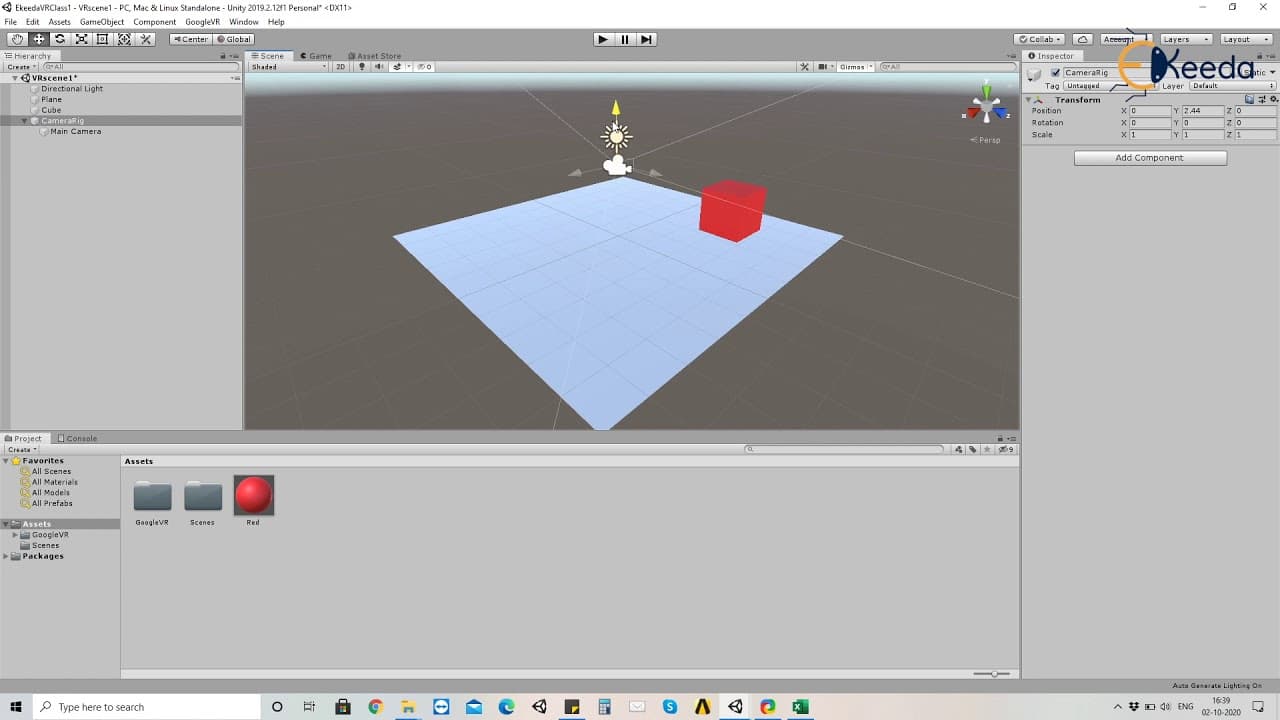
Learn how to create a first person view in Unity for VR experiences, using a camera rig as the head and the main camera as the eyes.

Transcript

i think as we made our ground and the cube in our previous lecture in our current lecture let's look at the first person view how do we define or design the first person view of the vr experience so if you look over here right now we just have the camera normally connected as we do in unity so whenever we are creating an experience here you are bas... Read More

Key Insights

  • 🎥 The first person view in VR is achieved by using a camera rig as the head and the main camera as the eyes.
  • 🗯️ The camera rig should be reset to the origin to ensure consistent positioning.
  • 😃 The reticle pointer shows where the user's eyes are focused in the VR experience.
  • 🆘 A VR emulator like the GVR Editor Emulator helps in testing and emulating the VR experience without physical devices.
  • ⤴️ The camera rig allows for movement of the head separately from the eyes, providing a more realistic and immersive VR experience.
  • 🎥 Understanding the relationship between the camera rig, main camera, and reticle pointer is crucial for designing VR experiences.
  • 🧑‍🏭 The camera rig acts as the head, while the main camera acts as the eyes in the first person view.

Install to Summarize YouTube Videos and Get Transcripts

Explore YouTube Video Summarizer or Get YouTube Transcript Extractor

Questions & Answers

Q: How do you define the first person view in VR experiences?

In VR, the first person view is created by using a camera rig as the head and the main camera as the eyes. It simulates the user's perspective inside the virtual environment.

Q: What is the importance of creating a camera rig in Unity?

The camera rig acts as the head in the VR experience, allowing the user to move their head while keeping the eyes (main camera) fixed. This separation between head and eyes enables a more immersive and realistic first person view.

Q: How can the viewing direction be controlled in Unity VR?

The viewing direction is controlled using a reticle pointer, which represents where the user's eyes are looking. By attaching the reticle as a child of the main camera, it accurately displays the focal point in the VR experience.

Q: What is the purpose of using a VR emulator?

A VR emulator, such as the GVR Editor Emulator, allows developers to test and experience the VR content without physical VR devices. It provides camera controls for the user to look around and simulate the VR perspective.

Summary & Key Takeaways

  • The lecture focuses on creating a first person view in Unity for VR experiences.

  • The first step is to create a camera rig, representing the head, and reset it to the origin.

  • The main camera is then added as the eyes, while a reticle pointer is used to determine the viewing direction.


Read in Other Languages (beta)

English

Share This Summary 📚

Summarize YouTube Videos and Get Video Transcripts with 1-Click

Download browser extensions on:

Try YouTube Summary with ChatGPT & Claude or YouTube Transcript Generator

Explore More Summaries from Ekeeda 📚

Darcy's Law and Duipits Theory -  Ground Water and Well Hydraulics - Water Resource Engineering 1 thumbnail
Darcy's Law and Duipits Theory - Ground Water and Well Hydraulics - Water Resource Engineering 1
Ekeeda
Non   Homogeneous Linear Equations with Constant Coefficients thumbnail
Non Homogeneous Linear Equations with Constant Coefficients
Ekeeda
Numerical on concept of Capillary rise thumbnail
Numerical on concept of Capillary rise
Ekeeda
Introduction to Simple Machines - Simple Machines - Engineering Mechanics thumbnail
Introduction to Simple Machines - Simple Machines - Engineering Mechanics
Ekeeda
Transient Response and Steady State Error Problem 1 - Time Response Analysis - Control Systems thumbnail
Transient Response and Steady State Error Problem 1 - Time Response Analysis - Control Systems
Ekeeda
Characteristics of Good Stone thumbnail
Characteristics of Good Stone
Ekeeda

Summarize YouTube Videos and Get Video Transcripts with 1-Click

Download browser extensions on:

Try YouTube Summary with ChatGPT & Claude or YouTube Transcript Generator

Apps & Extensions

  • Chrome Extension
  • Safari Extension
  • Edge Add-ons
  • Firefox Add-ons
  • iOS App
  • Android App

Key Features

  • YouTube Video Summarizer
  • Web & PDF Summarizer
  • Web & PDF Highlighter
  • Chat with PDF
  • Ask AI Clone
  • Audio Transcriber
  • Glasp Reader
  • Kindle Highlight Export
  • Idea Hatch

Integrations

  • Obsidian Plugin
  • Notion Integration
  • Pocket Integration
  • Instapaper Integration
  • Medium Integration
  • Readwise Integration
  • Snipd Integration
  • Hypothesis Integration

More Features

  • APIs
  • MCP Connector
  • Blog & Post
  • Embed Links
  • Image Highlight
  • Personality Test
  • Quote Shots

Company

  • About us
  • Blog
  • Community
  • FAQs
  • Job Board
  • Newsletter
  • Pricing
Terms

•

Privacy

•

Guidelines

© 2026 Glasp Inc. All rights reserved.




