Play Classic Arcade Games in R with the Rcade Package
TL;DR
Exploring and installing classic arcade games using the arcade package on GitHub.
Transcript
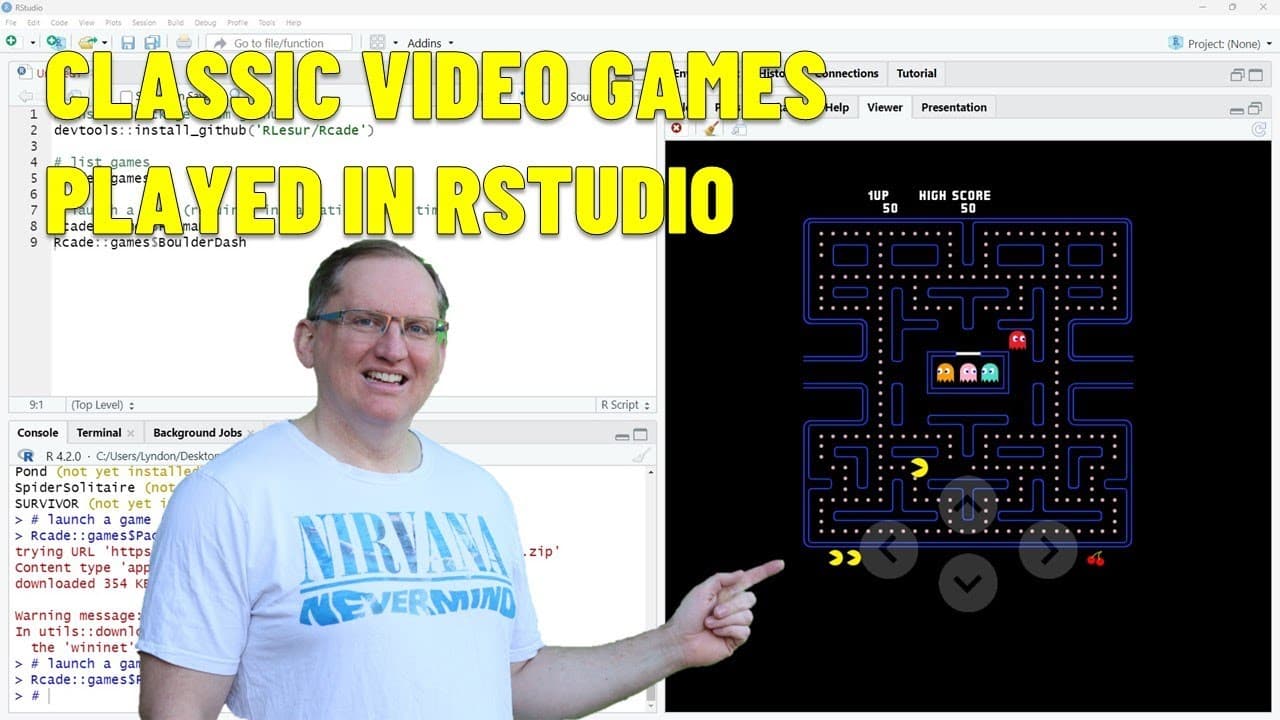
hi friends welcome back to the channel and today in our studio we are playing arcade games with the package arcade I know that uh I can never resist a good R pun and uh here we have arcade it's on GitHub uh I will link up this code to my website so you'll be able to copy and paste it if you don't want to type it out just looking at the video and ba... Read More
Key Insights
- 👾 The arcade package on GitHub offers users a way to experience classic arcade games from a coding environment, merging gaming with programming.
- 👨💻 Installation of the arcade package is straightforward, involving simple code execution, catering to both gaming enthusiasts and newcomers.
- 👾 Retro games like Pac-Man and Balderdash evoke nostalgia, indicating the lasting emotional connection players have with classic titles.
- 👤 The flexibility of using keyboard or on-screen controls enhances accessibility and user experience, aligning with modern gaming preferences.
- 👾 Strategic thinking is crucial in games like Balderdash, as players must navigate challenges creatively to avoid hazards posed by in-game elements.
- 💨 The video encourages viewers to reminisce about past gaming experiences while introducing them to new ways to enjoy these classics.
- 🧡 Future content promises to delve into various subjects, indicating the creator's commitment to a diverse range of topics for their audience.
Install to Summarize YouTube Videos and Get Transcripts
Explore YouTube Video Summarizer or Get YouTube Transcript Extractor
Questions & Answers
Q: What is the arcade package and where can it be found?
The arcade package is a software tool available on GitHub that allows users to play classic arcade games. It includes games like Pac-Man and Balderdash, which can be easily installed by running a specific command in a programming environment. The package offers a nostalgic experience with retro games and enhances coding and gaming skills simultaneously.
Q: How do you install the arcade package?
To install the arcade package, you simply run a command in your programming environment. The presenter shows the top line of code that executes the installation. This step is crucial for accessing the games, as users will be prompted to approve the installation during their first game playthrough.
Q: How can viewers interact with the games once installed?
Once the arcade package is installed, viewers can start a game by typing a command using 'games$game_name.' They can interact with the arcade games using on-screen arrow keys or their keyboard, giving flexibility in gameplay. This interactive design allows for a more engaging and familiar experience as players control characters and navigate game scenarios.
Q: What games are highlighted in the video?
The video highlights a couple of classic games, with heavy focus on Pac-Man and Balderdash. The presenter shares nostalgic sentiments about playing Balderdash on older gaming systems, and also mentions other classics like Tetris. The range of available games illustrates the enduring popularity of these titles among older and newer audiences alike.
Q: What kind of strategies is required in Balderdash?
In Balderdash, players must collect diamonds while maneuvering around falling boulders. Strategy is critical, as players need to position themselves carefully to avoid getting crushed by shifting boulders. Understanding the mechanics of the game and preempting boulder's movements is essential for successful gameplay and progressing through levels.
Q: What does the presenter plan to do next on the channel?
The presenter plans to continue creating content related to statistics, R programming, and other miscellaneous topics. They express a desire to share more tutorials and gaming experiences, suggesting that viewers can expect a mix of educational and entertaining content in future videos.
Summary & Key Takeaways
-
The video introduces viewers to the arcade package on GitHub, which allows users to play classic video games like Pac-Man and Balderdash directly from their studio environment after installing the package.
-
Users can navigate the games using either on-screen arrow icons or keyboard arrow keys, providing a traditional gaming experience while reminiscing about digital nostalgia.
-
The presenter expresses excitement about revisiting classic games, shares installation steps, and mentions future content related to statistics and R programming.
Read in Other Languages (beta)
Share This Summary 📚
Summarize YouTube Videos and Get Video Transcripts with 1-Click
Try YouTube Summary with ChatGPT & Claude or YouTube Transcript Generator
Explore More Summaries from Dr Lyndon Walker 📚





Summarize YouTube Videos and Get Video Transcripts with 1-Click
Try YouTube Summary with ChatGPT & Claude or YouTube Transcript Generator